





Thursday, 22 October 2026 · 11 Jumada I 1448 AH Sun – Thu · 9:00 – 18:00
+971 56 914 9477 العربية
WhatsApp

PA20

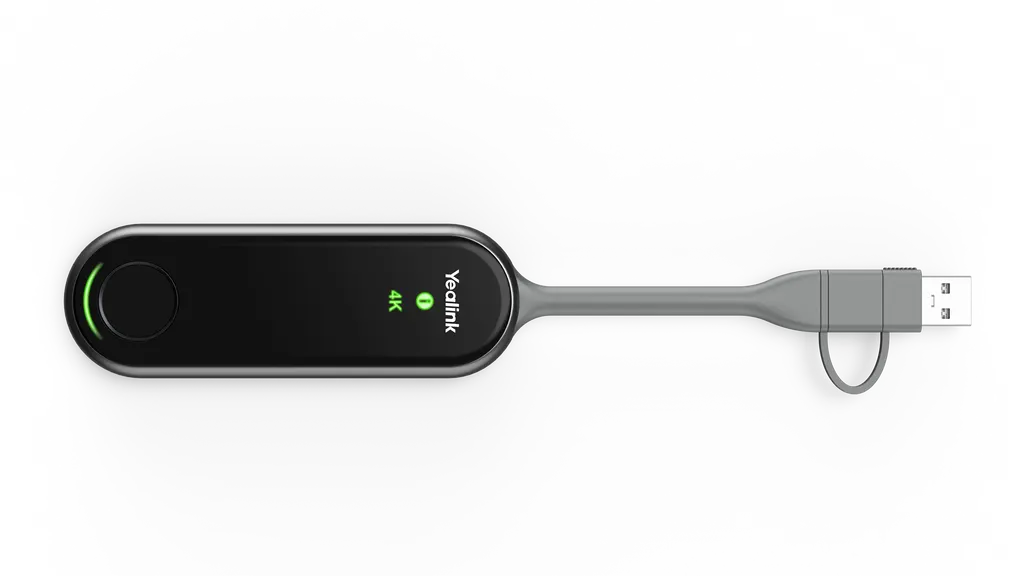
Yealink PA20 4K Content Sharing IP BYOD Device

WhatsApp
Priceon request
QuotationWithin 1 working day
DeliveryConfirmed with your quote, based on stock
PDFDownload datasheet (Yealink PA20 Datasheet.pdf)
Overview

The Yealink PA20 is a 4K Ultra HD content sharing device with a full-featured USB Type-C port and a USB-C to USB-A adapter included. Hardware encoding delivers up to 4K/30fps with no software or driver installed on the host device. Its Wi-Fi 6 link and embedded meeting assistant suit meeting rooms, classrooms and boardrooms in Doha where staff want to present quickly.

What the PA20 does in a meeting room

The Yealink PA20 is a wireless presentation device for rooms where people bring their own laptops or phones. The screen of a connected device is encoded in hardware and shown on the room display at up to 4K/30fps, so the presenter does not have to install a driver or application first. It is an IP BYOD unit, which suits spaces where the host computer changes from one meeting to the next.

Specifications that shape the purchase

  • Encoding: up to 4K/30fps hardware encoding, with the processing kept off the presenting computer's CPU.
  • Connections: one full-featured USB Type-C port, plus a USB-C to USB-A adapter in the box.
  • Wireless: Wi-Fi 6 supporting 802.11 b/g/a/n/ac/ax, dual-band 2.4GHz and 5GHz, and 2x2 MIMO.
  • Sharing: up to four content streams presented at the same time, with duplicated or extended desktop modes and annotation.
  • Security: WPA-PSK/WPA2-PSK with AES data encryption.
  • Power and size: 5V/600 mA input, 2.2 W typical consumption, 220 mm × 38 mm × 16 mm, 75 g.
  • Operating range: -10°C to 40°C and 0 to 90% humidity, non-condensing.

Where it fits across Qatar

A government ministry in Doha setting up a briefing room can use the PA20 so officials from different departments take turns sharing from their own laptops, with no software to install on visitors' machines. For a training centre in Msheireb, one unit per room lets several trainers present from the same screen during a session. In a hotel conference room in West Bay, event staff can connect a guest's laptop or phone quickly between sessions.

What to plan before you order

Summer heat needs attention. The PA20 is rated to 40°C, and summer temperatures in Qatar regularly exceed 45°C, so install it inside air-conditioned rooms, away from hot cabinets and direct sun through windows. Check that presenting devices run Windows 7, 8, 10 or 11, or Mac OS 10.10 or later. The manufacturer notes that versions 270.357.0.5 and later are not supported on Windows 7 and Windows 8, so confirm your software version before rolling out to older machines.

The unit is small enough to sit out of sight under a table or beside the display, but the final position depends on cable runs, sightlines and the room's wireless environment. SmartRooms Qatar offers free site surveys, so we can check placement before you commit. For several rooms, one purchase order or LPO can cover the full quantity, and quotations are usually issued within one working day.

Send us your room count, the presenting devices in use and your delivery location, and request a quote from SmartRooms Qatar for the Yealink PA20.

Highlights

  • Up to 4K/30fps hardware encoding with no software or drivers needed
  • Full-featured USB Type-C port with USB-C to USB-A adapter included
  • Wi-Fi 6 with dual-band 2.4GHz and 5GHz operation
  • Up to four content streams presented simultaneously
  • WPA2-PSK security with AES data encryption
  • 5V/600 mA input and 2.2 W typical power consumption

Room fit

Tell us the room size and platform (Teams, Zoom or BYOD) and we confirm the right combination with your quotation.

Estimated timeline

Quotation within 1 working day · delivery timing depends on stock availability, and we confirm it with your quotation.

Specifications

14 specifications · Source: manufacturer · checked Oct 2026
Basic5
Decoder
Up to 4k/30fps
Input Power
5V/600 mA
Power Consumption
2.2 W (Typical)
Button
START/STOP Button x 1
Details
Interface:  - Full-featured USB Type-C ×1  - USB-C to USB-A Adapter x1 LED  - 4K/UHD Indicator × 1  - System Error Indicator × 1  - System Status Indicator × 1
Wi-Fi3
Standard
802.11 b/g/a/n/ac/ax
Security
WPA-PSK/WPA2-PSK
Details
Frequency: 2400-2483.5MHz 5150-5250MHz 5250-5350MHz 5470-5725MHz 5725-5850MHz
Device Compatibility1
Details
Operation System:  - Windows 7/8/10/11  - Mac OS 10.10 or later Versions 270.357.0.5 and later are not supported on Windows 7 and Windows 8.
Advanced Features1
Details
IP-BYOD Desktop Sharing:  - Duplicated Desktop  - Extended Desktop Collaboration:  - Annotation  - Intuitive Remote Control  - Multiple Screens Share (MeetingBoard/RoomCast)
Operating Environmental2
Temperature range
-10 - 40℃
Humidity range
0 - 90%, non-condensing
Dimensions2
Weight (g/lb)
75 g (0.165 lb)
Size (mm/in)
220 mm × 38 mm × 16 mm (8.66″ x 1.50″ ×0.63″ )

Downloads

13 files from the manufacturer
PDF Datasheets Yealink PA20 Datasheet.pdf 1.7 MB Yealink PA20 datasheets (PDF, 1.7 MB) PDF Manuals & guides Yealink PA20 Pod Quick Start Guide (EN, DE, FR, ES) V1.0.pdf 524 KB Yealink PA20 manuals & guides (PDF, 524 KB) URL Manuals & guides · Opens on manufacturer site Wireless Content Sharing Yealink PA20 manuals & guides (URL) URL Manuals & guides · Opens on manufacturer site Wireless Content Sharing (MeetingBoard C EDLA) Yealink PA20 manuals & guides (URL) URL Manuals & guides · Opens on manufacturer site Wireless Content Sharing (MeetingBoard Pro) Yealink PA20 manuals & guides (URL) URL Manuals & guides · Opens on manufacturer site Wireless Content Sharing (MeetingDisplay) Yealink PA20 manuals & guides (URL) DXF Drawings & CAD · Opens on manufacturer site PA20 CAD Drawings.dxf Yealink PA20 drawings & cad (DXF) STP Drawings & CAD · Opens on manufacturer site PA20 CAD Drawings.stp Yealink PA20 drawings & cad (STP) PDF Other documents Yealink Regulatory Notice V1.2.pdf 1.0 MB Yealink PA20 other documents (PDF, 1.0 MB) URL Other documents · Opens on manufacturer site Rooms Accessories Compatibility Lists Yealink PA20 other documents (URL) URL Other documents · Opens on manufacturer site Rooms Product Family Yealink PA20 other documents (URL) PKG Other documents · Opens on manufacturer site Yealink Wireless Presentation Pod-MacOS.pkg Yealink PA20 other documents (PKG) MSI Other documents · Opens on manufacturer site Yealink Wireless Presentation Pod-Windows.msi Yealink PA20 other documents (MSI)

Questions about PA20

What is the Yealink PA20 used for and who is it for?
The Yealink PA20 is a wireless content sharing device for meeting rooms, lecture spaces and boardrooms where people bring their own laptops or phones. It shows a connected device's screen on the room display at up to 4K/30fps over Wi-Fi 6, so presenters do not need a cable to the display. The manufacturer describes it as intended for business customers, which suits organisations rather than home use.
Do presenters need to install software or drivers?
No. The PA20 uses built-in hardware encoding, so neither software nor drivers need to be installed on the presenting device, and according to the manufacturer the encoding does not use the computer's processor. For organisations where many staff and visitors present, this removes the job of installing driver packages on every laptop. Check the supported operating systems before rollout.
Which connections does the PA20 support?
The PA20 supports USB Type-A and Type-C connections. It has one full-featured USB Type-C port, and a USB-C to USB-A adapter is included for devices with Type-A ports. A direct Type-C connection requires a full-featured Type-C port, so check the port specification on your laptops and phones before ordering several units.
Which operating systems are supported?
The listed operating systems are Windows 7, 8, 10 and 11, plus Mac OS 10.10 or later. The manufacturer also notes that versions 270.357.0.5 and later are not supported on Windows 7 and Windows 8. Organisations with older Windows machines should confirm the software version with SmartRooms Qatar before deployment, so every presenter can connect without surprises.
Can a boardroom in West Bay share laptops from several executives?
Yes, for a boardroom where several executives present from different laptops in one session. The PA20 can present up to four content streams at the same time and supports duplicated or extended desktop modes, so one presenter can show a slide deck while a colleague shares a spreadsheet. Annotation and remote control features help during discussion. A site survey can confirm the display and cable layout of the room.
Can teachers at a school in Al Wakrah use it in every lesson?
A school in Al Wakrah fitting out a classroom can use the PA20 so teachers present from a laptop or phone without swapping cables at the start of each lesson. The device is listed for different computers and phones and has a single START/STOP button. Teachers should confirm that their devices have a full-featured USB Type-C port or can use the included adapter, and that they run a supported operating system.
Can the PA20 be installed in a hot lobby or a room near a window?
Keep it in an air-conditioned room. The rated operating range is -10°C to 40°C with 0 to 90% humidity, non-condensing, and summer temperatures in Qatar regularly exceed 45°C. A lobby or sun-facing room may get hotter than the rating allows. Place the unit away from direct sunlight and enclosed hot cabinets, and ask SmartRooms Qatar to review the site during a free site survey before you confirm the order.
Can a training centre in Msheireb equip several rooms with it?
A training centre in Msheireb running several rooms can equip each room with its own PA20, so trainers present from their own laptops or phones without moving equipment between sessions. Ordering all units on one quotation keeps the batch consistent, and a site survey confirms the placement of each unit before installation.
How is the wireless connection secured, and does it need the building's Wi-Fi?
The PA20 supports WPA-PSK and WPA2-PSK security with AES data encryption. The data sheet also lists a self-built Wi-Fi network alongside dual-band 2.4GHz and 5GHz operation. IT managers should confirm how that network sits alongside corporate and guest Wi-Fi before deployment, including passphrase management and the bands allowed in the building, and raise any requirements with SmartRooms Qatar during quotation.
How big is the PA20, and where can it be placed?
The PA20 measures 220 mm × 38 mm × 16 mm and weighs 75 g, so it can sit out of sight beneath a table or beside the display. The final position depends on cable runs, sightlines and the room's wireless environment. SmartRooms Qatar offers free site surveys, which let our team check placement and temperature conditions before a purchase order is raised.
What power does the PA20 need?
The power input is listed as 5V/600 mA, with typical consumption of 2.2 W. These figures help facilities teams plan socket and power supply needs for each room. Before ordering, check the power supply details in your quotation against the mains socket at the installation site, and confirm the adapter specification in writing so the installer does not find a mismatch on the day.
Can a ministry or school order several units through an LPO or tender?
Yes. SmartRooms Qatar supplies against purchase orders (LPOs) and government tenders, including Monaqasat, and accepts payment by bank transfer, cheque or purchase order. Send the room count and the number of PA20 units needed, and a quotation is usually issued within one working day. Delivery covers all 8 municipalities of Qatar, and products are covered by the manufacturer's warranty.

Similar models

Biamp MAX Connect Biamp MAX Connect 910-02278 Wireless Presentation System
CB
Clevertouch CleverCast Clevertouch CleverCast Wireless Presentation Device
Compatible
Clevertouch CleverHub 2 Clevertouch CleverHub 2 Wireless Presentation and Screen Sharing Device
Yes - CleverCast only NRCS
iiyama WP-D002C iiyama WP-D002C USB-C Wireless Presentation Dongle
Wireless presentation
iiyama WP-MEET03M iiyama WP-MEET03M Wireless Presentation Solution
Wireless presentation
Email Call



