





Thursday, 22 October 2026 · 11 Jumada I 1448 AH Sun – Thu · 9:00 – 18:00
+971 56 914 9477 العربية
WhatsApp

RoomCast

Yealink RoomCast Wireless Presentation System

WhatsApp
Priceon request
QuotationWithin 1 working day
DeliveryConfirmed with your quote, based on stock
PDFDownload datasheet (Yealink RoomCast Datasheet.pdf)
Overview

The Yealink RoomCast is a wireless presentation unit for meeting rooms and multimedia classrooms. It shows up to four sources on one screen, decodes 4K/60fps video and takes power from PoE or a 12V adapter. Yealink's notice says this model stopped selling from 28 February 2025, so SmartRooms Qatar will quote a current equivalent, such as the recommended replacement RoomCast E2.

What the standard RoomCast does in a meeting room

The Yealink RoomCast is a compact wireless presentation unit that connects to a TV or display and receives screens from laptops, tablets and phones without cables. Participants can cast through Miracast, AirPlay, Google Cast or the Yealink Wireless Presentation Pod. Up to four sources can appear on the same screen at once, which suits training rooms and multimedia classrooms where several people contribute to one discussion. This page covers the standard edition, not the separate RoomCast for Zoom Rooms listing.

Specifications that matter to the buyer

  • Video: 4K/60fps decoding for sharp slides and video on larger screens.
  • Wireless: built-in 802.11ac 2x2 MIMO Wi-Fi with STA, AP and P2P modes, plus Bluetooth 5.0.
  • Power: Power over Ethernet to IEEE 802.3af, or a 12V power adapter.
  • Ports: one HDMI output, one Gigabit Ethernet port, two USB type-A ports, a reset slot and a Kensington security slot.
  • Security: WPA2-PSK for Wi-Fi, AES 128 data encryption and a PIN code to block unwanted streams.
  • Size and weight: 145 x 72.5 x 23.5 mm and 0.192 kg.

Collaboration tools include a virtual whiteboard, annotation and intuitive remote control, so a presenter can mark up content without taking over the room's keyboard. Extended desktop is available for Windows and requires Miracast or the Yealink Wireless Presentation Pod.

Where it fits in Qatar

A private school in Al Wakrah fitting out new classrooms could place one unit beside each display so teachers and pupils share work from their own devices. A government office in Msheireb running internal briefings could let several officials add material to a single screen within the same session. A consulting firm in West Bay holding calls with colleagues abroad could use annotation during discussions, while a hotel in Doha could use the digital signage function to rotate messages on a meeting room screen.

Planning the installation

The unit can sit on top of a TV or on a desk. Where a PoE switch is available, one Ethernet cable provides both power and network, so confirm the switch port supports IEEE 802.3af before ordering. If you use the 12V adapter instead, plan a power point close to the display. The datasheet does not give an operating temperature range, so ask the SmartRooms Qatar team to confirm the location, especially for any unit near a window or in a space that is not air-conditioned. SmartRooms Qatar offers free site surveys and professional installation, which helps before a school or office rolls out several rooms.

Before you order: end-of-sale status

Yealink's end-of-sale notice for RoomCast states that new orders were no longer accepted after 28 February 2025. The notice names RoomCast E2 as the recommended replacement and describes it as functionally richer. Request a quote for this model or a current equivalent, and SmartRooms Qatar will explain the options, usually within one working day.

To request a quote, send the number of rooms, the display sizes and whether your network supports PoE. SmartRooms Qatar will recommend the right route for your site.

Highlights

  • 4K/60fps video decoding for sharp content on large screens
  • Four sources shown on one screen at the same time
  • Built-in 802.11ac 2x2 MIMO Wi-Fi with STA, AP and P2P modes
  • Power over Ethernet (IEEE 802.3af) or 12V power adapter
  • WPA2-PSK Wi-Fi, AES 128 encryption and PIN code protection
  • Yealink end-of-sale notice dated 28 February 2025

Room fit

Tell us the room size and platform (Teams, Zoom or BYOD) and we confirm the right combination with your quotation.

Estimated timeline

Quotation within 1 working day · delivery timing depends on stock availability, and we confirm it with your quotation.

Specifications

3 specifications · Source: manufacturer · checked Oct 2026
OverView3
Keywords
Zoom Digital Signage,Unlimited Casting, Higher Productivity,Safe, Reliable, and IT-Friendly
Key Features
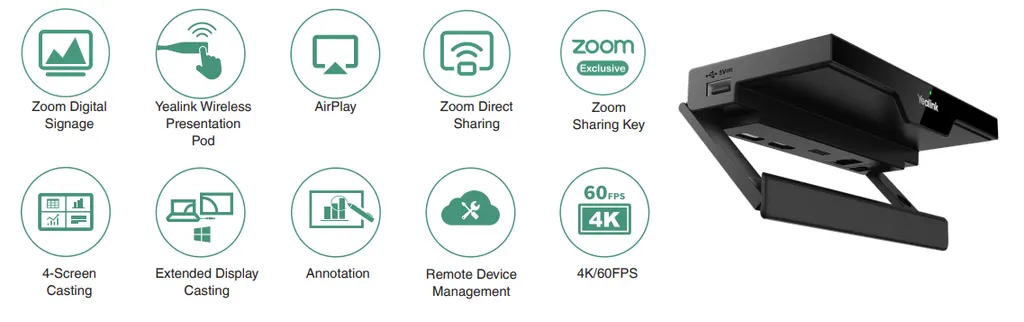
• Zoom Digital Signage • Yealink Wireless Presentation Pod • AirPlay • Zoom Direct Sharing • Zoom Sharing Key • 4-Screen Casting • Power over Ethernet • Remote device management • AES 128 data encryption
Introduction
ealink RoomCast for Zoom Rooms supports 4K ultra HD Zoom's Digital Signage features to project compelling content to employees and guests. Digital signage allows you to share images, videos, or websites on your Zoom Rooms screen.


Downloads

26 files from the manufacturer
PDF Datasheets Yealink RoomCast Datasheet.pdf 294 KB Yealink RoomCast datasheets (PDF, 294 KB) URL Datasheets · Opens on manufacturer site Download Yealink RoomCast datasheets (URL) URL Datasheets · Opens on manufacturer site Download Yealink RoomCast datasheets (URL) PDF Datasheets · Opens on manufacturer site Yealink RoomCast Datasheet (DE).pdf Yealink RoomCast datasheets (PDF) PDF Datasheets · Opens on manufacturer site Yealink RoomCast Datasheet (ES).pdf Yealink RoomCast datasheets (PDF) PDF Datasheets · Opens on manufacturer site Yealink RoomCast Datasheet (FR).pdf Yealink RoomCast datasheets (PDF) PDF Datasheets · Opens on manufacturer site Yealink RoomCast Datasheet (IT).pdf Yealink RoomCast datasheets (PDF) PDF Datasheets · Opens on manufacturer site Yealink RoomCast Datasheet (NL).pdf Yealink RoomCast datasheets (PDF) URL Datasheets · Opens on manufacturer site  Download Yealink RoomCast datasheets (URL) URL Datasheets · Opens on manufacturer site  Download Yealink RoomCast datasheets (URL) PDF Manuals & guides Yealink Room Cast User Guide V1.1.pdf 3.9 MB Yealink RoomCast manuals & guides (PDF, 3.9 MB) PDF Manuals & guides Yealink RoomCast Quick Start Guide (EN, DE, FR, ES) V1.3.pdf 710 KB Yealink RoomCast manuals & guides (PDF, 710 KB) URL Manuals & guides · Opens on manufacturer site RoomCast Integrate with MVC Yealink RoomCast manuals & guides (URL) PDF Manuals & guides · Opens on manufacturer site Yealink RoomCast Quick Start Guide (IT).pdf Yealink RoomCast manuals & guides (PDF) DXF Drawings & CAD · Opens on manufacturer site RoomCast CAD Drawings.dxf Yealink RoomCast drawings & cad (DXF) STP Drawings & CAD · Opens on manufacturer site RoomCast CAD Drawings.stp Yealink RoomCast drawings & cad (STP) 1 - Software & firmware · Opens on manufacturer site RoomCast 144.313.0.1 - Firmware & Release Note Yealink RoomCast software & firmware (1 - FIRMWARE & RELEASE NOTE) 1 - Software & firmware · Opens on manufacturer site RoomCast 144.320.0.1 - Firmware & Release Note Yealink RoomCast software & firmware (1 - FIRMWARE & RELEASE NOTE) 20 - Software & firmware · Opens on manufacturer site RoomCast 144.320.0.20 - Firmware & Release Note Yealink RoomCast software & firmware (20 - FIRMWARE & RELEASE NOTE) 5 - Software & firmware · Opens on manufacturer site RoomCast 144.320.0.5 - Firmware & Release Note Yealink RoomCast software & firmware (5 - FIRMWARE & RELEASE NOTE) 5 - Software & firmware · Opens on manufacturer site RoomCast 144.320.1.5 - Firmware & Release Note Yealink RoomCast software & firmware (5 - FIRMWARE & RELEASE NOTE) PDF Other documents Yealink Regulatory Notice V1.2.pdf 1.0 MB Yealink RoomCast other documents (PDF, 1.0 MB) PDF Other documents Zoom-Security-White-Paper.pdf 240 KB Yealink RoomCast other documents (PDF, 240 KB) URL Other documents · Opens on manufacturer site Rooms Product Family Yealink RoomCast other documents (URL) MP4 Other documents · Opens on manufacturer site Yealink RoomCast Unboxing V1.0.mp4 Yealink RoomCast other documents (MP4) MP4 Other documents · Opens on manufacturer site Zoom-Yealink RoomCast Unboxing V1.0.mp4 Yealink RoomCast other documents (MP4)

Questions about RoomCast

Is the Yealink RoomCast still available to order?
Yealink's end-of-sale notice states that RoomCast was discontinued and that new orders would not be accepted after 28 February 2025. Request a quote and SmartRooms Qatar will explain the options, including a current equivalent. Yealink names the RoomCast E2 as its recommended replacement, which it describes as functionally richer. Check with the team before choosing, because a replacement may differ in ports and features.
What is the RoomCast used for?
It is a wireless presentation unit for small and medium meeting rooms and multimedia classrooms. It connects to a TV or display and lets participants cast their screens without cables, using Miracast, AirPlay, Google Cast or the Yealink Wireless Presentation Pod. Up to four sources can be shown at once, so a training session in a Doha office can move between presenters without swapping cables.
Does the RoomCast support 4K video?
Yes. The datasheet lists 4K/60fps decoding, and Yealink describes a 4K Ultra HD multi-sharing experience. For a boardroom with a large display, this helps slides and video stay sharp. The source device and display must also support 4K to get the full benefit, so check the laptop outputs and screen specification before you order.
How many devices can cast to the screen at the same time?
Four sources can be shown simultaneously on screen. If a fifth device connects, the system follows a first in, first out rule and the earliest caster is removed. This suits a meeting in a government office in Msheireb where four officials need to present in turn, without anyone waiting for a cable change.
How is the RoomCast powered?
It supports Power over Ethernet to IEEE 802.3af through its Gigabit Ethernet port, or a 12V power adapter through its power connector. Where your network has a PoE switch, one cable provides power and network. Confirm the switch port before ordering, and plan a nearby power point if you choose the adapter option for a classroom display.
Which devices can connect without installing an app?
Yealink states the unit works with Windows, Mac, iOS and Android devices, including PCs and tablets. Casting uses Miracast, AirPlay or Google Cast, and the Yealink Wireless Presentation Pod gives one-touch sharing. Extended desktop is available for Windows and requires Miracast or the Pod. Check your staff devices against these options before buying for a private school or office.
What security features does it include?
Casting content stays within the local area network, and Wi-Fi uses WPA2-PSK. Data is protected with AES 128 encryption, and a PIN code can block unwanted streams. PIN authentication is also supported for Miracast and AirPlay. These features suit a ministry or energy company that needs controlled meeting room sharing on its internal network.
Can the RoomCast show digital signage?
Yes. The multimedia digital signage function delivers customised content or streaming media to the screen through cloud management. A hotel lobby in West Bay could rotate welcome messages, or a clinic waiting area in Al Sadd could show health information. The datasheet gives no operating temperature range, so confirm with SmartRooms Qatar where the screen and unit will be placed before committing.
How is the RoomCast managed remotely?
Administrators can manage and diagnose the unit remotely through the Yealink Device Management Platform or the Yealink Workspace Management Platform. An IT team in Lusail looking after several meeting rooms can therefore check devices without visiting each room. Ask SmartRooms Qatar which platform fits your existing setup before ordering.
What are the size and weight of the RoomCast?
The unit measures 145 x 72.5 x 23.5 mm and weighs 0.192 kg. Its compact form lets it sit on top of a TV or on a desk, hiding cables. Before wall or desk placement, measure the space behind the display and the cable route. A free site survey from SmartRooms Qatar can confirm the layout before installation.
Is this the RoomCast for Zoom Rooms?
No. This page covers the standard RoomCast. Yealink also lists a separate RoomCast for Zoom Rooms edition with its own specifications. If your organisation runs Zoom Rooms in its meeting spaces, tell SmartRooms Qatar so the correct edition is quoted. Both editions are wireless presentation systems, but their features and intended platform differ.
What ports does the RoomCast have?
It has one HDMI output, one Gigabit Ethernet port with PoE support, two USB type-A ports, a reset slot, a power connector and a Kensington security slot. It also supports Bluetooth 5.0 and ultrasonic communication. For a classroom or boardroom, count your display and network connections in advance, and request a quote to check the setup against your room.

Similar models

Biamp MAX Connect Biamp MAX Connect 910-02278 Wireless Presentation System
CB
Clevertouch CleverCast Clevertouch CleverCast Wireless Presentation Device
Compatible
Clevertouch CleverHub 2 Clevertouch CleverHub 2 Wireless Presentation and Screen Sharing Device
Yes - CleverCast only NRCS
iiyama WP-D002C iiyama WP-D002C USB-C Wireless Presentation Dongle
Wireless presentation
iiyama WP-MEET03M iiyama WP-MEET03M Wireless Presentation Solution
Wireless presentation
Email Call


