Thursday, 22 October 2026 · 11 Jumada I 1448 AH Sun – Thu · 9:00 – 18:00
+971 56 914 9477 العربية
WhatsApp
This model is discontinuedThe manufacturer no longer makes it. Request a quote and we will propose the closest current replacement.
Suggested replacements ↓

VC110

Yealink VC110 All-in-One Video Conferencing Endpoint (Discontinued)

WhatsApp
Priceon request
QuotationWithin 1 working day
DeliveryConfirmed with your quote, based on stock
PDFDownload datasheet (Yealink VC Camera Profolio Datasheet.pdf)
Overview

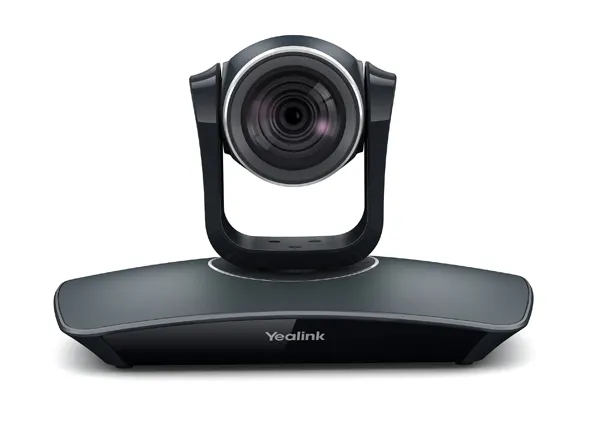
The Yealink VC110 is a discontinued all-in-one video conferencing endpoint for smaller meeting rooms, combining a 1080p30 camera with a codec, cable hub and PoE power. Yealink has ended sale and support for this model, so organisations in Qatar that already run it, or are comparing it with newer systems, should request a quote for a current equivalent or compatible replacement.

What the Yealink VC110 is and who it suits

The Yealink VC110 is an all-in-one video conferencing endpoint designed for smaller meeting rooms. The codec, camera and audio processing sit in one system, so a room can be equipped without assembling a separate camera, codec and microphone set. Yealink built it for organisations that wanted a capable room system that is quick to deploy and simple to maintain. Yealink has discontinued this model. It was withdrawn from sale on 1 February 2018, its end-of-life date was 1 February 2023, and after that date Yealink ended support and services for it.

Video, audio and connectivity facts that matter

The camera captures 1920 x 1080 video at 30 frames per second, with a horizontal field of view of 75 degrees, a pan range of ±100 degrees, a tilt range of ±30 degrees and 4x digital zoom. Up to 10 preset positions can be stored, which suits a room that hosts regular calls with a fixed seating layout. Audio uses 14 kHz wideband codecs, including G.722.1C, with echo cancellation and automatic gain control.

The codec offers 2 x HDMI connections and a DVI link to the cable hub, plus two USB 2.0 ports and 3.5 mm line-in and line-out jacks. The cable hub adds a VGA video input and a RJ-45 audio port. Protocol support covers H.323 and SIP, dual-stream content sharing using H.239 or BFCP over SIP, and the Yealink, Starleaf, Zoom, Pexip, BlueJeans and Mind cloud platforms listed in the data.

Where it fits in Qatar

Three realistic settings suit this system. A management office in West Bay that needs one room for weekly calls with teams abroad can use the camera presets and an H.323 or SIP connection to its existing video platform. A private school in Al Wakrah turning a classroom into a small staff meeting room can use the 3.5 mm audio jacks to connect existing speakers. A training room at a centre in Education City can use the built-in audio and video recording and playback feature to review sessions with participants who missed them.

What to plan for before buying or replacing

  • Environment: operating temperature 10 to 40°C and operating humidity 10 to 95%. Keep the room air-conditioned, because outdoor temperatures in Qatar can exceed 45°C in summer.
  • Power: AC 100 to 240V input with DC 12V/2A output. The cable hub connects over 10/100Mb Ethernet with Power over Ethernet (IEEE 802.3at, Class 4). Consumption is 24W in normal operation and 30W at maximum.
  • Mounting: the data lists a wall-mounted shelf with screws. The codec measures 234.6 x 151.5 x 161 mm and the cable hub 123.5 x 96.35 x 37.5 mm. Book a free site survey before fixing any equipment.
  • Network: NAT, OpenVPN and H.460 traversal, QoS, and SRTP/TLS with 128-bit AES encryption.
  • Support: the manufacturer's support ended at the end-of-life date, so organisations still using the model should plan a migration.

Choosing a current equivalent or replacement

Because this model is discontinued, the practical choice for most buyers is a current room system from a supported range. Before comparing options, check the display connections on the codec, the camera field of view and zoom, protocol support, compatibility with your cloud meeting platform, and whether the manufacturer still supports the product. Schools and government bodies can order on a purchase order (LPO) or through a tender on Monaqasat. Request a quote from SmartRooms Qatar for a current equivalent or a compatible replacement, and we will confirm the estimated lead time, which depends on stock, in the quotation.

Highlights

  • Full HD 1080p30 camera with ±100° pan and ±30° tilt
  • H.323 and SIP dual-protocol support for mixed networks
  • Power over Ethernet (IEEE 802.3at, Class 4) on the cable hub
  • Wireless VCM60 Micpod listed among system components
  • Operating range 10–40°C with 10–95% humidity
  • Discontinued: sale ended February 2018, support ended February 2023

Room fit

Tell us the room size and platform (Teams, Zoom or BYOD) and we confirm the right combination with your quotation.

Estimated timeline

Quotation within 1 working day · delivery timing depends on stock availability, and we confirm it with your quotation.

Specifications

Source: manufacturer · checked Oct 2026
The full specification and datasheet for this model are available on request; we send them with your quotation.

Downloads

33 files from the manufacturer
PDF Datasheets Yealink VC Camera Profolio Datasheet.pdf 420 KB Yealink VC110 datasheets (PDF, 420 KB) PDF Datasheets Yealink VC Microphone Datasheet.pdf 1.6 MB Yealink VC110 datasheets (PDF, 1.6 MB) PDF Datasheets Yealink VC110 Video Conferencing Endpoint Datasheet.pdf 381 KB Yealink VC110 datasheets (PDF, 381 KB) PDF Manuals & guides Yealink_VC110_All-in-one_HD_Video_Conferencing_Endpoint_Quick_Start_Guide_V23.20.pdf 38.8 MB Yealink VC110 manuals & guides (PDF, 38.8 MB) PDF Manuals & guides · Opens on manufacturer site Yealink_VC110_All-in-one_HD_Video_Conferencing_Endpoint_Quick_Start_Guide_V10.6.pdf Yealink VC110 manuals & guides (PDF) PDF Manuals & guides · Opens on manufacturer site Yealink_VC110_All-in-one_HD_Video_Conferencing_Endpoint_Quick_Start_Guide_V21.15.pdf Yealink VC110 manuals & guides (PDF) PDF Manuals & guides · Opens on manufacturer site Yealink_VC110_All-in-one_HD_Video_Conferencing_Endpoint_Quick_Start_Guide_V21.20.pdf Yealink VC110 manuals & guides (PDF) PDF Manuals & guides · Opens on manufacturer site Yealink_VC110_All-in-one_HD_Video_Conferencing_Endpoint_Quick_Start_Guide_V22.15.pdf Yealink VC110 manuals & guides (PDF) PDF Manuals & guides · Opens on manufacturer site Yealink_VC110_All_in_one_HD_Video_Conferencing_Endpoint_Administrator_Guide_V10.11.pdf Yealink VC110 manuals & guides (PDF) PDF Manuals & guides · Opens on manufacturer site Yealink_VC110_All_in_one_HD_Video_Conferencing_Endpoint_Administrator_Guide_V10.6.pdf Yealink VC110 manuals & guides (PDF) PDF Manuals & guides · Opens on manufacturer site Yealink_VC110_All_in_one_HD_Video_Conferencing_Endpoint_Administrator_Guide_V21.15.pdf Yealink VC110 manuals & guides (PDF) PDF Manuals & guides · Opens on manufacturer site Yealink_VC110_All_in_one_HD_Video_Conferencing_Endpoint_Administrator_Guide_V21.20.pdf Yealink VC110 manuals & guides (PDF) PDF Manuals & guides · Opens on manufacturer site Yealink_VC110_All_in_one_HD_Video_Conferencing_Endpoint_Administrator_Guide_V22.15.pdf Yealink VC110 manuals & guides (PDF) PDF Manuals & guides · Opens on manufacturer site Yealink_VC110_All_in_one_HD_Video_Conferencing_Endpoint_Administrator_Guide_V23.20.pdf Yealink VC110 manuals & guides (PDF) PDF Manuals & guides · Opens on manufacturer site Yealink_VC110_All_in_one_HD_Video_Conferencing_Endpoint_User Guide_V10.6.pdf Yealink VC110 manuals & guides (PDF) PDF Manuals & guides · Opens on manufacturer site Yealink_VC110_All_in_one_HD_Video_Conferencing_Endpoint_User Guide_V21.15.pdf Yealink VC110 manuals & guides (PDF) PDF Manuals & guides · Opens on manufacturer site Yealink_VC110_All_in_one_HD_Video_Conferencing_Endpoint_User Guide_V21.20.pdf Yealink VC110 manuals & guides (PDF) PDF Manuals & guides · Opens on manufacturer site Yealink_VC110_All_in_one_HD_Video_Conferencing_Endpoint_User Guide_V22.15.pdf Yealink VC110 manuals & guides (PDF) PDF Manuals & guides · Opens on manufacturer site Yealink_VC110_All_in_one_HD_Video_Conferencing_Endpoint_User Guide_V23.20.pdf Yealink VC110 manuals & guides (PDF) PDF Manuals & guides · Opens on manufacturer site Yealink_VC110_Video_Conference_Room_Deployment_Solution_V10.6.pdf Yealink VC110 manuals & guides (PDF) PDF Manuals & guides · Opens on manufacturer site Yealink_VC110_Video_Conference_Room_Deployment_Solution_V21.15.pdf Yealink VC110 manuals & guides (PDF) PDF Manuals & guides · Opens on manufacturer site Yealink_VC_Deployment_and_ User_Manual_for_AMX_Control_Systems.pdf Yealink VC110 manuals & guides (PDF) PDF Manuals & guides · Opens on manufacturer site Yealink_VC_Deployment_and_ User_Manual_for_Crestron_3-Series_Control_Systems .pdf Yealink VC110 manuals & guides (PDF) PDF Manuals & guides · Opens on manufacturer site Yealink_VC_Series_Video_Conferencing_System_Network_Deployment_Solution_V10.6.pdf Yealink VC110 manuals & guides (PDF) PDF Manuals & guides · Opens on manufacturer site Yealink_VC_Series_Video_Conferencing_System_Network_Deployment_Solution_V21.15.pdf Yealink VC110 manuals & guides (PDF) PDF Manuals & guides · Opens on manufacturer site Yealink_VC_Series_Video_Conferencing_System_Network_Deployment_Solution_V21.20.pdf Yealink VC110 manuals & guides (PDF) PDF Manuals & guides · Opens on manufacturer site Yealink_VC_Series_Video_Conferencing_System_Network_Deployment_Solution_V22.15.pdf Yealink VC110 manuals & guides (PDF) PDF Manuals & guides · Opens on manufacturer site Yealink_VC_Series_Video_Conferencing_System_Network_Deployment_Solution_V23.20.pdf Yealink VC110 manuals & guides (PDF) 1 - Software & firmware · Opens on manufacturer site VC110 50.24.0.1 - Firmware & Release Note Yealink VC110 software & firmware (1 - FIRMWARE & RELEASE NOTE) PDF Other documents · Opens on manufacturer site API_Commands_Introduction_for_Yealink_Video_Conferencing_System_V1.06.pdf Yealink VC110 other documents (PDF) PDF Other documents · Opens on manufacturer site VC110 CE Cert.pdf Yealink VC110 other documents (PDF) PDF Other documents · Opens on manufacturer site Yealink Regulatory Notice V1.2.pdf Yealink VC110 other documents (PDF) PDF Other documents · Opens on manufacturer site Yealink_End_of_Life_Announcement-VC110.pdf Yealink VC110 other documents (PDF)

Questions about VC110

Can I still buy a new Yealink VC110?
Yealink discontinued the VC110 and ended sale on 1 February 2018, so it is no longer a current option for a new purchase. SmartRooms Qatar can quote for a current equivalent or a compatible replacement that matches your room size, camera needs and video platform. Send us those details and we will prepare a quotation, usually within one working day, with the estimated lead time confirmed in the quote.
Who is the Yealink VC110 designed for?
The VC110 is an all-in-one endpoint for smaller meeting rooms, combining a 1080p30 camera, codec and audio processing in one unit. It suits small teams that hold regular video calls, for example a department room in an office in West Bay, Doha, that connects with colleagues abroad. Yealink positioned it for businesses that wanted an advanced system without a complex build. The datasheet quotes a setup time of about three minutes.
What can the camera do: pan, tilt and zoom?
The camera offers a pan range of ±100 degrees, a tilt range of ±30 degrees, 4x digital zoom and a 75 degree horizontal field of view. Up to 10 preset positions can be saved, so a room with fixed seating can move straight to the right framing for each call. The camera outputs 1920 x 1080 video at 30 frames per second. Because the zoom is digital, plan the seating distance from the camera rather than relying on zoom alone.
What video resolutions and frame rates does it support?
The datasheet lists full HD 1080p at 30 fps (1920 x 1080) from 1 Mbps, 720p (1280 x 720) from 512 Kbps, and lower resolutions including 4CIF and CIF. It supports H.264 High Profile, H.264 and H.263 video, and the manufacturer states that H.264 High Profile saves 50% bandwidth. Content sharing uses dual-stream H.239 or BFCP over SIP. Check the upload capacity of your network before rolling the system out to several rooms.
Which call protocols and cloud platforms does it work with?
The VC110 supports H.323 and SIP, so it can register with an H.323 gatekeeper or a SIP server. The data lists compatibility with Yealink, Starleaf, Zoom, Pexip, BlueJeans and Mind cloud platforms. Because this model is discontinued and manufacturer support has ended, confirm with your platform vendor that its current service version still accepts the endpoint before relying on it for calls between Doha and overseas offices.
How many displays and audio devices can I connect?
The codec provides 2 x HDMI connections and a DVI link to the cable hub, which adds a VGA video input and an RJ-45 audio port. Audio also uses 3.5 mm line-in and line-out jacks, and there are two USB 2.0 ports. A boardroom in Msheireb that wants a main display plus a second screen for presentations can use the dual displays and focus feature listed in the data.
How is it powered, and how much power does it draw?
The codec accepts AC 100 to 240V input and outputs DC 12V/2A, while the cable hub connects over 10/100Mb Ethernet with Power over Ethernet (IEEE 802.3at, Class 4). Power consumption is below 2.8W idle, 24W in normal operation and 30W at maximum. The 100 to 240V input range covers Qatar's 240V, 50Hz mains supply. Confirm the plug type of the supplied adapter with SmartRooms Qatar before ordering for BS 1363 sockets.
Will it cope with Qatar summer temperatures?
The data gives an operating temperature of 10 to 40°C and operating humidity of 10 to 95%, with storage from -20 to 50°C. Outdoor summer temperatures in Qatar can exceed 45°C, so the system should sit in an air-conditioned room that stays inside its operating range. Keep the codec away from windows that receive direct afternoon sun, and do not place it in an unconditioned corridor or lobby. Ask the SmartRooms Qatar team to confirm your room conditions.
Can a school order it through an LPO or a government tender?
Yes. SmartRooms Qatar supplies against purchase orders (LPOs) and government tenders, including Monaqasat, and accepts payment by bank transfer, cheque or purchase order. A private school in Al Wakrah preparing a small staff meeting room would typically raise one LPO covering the complete system, then book a free site survey before installation. Since the VC110 is discontinued, the quotation should name a current equivalent instead of this model.
Can it work on a weak or fluctuating network?
The datasheet lists forward error correction that resists 8% video packet loss and 20% audio packet loss, plus dynamic bandwidth adaptive adjustment. Firewall traversal includes NAT in manual or automatic mode, OpenVPN and H.460. A company in Lusail calling partners overseas over a shared internet line can rely on these features to keep calls smooth when conditions change, though the actual result depends on the bandwidth available.
What does end of life mean for support on the VC110?
Yealink ended support and services for the VC110 from its end-of-life date of 1 February 2023. Firmware upgrading and remote diagnosis are listed features, but the manufacturer no longer provides them for this model after that date. Organisations still running one should plan a move to an alternative system to keep meetings reliable. SmartRooms Qatar can quote for a current replacement and arrange a free site survey before the changeover.
Can I add a wireless microphone to the system?
The system components list includes the VCM60 wireless Micpod, which the datasheet describes with 360 degree voice pickup up to 2 meters, a 2710 mAh battery, about 72 hours of talk time, 35 days of standby time and DECT 6.0 technology. A wired VCM30 Micpod and a VCP41 phone are listed as optional. Place the Micpod centrally on the table, away from air-conditioning vents, for the clearest pickup.

Suggested replacements

Yealink MVC S60 Yealink MVC S60 Microsoft Teams Rooms System with 360° Camera
360°
Yealink CM-MountKIT Yealink CM-MountKIT Ceiling Mic Deployment Kit for CM20
Room kits & bundles
Yealink CMKit-121 Yealink CMKit-121 Ceiling Audio Kit for Conference Rooms
Room kits & bundles
Yealink CTP25 Mount Kits Yealink CTP25 Mount Kits for CTP25 Touch Console
Room kits & bundles
Yealink MCore Kit Yealink MCore Kit AI PC and Touch Panel Room Bundle
Room kits & bundles

Similar models

Biamp Evoko Liso Wall Mount Kit Biamp Evoko Liso Wall Mount Kit (910-01930) for Room Scheduling Displays
TAA Compliant
Email Call