Thursday, 22 October 2026 · 11 Jumada I 1448 AH Sun – Thu · 9:00 – 18:00
+971 56 914 9477 العربية
WhatsApp
This model is discontinuedThe manufacturer no longer makes it. Request a quote and we will propose the closest current replacement.
Suggested replacements ↓

VC120

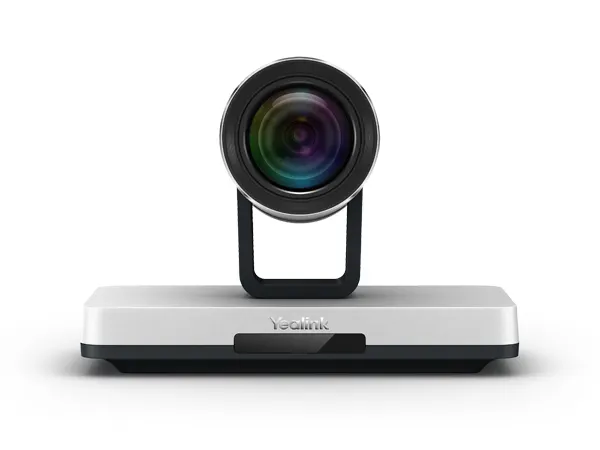
Yealink VC120 1080P Video Conferencing Room System (Discontinued)

WhatsApp
Priceon request
QuotationWithin 1 working day
DeliveryConfirmed with your quote, based on stock
PDFDownload datasheet (Yealink VC Camera Extension Adapter VCA70 Datasheet.pdf)
Overview

The Yealink VC120 is a discontinued 1080P video conferencing room system for small and medium meeting rooms. The manufacturer has discontinued this model, so owners and buyers comparing options should plan ahead. It pairs a codec with a PTZ camera, supports 720P multi-party calls for up to eight parties and works with H.323 and SIP. Request a quote for a current equivalent or compatible replacement.

What the VC120 is and why its status matters

The Yealink VC120 is a 1080P room video conferencing system built for small and medium-sized meeting rooms. Yealink has discontinued it. According to the manufacturer's end-of-life notice, sale ended on 1 February 2018 and end of life took effect on 1 February 2023, after which Yealink terminates support and services for the model. Organisations already running a VC120 should plan a migration, and buyers comparing endpoints should request a quote for a current equivalent or compatible replacement.

Video, audio and sharing facts that matter

  • Dual-stream sharing: people and content can be sent together at 1080P30 using H.239/BFCP on SIP calls.
  • Multi-party calls: 720P calls for up to eight parties in an asymmetric mode, with a multipoint licence.
  • Microphone pickup: a built-in array covers 360 degrees, and an optional expansion kit extends pickup to up to 5 metres.
  • Packet loss tolerance: the datasheet quotes forward error correction that resists 8% video and 20% audio packet loss.

The datasheet also claims that the H.264 High Profile codec saves 50% bandwidth. Treat that as the manufacturer's figure and test it on your own network before relying on it.

Connections and camera options

The codec provides two HDMI outputs, a DVI port used for camera or VCB20 connections, a VGA port, a 10/100/1000M Ethernet port, two USB 2.0 ports and 3.5 mm line-in and line-out. The standard package includes a Full-HD PTZ camera with 12x optical zoom, a 70 degree horizontal field of view and 1920 x 1080 resolution. The datasheet also lists an 18x zoom camera, and an optional VCB20 dual-camera box for rooms that need two cameras.

Where it fits in Qatar

  • A private school in Al Wakrah fitting out a staff meeting room that links teachers with a head office in Doha over SIP.
  • A government office in Msheireb holding weekly review meetings with colleagues abroad, where the remote control and browser-based configuration let the IT team manage settings.
  • A clinic group in West Bay with a small boardroom that calls partner sites on different platforms.

What to plan before ordering

The external adapter accepts 100 to 240V input and outputs 19V DC at 3.42A. Power draw is below 2.8W at idle, 24W in normal operation and 30W at maximum. The codec measures 330 x 183 x 40 mm, the PTZ camera 282 x 152 x 159 mm and the remote control 190 x 55 x 24 mm. The source gives a storage temperature range of -10 to 50 degrees Celsius and an operating humidity range of 10 to 95%, but no operating temperature, so keep the equipment in an air-conditioned room and confirm placement with the SmartRooms Qatar team. Doha summers can exceed 45 degrees Celsius.

Before installation, a free site survey checks camera sightlines, cable routes and wall construction, especially for a wall-mounted camera. Quotations are usually issued within one working day. We accept purchase orders (LPOs), government tenders including Monaqasat, and payment by bank transfer, cheque or purchase order. Delivery covers all eight municipalities of Qatar.

Request a quote from SmartRooms Qatar for a current equivalent or compatible replacement, and tell us how many rooms you need and which conferencing platforms you use so the quotation matches your meetings.

Highlights

  • Discontinued by Yealink; sale ended 1 February 2018
  • 1080P30 dual-stream sharing of people and content
  • 720P calls for up to eight parties with multipoint licence
  • Two HDMI outputs, DVI, VGA and 10/100/1000M Ethernet
  • 12x optical zoom PTZ camera with 1920 x 1080 video
  • Power draw below 2.8W idle, 24W normal, 30W maximum

Room fit

Tell us the room size and platform (Teams, Zoom or BYOD) and we confirm the right combination with your quotation.

Estimated timeline

Quotation within 1 working day · delivery timing depends on stock availability, and we confirm it with your quotation.

Specifications

Source: manufacturer · checked Oct 2026
The full specification and datasheet for this model are available on request; we send them with your quotation.

Downloads

27 files from the manufacturer
PDF Datasheets Yealink VC Camera Extension Adapter VCA70 Datasheet.pdf 260 KB Yealink VC120 datasheets (PDF, 260 KB) PDF Datasheets Yealink VC Camera Profolio Datasheet.pdf 420 KB Yealink VC120 datasheets (PDF, 420 KB) PDF Datasheets Yealink VC Dual-camera Box VCB20 Datasheet.pdf 297 KB Yealink VC120 datasheets (PDF, 297 KB) PDF Datasheets Yealink VC Microphone Datasheet.pdf 1.6 MB Yealink VC120 datasheets (PDF, 1.6 MB) PDF Datasheets Yealink VC120 Video Conferencing Endpoint Datasheet.pdf 406 KB Yealink VC120 datasheets (PDF, 406 KB) PDF Manuals & guides Yealink_VC120_Video_Conferencing_Endpoint_Quick_Start_Guide_V20.6.pdf 24.7 MB Yealink VC120 manuals & guides (PDF, 24.7 MB) PDF Manuals & guides Yealink_VC120_Video_Conferencing_System_Quick_Start_Guide_V23.20.pdf 32.9 MB Yealink VC120 manuals & guides (PDF, 32.9 MB) PDF Manuals & guides · Opens on manufacturer site Yealink_VC120_Video_Conferencing_Endpoint_User_Guide_V20.6.pdf Yealink VC120 manuals & guides (PDF) PDF Manuals & guides · Opens on manufacturer site Yealink_VC120_Video_Conferencing_System_Quick_Start_Guide_V21.15.pdf Yealink VC120 manuals & guides (PDF) PDF Manuals & guides · Opens on manufacturer site Yealink_VC120_Video_Conferencing_System_Quick_Start_Guide_V21.15.pdf Yealink VC120 manuals & guides (PDF) PDF Manuals & guides · Opens on manufacturer site Yealink_VC120_Video_Conferencing_System_Quick_Start_Guide_V21.20.pdf Yealink VC120 manuals & guides (PDF) PDF Manuals & guides · Opens on manufacturer site Yealink_VC120_Video_Conferencing_System_Quick_Start_Guide_V22.15.pdf Yealink VC120 manuals & guides (PDF) PDF Manuals & guides · Opens on manufacturer site Yealink_VC120_Video_Conferencing_System_User_Guide_V21.20.pdf Yealink VC120 manuals & guides (PDF) PDF Manuals & guides · Opens on manufacturer site Yealink_VC120_Video_Conferencing_System_User_Guide_V22.15.pdf Yealink VC120 manuals & guides (PDF) PDF Manuals & guides · Opens on manufacturer site Yealink_VC120_Video_Conferencing_System_User_Guide_V23.20.pdf Yealink VC120 manuals & guides (PDF) PDF Manuals & guides · Opens on manufacturer site Yealink_VC400 & VC120_Video_Conferencing_System_Administrator_Guide_V21.15.pdf Yealink VC120 manuals & guides (PDF) PDF Manuals & guides · Opens on manufacturer site Yealink_VC400 & VC120_Video_Conferencing_System_Administrator_Guide_V21.20.pdf Yealink VC120 manuals & guides (PDF) PDF Manuals & guides · Opens on manufacturer site Yealink_VC400 & VC120_Video_Conferencing_System_Administrator_Guide_V22.15.pdf Yealink VC120 manuals & guides (PDF) PDF Manuals & guides · Opens on manufacturer site Yealink_VC400 & VC120_Video_Conferencing_System_Administrator_Guide_V23.20.pdf Yealink VC120 manuals & guides (PDF) PDF Manuals & guides · Opens on manufacturer site Yealink_VC_Deployment_and_ User_Manual_for_AMX_Control_Systems.pdf Yealink VC120 manuals & guides (PDF) PDF Manuals & guides · Opens on manufacturer site Yealink_VC_Deployment_and_ User_Manual_for_Crestron_3-Series_Control_Systems .pdf Yealink VC120 manuals & guides (PDF) PDF Manuals & guides · Opens on manufacturer site Yealink_VC_Series_Video_Conferencing_System_Administrator_Guide_V20.6.pdf Yealink VC120 manuals & guides (PDF) PDF Manuals & guides · Opens on manufacturer site Yealink_Video_Conference_Room_Deployment_Solution_V20.1.pdf Yealink VC120 manuals & guides (PDF) 1 - Software & firmware · Opens on manufacturer site VC120 40.24.0.1 - Firmware & Release Note Yealink VC120 software & firmware (1 - FIRMWARE & RELEASE NOTE) PDF Other documents · Opens on manufacturer site API_Commands_Introduction_for_Yealink_Video_Conferencing_System_V1.06.pdf Yealink VC120 other documents (PDF) PDF Other documents · Opens on manufacturer site VC400 VC120 CE Cert.pdf Yealink VC120 other documents (PDF) PDF Other documents · Opens on manufacturer site Yealink Regulatory Notice V1.2.pdf Yealink VC120 other documents (PDF)

Questions about VC120

Is the Yealink VC120 still sold by Yealink?
No. Yealink has discontinued the VC120. According to its end-of-life notice, sale ended on 1 February 2018 and the product reached end of life on 1 February 2023, after which support and services for it terminate. If your organisation in Qatar still runs one, plan a migration now. The SmartRooms Qatar team can quote a current equivalent or a compatible replacement for your meeting rooms.
What should a private school in Al Wakrah do if it already has VC120 units?
Start by listing each unit, its room, the platform or SIP and H.323 settings it uses, and how many meetings depend on it each day. Because manufacturer support has ended, replacing units in rooms used regularly is the safer route. Send that list to SmartRooms Qatar and we will return a quotation for a compatible current replacement, usually within one working day. A site survey can confirm whether existing cabling can be reused.
Can the VC120 host calls with several sites at once?
Yes, within the limits of its licence. The datasheet describes 8-party calls at 720P in an asymmetric mode with a multipoint licence for up to eight parties. For example, a boardroom at a head office in Doha could connect with branches in Al Khor and Mesaieed within that pattern. Check the licence on the unit you hold before relying on it for board or government meetings.
How does the VC120 share a document while remote sites still see the room?
It sends people and content together using a dual-stream method at 1080P30, supported through H.239/BFCP on SIP calls. In practice, a presenter can show a spreadsheet or lecture slides at full size on a second display while remote participants still see the room. The system also offers a dual-display mode with a focus feature, which suits a teacher presenting a lesson to a classroom while students at another campus follow along.
Which conferencing platforms and protocols does the VC120 support?
The VC120 runs H.323 and SIP and is listed as compatible with Yealink, StarLeaf, Zoom, Pexip, BlueJeans and Mind cloud platforms. Its video standards include H.264 High Profile, H.264 and H.263. Before ordering, confirm that the platform your Doha team uses appears on that list, and check that the firmware and licence on the unit match your setup. SmartRooms Qatar can check this during the quotation stage.
Which camera options come with the VC120?
The package includes a Full-HD PTZ camera with 12x optical zoom, a 70 degree horizontal field of view and 1920 x 1080 resolution. The datasheet also lists an 18x optical zoom camera for the same family, and an optional VCB20 dual-camera box for two-camera setups. Some items, including the VCB20 and the expansion microphone kit, are marked optional, so check the exact kit on your quotation.
How far can the microphones pick up voices in a large meeting room?
The VCS phone has several built-in microphone arrays and picks up voices across 360 degrees. An optional expansion microphone kit extends pickup to up to 5 metres, which suits a large boardroom or a classroom where the speaker moves around. Audio is described as 14kHz broadband quality with echo cancellation. If your room is wider than a typical boardroom, request the expansion kit in your quotation.
What connections does the VC120 offer for displays and peripherals?
The codec has two HDMI outputs, one DVI port, one VGA port, a 10/100/1000M Ethernet port, two USB 2.0 ports, and 3.5 mm line-in and line-out connectors. Confirm that your display has a matching input before ordering, and plan cable runs during a site survey so that the screen sits within reach of the codec and the network point.
What power does the VC120 need in Qatar?
The external AC adapter accepts 100 to 240V input and outputs 19V DC at 3.42A, so Qatar's 240V, 50 Hz supply falls within the input range. Power draw is under 2.8W at idle, 24W in normal operation and 30W at maximum, which helps when planning a circuit or a UPS for a meeting room. The plug type is not specified in the source data, so confirm it on your quotation before installation.
Can the camera be wall-mounted in a meeting room?
The PTZ camera measures 282 x 152 x 159 mm and the codec measures 330 x 183 x 40 mm. The source also mentions a wall-mounted shelf with screws, so confirm exactly which mounting parts come in your kit. Mounting should follow a site survey that checks wall construction, the sightline to the table and the cable route. SmartRooms Qatar offers free site surveys before installation.
Can the VC120 run in a hot room or near a window during a Doha summer?
The source gives a storage temperature range of -10 to 50 degrees Celsius and an operating humidity range of 10 to 95%, but no operating temperature range, so we cannot confirm one from the data. Doha summer temperatures can exceed 45 degrees Celsius, so keep the equipment in an air-conditioned room away from direct sun and dust, and confirm the location with the SmartRooms Qatar team before installation.
How can a government office or school in Qatar order a VC120 or a replacement?
Send your request with your LPO details or tender reference, and we will quote for the VC120 or a current compatible replacement, usually within one working day. Payment can be made by bank transfer, cheque or purchase order, and delivery covers all eight municipalities of Qatar. Professional installation and free site surveys are also available. Because this model is discontinued, ask for the replacement option explicitly in your request.

Suggested replacements

Yealink MVC S60 Yealink MVC S60 Microsoft Teams Rooms System with 360° Camera
360°
Yealink CM-MountKIT Yealink CM-MountKIT Ceiling Mic Deployment Kit for CM20
Room kits & bundles
Yealink CMKit-121 Yealink CMKit-121 Ceiling Audio Kit for Conference Rooms
Room kits & bundles
Yealink CTP25 Mount Kits Yealink CTP25 Mount Kits for CTP25 Touch Console
Room kits & bundles
Yealink MCore Kit Yealink MCore Kit AI PC and Touch Panel Room Bundle
Room kits & bundles

Similar models

Biamp Evoko Liso Wall Mount Kit Biamp Evoko Liso Wall Mount Kit (910-01930) for Room Scheduling Displays
TAA Compliant
Email Call