





Thursday, 22 October 2026 · 11 Jumada I 1448 AH Sun – Thu · 9:00 – 18:00
+971 56 914 9477 العربية
WhatsApp

VCH51 PRO

Yealink VCH51 PRO Video Conferencing Hub

WhatsApp
Priceon request
QuotationWithin 1 working day
DeliveryConfirmed with your quote, based on stock
PDFDownload datasheet (VCH51 Pro Datasheet.pdf)
Overview

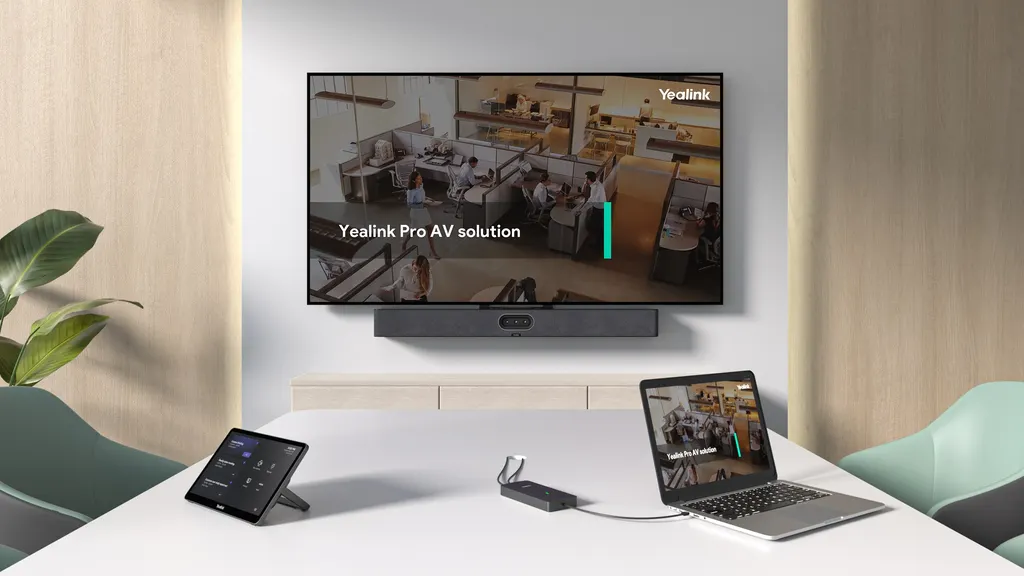
The Yealink VCH51 PRO is a Video Conferencing Hub that links a laptop to a compatible Yealink MTR room over one USB-C cable. It carries up to 4K/60fps content with low latency, supplies up to 65W PD2.0 to charge the laptop, and needs no driver. It suits boardrooms and meeting rooms in Doha and Lusail already fitted with MeetingBar, MeetingBoard, MVC or ZVC equipment.

One USB-C cable for presenting and charging

The Yealink VCH51 PRO is a compact hub that connects a laptop to a Yealink room system already installed in a meeting room. A presenter plugs a single USB-C cable from the laptop into the hub, and the hub handles the content stream and the power to the laptop. The meeting itself still runs on the room's own cameras, microphones and speakers, while the presenter keeps using the video platform and software they prefer.

Cable clutter is a common complaint in shared rooms, where visitors arrive with different laptops and need a quick way to share. One connection replaces the usual mix of display cables and separate charging leads, which keeps the table tidy and shortens the time spent before a meeting starts.

Key specifications for room planners

Check these figures against the room layout and the power plan before you order.

  • Presentation: up to 4K/60fps with low latency
  • Ports: one USB 2.0 Type-C port with DP video input, one PD power port, and one 1000Mbps RJ45 port rated to IEEE 802.3af full-duplex, plus an LED indicator
  • Charging: up to 65W PD2.0 to a laptop when a PD power adapter is connected
  • Dimensions and weight: 144 x 65 x 18 mm, 0.602 kg
  • Operating conditions: 0 to 40°C and 10 to 95% humidity
  • Laptop software: Windows 7, 8.1, 10 and 11, and macOS 10.6 or higher, with no driver needed

The hub encodes video with a built-in hardware chip, so the laptop's processor is not loaded with encoding work during a presentation. That matters when a presenter runs a heavy slide deck or plays a video clip during a meeting.

Which Yealink room systems it works with

Compatibility is the first thing to confirm, because support depends on the exact model. For MTR-A rooms, the manufacturer lists support for MeetingBar A50, A40, A25 and A10, MeetingBoard 86 Pro, 75 Pro, 65 Pro, 75C EDLA and 65C EDLA, and MeetingEye 500. MeetingBar A30 and A20 and MeetingBoard 86 and 65 are not supported. For MTR-W rooms, MVC and ZVC S40-C5U, S80-C5U, S90-C5U and S98-C5U are supported, while the S50-C5U is listed as coming soon.

Where it fits in Qatar

Three situations show where the hub earns its place:

  • A ministry boardroom in West Bay with a MeetingBoard 75 Pro, where visiting officials present from their own laptops without swapping cables or waiting for IT.
  • A university seminar room in Education City with an MVC S90-C5U, where faculty from different departments share slides and lab videos in one session.
  • A logistics company's meeting room in the Industrial Area, where a visiting supplier's laptop is charged and presenting within seconds of being plugged in.

What to plan before ordering

Confirm the room system model and whether it is on the supported list, because some models in the same family are not supported. Check that each laptop that will connect has a full-featured USB Type-C port, since the hub is designed for those ports. Plan the PD power adapter that will supply the laptop, and keep the hub inside an air-conditioned room. Qatar summer temperatures outdoors often pass 45°C, so do not leave the hub in an unventilated cabinet or hot equipment space that could exceed the 40°C limit.

SmartRooms Qatar carries out free site surveys to confirm where the hub will sit, how cables will run, and whether each room suits the setup. For a school, ministry or company buying several units, we can prepare a quotation for a purchase order (LPO), and government tenders including Monaqasat are supported. Request a quote and send us your room system model so we can confirm compatibility before you commit.

Highlights

  • Up to 4K/60fps presentation with low latency
  • One USB-C cable for content sharing, BYOD and power
  • Up to 65W PD2.0 laptop charging
  • No driver or software needed; plug and play
  • Supports MeetingBar, MeetingBoard, MVC and ZVC rooms
  • Dimensions 144 x 65 x 18 mm; weighs 0.602 kg

Room fit

Tell us the room size and platform (Teams, Zoom or BYOD) and we confirm the right combination with your quotation.

Estimated timeline

Quotation within 1 working day · delivery timing depends on stock availability, and we confirm it with your quotation.

Specifications

7 specifications · Source: manufacturer · checked Oct 2026
Key Features2
-Presentation resolution
up to 4K/60fps
Details
Interface  -1 x 1000Mbps RJ45 port (IEEE 802.3af, full-duplex)  -1 x USB 2.0 Type C (with DP video input)  -1 x PD power port LED
Physical Features3
Dimension (W.D.H)
144 x 65 x 18 mm
Weight
0.602 kg
Details
Compatible OS  -Windows 7/8.1/10/11  -macOS 10.6 or higher Compatible applications  -most PC applications, as the PC audio & video device
Other Physical Features2
Operating humidity
10 - 95%
Operating temperature
0 - 40℃

Downloads

10 files from the manufacturer

Questions about VCH51 PRO

What is the Yealink VCH51 PRO used for, and who is it for?
It is a Video Conferencing Hub that connects a laptop to an existing Yealink MTR room system through one USB-C cable. Presenters share content up to 4K/60fps and can join meetings on any video platform they choose. It suits boardrooms and meeting rooms in Doha and Lusail that already use compatible Yealink room equipment, and it is a current model, so you can request a quote now.
Which Yealink room systems is it compatible with?
It supports MTR-A and MTR-W rooms. Supported MTR-A devices are MeetingBar A50, A40, A25 and A10, MeetingBoard 86 Pro, 75 Pro, 65 Pro, 75C EDLA and 65C EDLA, and MeetingEye 500. For MTR-W, MVC and ZVC S40-C5U, S80-C5U, S90-C5U and S98-C5U are supported, with the S50-C5U listed as coming soon. MeetingBar A30 and A20 and MeetingBoard 86 and 65 are not supported.
Does the laptop need software or drivers?
No. The hub is plug and play and has a built-in hardware encoding chip, so no software or driver needs to be installed. The manufacturer lists support for Windows 7, 8.1, 10 and 11, and macOS 10.6 or higher. Because encoding happens inside the hub, the laptop's processor is not loaded with encoding work while presenting.
How much power can it supply to a laptop?
The PD power port can supply up to 65W PD2.0 to a laptop when a PD power adapter is connected to the hub. The laptop needs a full-featured USB Type-C port to receive power and share content through the cable. Confirm the laptop models your staff use before ordering, especially if they come from different brands.
What presentation resolution can it handle?
The hub supports content sharing up to 4K/60fps with low latency over its wired USB-C connection. The manufacturer notes that this maximum applies in select situations, so test a typical laptop and a video clip before the first meeting. Full 4K detail is most useful for engineering drawings or high-resolution slide decks.
Could a hotel meeting room in The Pearl use it with a MeetingBar A40?
Yes. A meeting room in a hotel at The Pearl fitted with a MeetingBar A40 can let guests present from their own laptops. One USB-C cable carries the content and charges the laptop, so the room can be reset quickly between sessions. Confirm the MeetingBar model first, because the A30 and A20 are not supported.
How large is it, and what should I plan for mounting?
It measures 144 x 65 x 18 mm and weighs 0.602 kg, so it is small and light enough to sit near the room system. The available data does not specify a mounting kit, so confirm the position, cable route and fixing method during our free site survey. Measure the distance from the laptop position to the hub to choose the right USB-C cable length.
Can it be installed in a hot room or near a sunny window in Qatar?
Its stated operating range is 0 to 40°C, with humidity from 10 to 95%. Qatar summer temperatures can pass 45°C outdoors, so place the hub inside an air-conditioned meeting room, away from sunny windows and unventilated cabinets. Confirm the final spot during the site survey.
Will it suit a ministry boardroom in West Bay with a MeetingBoard 75 Pro?
Yes, the MeetingBoard 75 Pro is on the supported list. Visiting officials can present from their own laptops using one USB-C cable, with content shared up to 4K/60fps and the laptop charged at up to 65W PD2.0. Check the room's MeetingBoard model first, because the MeetingBoard 86 and 65 are not supported.
Is it a fit for a university seminar room in Education City with an MVC S90-C5U?
Yes. The hub connects faculty laptops to the room's camera and audio system. Staff from different departments can plug in, share slides or lab videos up to 4K/60fps, and continue the session with partners abroad on any video platform. Confirm the room system model with the SmartRooms Qatar team before requesting a quote.
Can a school in Al Wakrah buy several units on one purchase order?
Yes. A school in Al Wakrah equipping staff rooms with MeetingBoard 65C EDLA panels can order several hubs against one purchase order (LPO). SmartRooms Qatar delivers to all eight municipalities, offers free site surveys and usually issues quotations within one working day. Send the room list and room system models so each quotation matches the space.
Is it wired only, or does it support wireless presenting?
It works over a wired USB-C cable, which is the connection method the manufacturer describes for content sharing, BYOD and power. The available data does not describe a wireless presenting mode. If your rooms need cable-free sharing, mention that when you request a quote so the team can advise you on the options.

Similar models

Biamp MAX Connect Biamp MAX Connect 910-02278 Wireless Presentation System
CB
Clevertouch CleverCast Clevertouch CleverCast Wireless Presentation Device
Compatible
Clevertouch CleverHub 2 Clevertouch CleverHub 2 Wireless Presentation and Screen Sharing Device
Yes - CleverCast only NRCS
iiyama WP-D002C iiyama WP-D002C USB-C Wireless Presentation Dongle
Wireless presentation
iiyama WP-MEET03M iiyama WP-MEET03M Wireless Presentation Solution
Wireless presentation
Email Call




