





Thursday, 22 October 2026 · 11 Jumada I 1448 AH Sun – Thu · 9:00 – 18:00
+971 56 914 9477 العربية
WhatsApp

VCH51

Yealink VCH51 Wired Sharing Box for MeetingBar and MeetingEye

WhatsApp
Priceon request
QuotationWithin 1 working day
DeliveryConfirmed with your quote, based on stock
PDFDownload datasheet (Yealink VCH51 Datasheet.pdf)
Overview

The Yealink VCH51 is a wired sharing box that links a laptop to Yealink MeetingBar A20/A30 or MeetingEye 400/600 room systems. It takes HDMI and USB Type-C video input, shares up to 4Kp15 on MeetingEye 400/600, and enables BYOD mode, which lets a laptop use the room system as its audio and video device. It suits meeting rooms and classrooms across Doha and Lusail.

What the VCH51 does in a Yealink meeting room

The VCH51 is a wired sharing box for Yealink's MTR-A room systems. It carries a presenter's screen from a laptop into the room system, so remote participants see the same content as people in the room. Yealink lists compatibility with MeetingBar A20/A30 and MeetingEye 400/600, which makes it a room-system accessory rather than a standalone display or conferencing device.

The box connects to the room system over its RJ45 port, so it can be placed in a comms cabinet or near the room system, away from the presenter's table.

Ports, resolution and BYOD mode explained

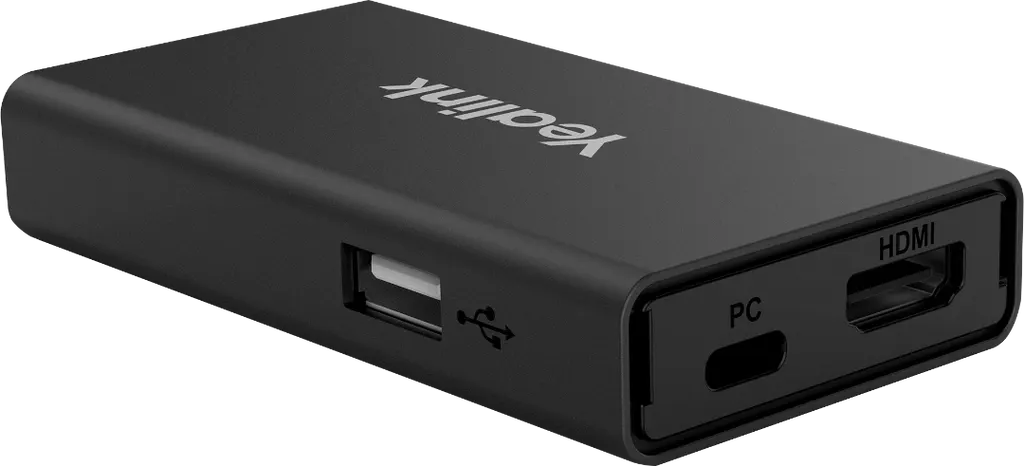
The unit offers four connections: one 100Mbps RJ45 port that follows the IEEE 802.3af standard and runs full-duplex, one USB 2.0 Type A port, one USB 2.0 Type C port that also takes DisplayPort video input, and one HDMI video input. Presentation resolution reaches 4Kp15 with MeetingEye 400/600 and 1080p30 with MeetingBar A20/A30, so the room system you choose sets the ceiling.

BYOD mode is the other half of the product. When a compatible Yealink system is selected as the laptop's audio and video device, most PC applications can use it for audio and video. Supported operating systems are Windows 7, 8.1 and 10, and macOS 10.6 or higher.

Where it fits in Qatar

  • Corporate meeting rooms in West Bay or The Pearl: staff share slides from their own laptops in a room fitted with a MeetingBar, without reconfiguring the room each time.
  • Seminar rooms in Education City: lecturers present from their own machines while a MeetingEye 400/600 system carries the session to partner teams abroad.
  • Government boardrooms in Msheireb: executives present from their own devices, and the room's Yealink hardware reaches remote colleagues in the same session.

Planning the installation

Confirm which room system is installed before ordering, because it sets the presentation ceiling and decides whether BYOD is available. Then map the cable route between the box and the room system, and choose where the laptop connection will sit: on the table, a wall plate or at the lectern. SmartRooms Qatar offers a free site survey to check cable routes and cabinet space before any equipment is purchased.

The manufacturer data does not give an operating temperature range for the VCH51. Confirm the room conditions with the SmartRooms Qatar team, particularly in rooms that run hot or are exposed to dust.

Request a quote

If your meeting rooms run MeetingBar or MeetingEye systems, request a quote for the VCH51 and our team will confirm compatibility, quantities and installation. Quotations are usually issued within one working day, and we accept LPOs as well as bank transfer, cheque or purchase order payments.

Highlights

  • Presentation up to 4Kp15 with MeetingEye 400/600
  • Up to 1080p30 presentation with MeetingBar A20/A30
  • BYOD mode for laptops on compatible Yealink systems
  • HDMI input, USB Type-C with DisplayPort video input
  • 100Mbps RJ45 port following IEEE 802.3af, full-duplex
  • Compact body: 123 x 49 x 16.8 mm, weighing 76 g

Room fit

Tell us the room size and platform (Teams, Zoom or BYOD) and we confirm the right combination with your quotation.

Estimated timeline

Quotation within 1 working day · delivery timing depends on stock availability, and we confirm it with your quotation.

Specifications

5 specifications · Source: manufacturer · checked Oct 2026
Key Features2
Presentation resolution
up to 4Kp15
Details
1 x 100Mbps RJ45 port (IEEE 802.3af, full-duplex) 1 x USB 2.0 Type A 1 x USB 2.0 Type C (with DP video input) 1 x HDMI video input
Physical Features3
Dimension (W. D. H)
123 x 49 x 16.8 mm
Weight
76 g
Details
Compatible OS - Windows 7/8.1/10 - macOS 10.6 or higher Compatible applications - most PC applications, as the PC audio & video device


Downloads

14 files from the manufacturer
PDF Datasheets Yealink VCH51 Datasheet.pdf 210 KB Yealink VCH51 datasheets (PDF, 210 KB) PDF Datasheets · Opens on manufacturer site Yealink VCH51 Datasheet (FR).pdf Yealink VCH51 datasheets (PDF) PDF Manuals & guides Yealink VCH51 Quick Start Guide (EN, CN) V1.2.pdf.pdf 1.7 MB Yealink VCH51 manuals & guides (PDF, 1.7 MB) URL Manuals & guides · Opens on manufacturer site Wired BYOD (Via Yealink VCH51) Yealink VCH51 manuals & guides (URL) URL Manuals & guides · Opens on manufacturer site Wired Content Sharing (VCH51 & VCH51 Pro) Yealink VCH51 manuals & guides (URL) DXF Drawings & CAD · Opens on manufacturer site VCH51 CAD Drawings.dxf Yealink VCH51 drawings & cad (DXF) STP Drawings & CAD · Opens on manufacturer site VCH51 CAD Drawings.stp Yealink VCH51 drawings & cad (STP) PDF Other documents Yealink Regulatory Notice V1.2.pdf 1.0 MB Yealink VCH51 other documents (PDF, 1.0 MB) URL Other documents · Opens on manufacturer site Rooms Accessories Compatibility Lists Yealink VCH51 other documents (URL) URL Other documents · Opens on manufacturer site Rooms Product Family Yealink VCH51 other documents (URL) MP4 Other documents · Opens on manufacturer site Teams-How to Share Content with VCH51 on MeetingBar V1.0.mp4 Yealink VCH51 other documents (MP4) MP4 Other documents · Opens on manufacturer site Teams-How to Use BYOD with VCH51 on MeetingBar V1.0.mp4 Yealink VCH51 other documents (MP4) MP4 Other documents · Opens on manufacturer site Zoom-How to Share Content with VCH51 on MeetingBar V1.0.mp4 Yealink VCH51 other documents (MP4) MP4 Other documents · Opens on manufacturer site Zoom-How to Use BYOD with VCH51 on MeetingBar V1.0.mp4 Yealink VCH51 other documents (MP4)

Questions about VCH51

What is the Yealink VCH51 used for?
The VCH51 is a wired sharing box that connects a laptop to a compatible Yealink room system so the presenter's screen reaches everyone in the meeting. It is built for MeetingBar A20/A30 and MeetingEye 400/600 installations and accepts HDMI or a USB Type-C port that carries DisplayPort video. It suits rooms already running one of those systems that need a stable presentation route.
Which Yealink systems is the VCH51 compatible with?
The manufacturer lists compatibility with MeetingEye 400/600 and MeetingBar A20/A30, which are the systems that support BYOD mode with this box. If your room uses a different Yealink device, confirm compatibility before ordering. SmartRooms Qatar can check your current equipment during a free site survey, and quotations are usually issued within one working day.
What is the maximum presentation resolution?
Presentation resolution reaches up to 4Kp15 with MeetingEye 400/600 and up to 1080p30 with MeetingBar A20/A30. The room system therefore sets the ceiling. If presenters regularly show detailed spreadsheets or engineering drawings, choose the system that meets those needs before buying, because the box cannot exceed the limit of the system it feeds.
What is BYOD mode and how does it work with the VCH51?
BYOD mode lets a laptop select a compatible Yealink room system as its PC audio and video device. The VCH51 enables this with MeetingBar A20/A30 and MeetingEye 400/600. Users choose the Yealink system in their computer settings, and most PC applications can then use it for audio and video during calls.
Which operating systems and applications are supported?
The VCH51 supports Windows 7, Windows 8.1, Windows 10 and macOS 10.6 or higher. The manufacturer states that most PC applications can use the Yealink system as their audio and video device. If your organisation relies on one specific conferencing app, test it on a sample laptop before installation day.
What ports does the VCH51 have?
The box has one 100Mbps RJ45 port that follows IEEE 802.3af and runs full-duplex, one USB 2.0 Type A port, one USB 2.0 Type C port with DisplayPort video input, and one HDMI video input. Plan where each connection will be used before installation, so the laptop connection point matches how presenters work in the room.
How big is the VCH51 and how much does it weigh?
The VCH51 measures 123 x 49 x 16.8 mm and weighs 76 g. Its small footprint makes it easy to place near the room system, whether in a comms cabinet or on a shelf. Check the available space in the cabinet during the site survey before fixing the unit in position.
Is the VCH51 suitable for a boardroom in West Bay or Msheireb?
Yes, provided the boardroom has a MeetingBar A20/A30 or MeetingEye 400/600 system or is planning to install one. Executives can present from their own laptops, and the content reaches remote participants through the room system. Each presenter can share from a personal device without changing the room's settings.
Can it be used in a seminar or lecture room at Education City?
Yes, in a seminar room equipped with a compatible MeetingEye 400/600 or MeetingBar A20/A30 system. Lecturers can connect their own laptops to show slides or video, and remote partners see the same content. Ask the SmartRooms Qatar team to review the RJ45 and HDMI cable routes during the site survey.
How should we plan the installation in an existing room?
Start with a free site survey to confirm the installed room system, the cable route and the laptop connection point. SmartRooms Qatar provides professional installation, and careful planning prevents rework after equipment is mounted. Because the manufacturer data gives no operating temperature range, confirm the room conditions with our team before ordering.
Is the VCH51 wireless, and does it suit an existing room in Al Rayyan?
No. The VCH51 is a wired sharing box that connects to the room system through its RJ45 port and takes laptop content through HDMI or USB Type-C. It suits an existing room in Al Rayyan when a cable route can be run from the laptop position to the room system, which the site survey will confirm.
Do you deliver across Qatar, and how do we order for several rooms?
Yes, SmartRooms Qatar delivers to all eight municipalities of Qatar. A school or company equipping several meeting rooms with MeetingBar or MeetingEye systems can send its room list and quantities to receive one quotation. We accept purchase orders (LPOs), so a single LPO can cover multiple rooms.

Similar models

Biamp MAX Connect Biamp MAX Connect 910-02278 Wireless Presentation System
CB
Clevertouch CleverCast Clevertouch CleverCast Wireless Presentation Device
Compatible
Clevertouch CleverHub 2 Clevertouch CleverHub 2 Wireless Presentation and Screen Sharing Device
Yes - CleverCast only NRCS
iiyama WP-D002C iiyama WP-D002C USB-C Wireless Presentation Dongle
Wireless presentation
iiyama WP-MEET03M iiyama WP-MEET03M Wireless Presentation Solution
Wireless presentation
Email Call


