





Thursday, 22 October 2026 · 11 Jumada I 1448 AH Sun – Thu · 9:00 – 18:00
+971 56 914 9477 العربية
WhatsApp

WPP30

Yealink WPP30 4K Wireless Presentation Pod

WhatsApp
Priceon request
QuotationWithin 1 working day
DeliveryConfirmed with your quote, based on stock
PDFDownload datasheet (Yealink WPP30 Datasheet.pdf)
Overview

A 4K wireless presentation pod that shares up to 4K/30fps content from a computer or phone with no software or driver installation. It uses Wi-Fi 6 with 2x2 MIMO on dual-band 2.4GHz and 5GHz, creates its own Wi-Fi network so no router setup is needed, and supports up to four streams on one screen. Suited to boardrooms, training rooms and lecture spaces across Doha, Lusail and Education City.

Sharing 4K/30fps content without installing software

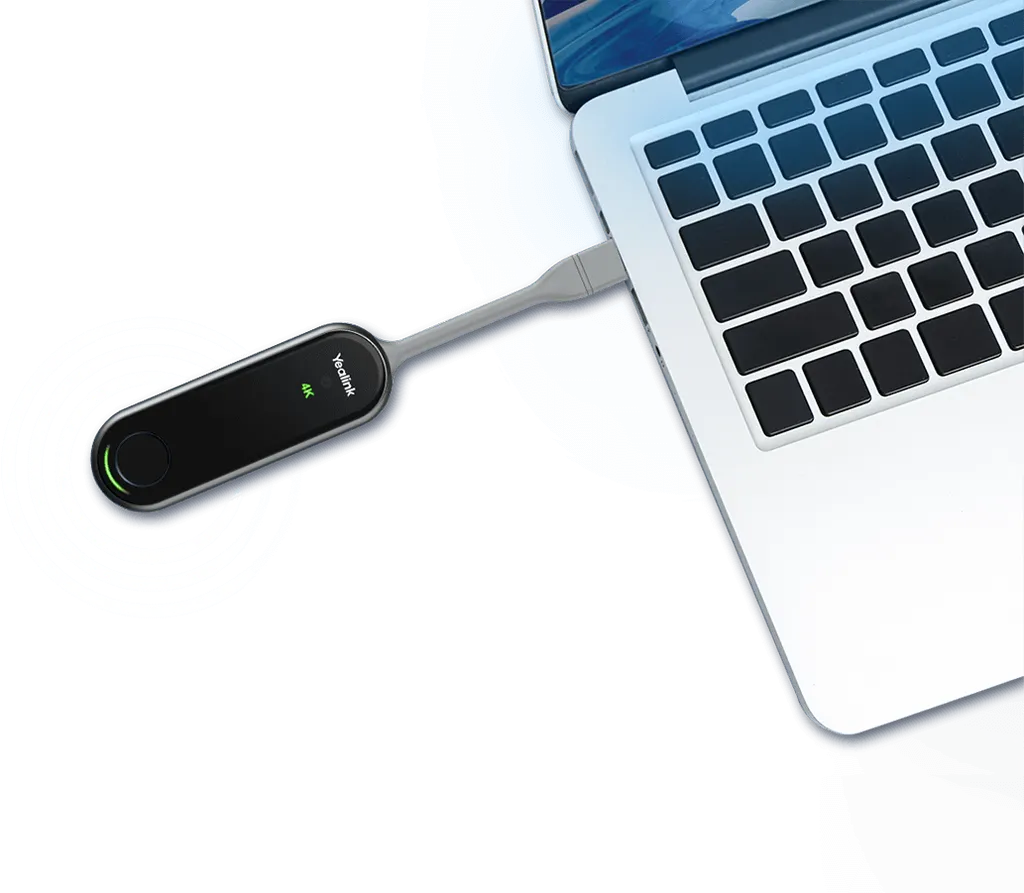
The Yealink WPP30 is a 4K wireless presentation pod that uses a built-in hardware encoding chip, so the 4K/30fps video is processed inside the device instead of on the host computer's processor. Connect it to a computer or phone with a full-featured USB Type-C port and the presentation can start, with no driver or application to install. That matters in Qatar's busy meeting rooms, where a presenter often arrives with a device that has never been used in the room and has only minutes to get on screen.

A USB-C to USB-A adapter comes in the box, and a single START/STOP button begins and ends a session. Three status indicators show the state of the link: a slowly flashing green light means the pod is connected and waiting for content, solid green means content is being shared, solid orange means it is updating or pairing, and solid red means the connection has failed.

Wi-Fi 6, 2x2 MIMO and a self-built network

The pod supports 802.11 a/b/g/n/ac/ax with 2x2 MIMO and works across both the 2.4GHz and 5GHz bands, which helps keep the link steady in rooms full of other wireless devices. It creates its own Wi-Fi network, so it has low dependence on the building network and needs no router or extra network configuration. Shared content is protected with AES encryption and WPA-PSK/WPA2-PSK security.

Where the WPP30 fits in Qatar

In a boardroom in West Bay, several managers from different departments can each present from their own laptop, because the pod supports up to four streams shown at the same time on the main screen. In a training centre in Education City, a tutor can share slides with a full room while participants use annotation and the virtual whiteboard to mark up the same content. For a meeting that links Doha with teams abroad, reverse control lets a participant click or drag on a touchscreen display to operate the presenter's computer, provided the display is compatible.

What to plan for before installation

  • The operating temperature range is -10 to 40°C, with 0 to 90% humidity, non-condensing. Place it in an air-conditioned room away from sun-facing windows.
  • The input rating is 5V/600 mA, with typical power consumption of 2.2 W.
  • Supported systems are Windows 7, 8, 10 and 11, and macOS 10.10 or later. Software versions 270.357.0.5 and later are not supported on Windows 7 or Windows 8.
  • At 220 mm × 38 mm × 16 mm and 75 g, it is small enough to keep on a conference table.

SmartRooms Qatar offers a free site survey before installation, so the team can confirm table layout, display position and room conditions. We supply and professionally install across all eight municipalities, and quotations are usually issued within one working day. Purchase orders (LPOs) are accepted for schools and government offices equipping several rooms. Request a quote for your meeting room, classroom or training space today.

Highlights

  • 4K/30fps sharing from hardware encoding, with no driver needed
  • Wi-Fi 6 with 2x2 MIMO on 2.4GHz and 5GHz bands
  • Self-built Wi-Fi network, no router configuration required
  • Up to four content streams shown on the main screen
  • Full-featured USB Type-C port and USB-C to USB-A adapter included
  • Operating range of -10 to 40°C, 0 to 90% humidity non-condensing

Room fit

Tell us the room size and platform (Teams, Zoom or BYOD) and we confirm the right combination with your quotation.

Estimated timeline

Quotation within 1 working day · delivery timing depends on stock availability, and we confirm it with your quotation.

Specifications

14 specifications · Source: manufacturer · checked Oct 2026
Basic5
Decoder
Up to 4k/30fps
Input Power
5V/600 mA
Power Consumption
2.2 W (Typical)
Button
START/STOP Button x 1
Details
Interface:  - Full-featured USB Type-C ×1  - USB-C to USB-A Adapter x1 LED  - 4K/UHD Indicator × 1  - System Error Indicator × 1  - System Status Indicator × 1
Wi-Fi3
Standard
802.11 b/g/a/n/ac/ax
Security
WPA-PSK/WPA2-PSK
Details
Frequency: 2400-2483.5MHz 5150-5250MHz 5250-5350MHz 5470-5725MHz 5725-5850MHz
Device Compatibility1
Details
Operating System:  - Windows 7/8/10/11  - macOS 10.10 or later Versions 270.357.0.5 and later are not supported on Windows 7 and Windows 8.
Advanced Features1
Details
Desktop Sharing:  - Duplicated Desktop  - Extended Desktop Collaboration:  - Annotation  - Whiteboard  - Intuitive Remote Control  - Multiple Screens Share
Operating Environmental2
Temperature range
-10 - 40℃
Humidity range
0 - 90%, non-condensing
Dimensions2
Weight (g/lb)
75 g (0.165 lb)
Size (mm/in)
220 mm × 38 mm × 16 mm (8.66″ x 1.50″ ×0.63″ )

Downloads

15 files from the manufacturer
PDF Datasheets Yealink WPP30 Datasheet.pdf 1.7 MB Yealink WPP30 datasheets (PDF, 1.7 MB) PDF Manuals & guides Yealink WPP30 Wireless Presentation Pod Quick Start Guide (EN, DE, FR, ES) V1.3.pdf 509 KB Yealink WPP30 manuals & guides (PDF, 509 KB) URL Manuals & guides · Opens on manufacturer site Wireless Content Sharing Yealink WPP30 manuals & guides (URL) URL Manuals & guides · Opens on manufacturer site Wireless Content Sharing (MeetingBoard C EDLA) Yealink WPP30 manuals & guides (URL) URL Manuals & guides · Opens on manufacturer site Wireless Content Sharing (MeetingBoard Pro) Yealink WPP30 manuals & guides (URL) URL Manuals & guides · Opens on manufacturer site Wireless Content Sharing (MeetingBoard) Yealink WPP30 manuals & guides (URL) URL Manuals & guides · Opens on manufacturer site Wireless Content Sharing (MeetingDisplay) Yealink WPP30 manuals & guides (URL) DXF Drawings & CAD · Opens on manufacturer site WPP30 CAD Drawings.dxf Yealink WPP30 drawings & cad (DXF) STP Drawings & CAD · Opens on manufacturer site WPP30 CAD Drawings.stp Yealink WPP30 drawings & cad (STP) PDF Other documents Yealink Regulatory Notice V1.2.pdf 1.0 MB Yealink WPP30 other documents (PDF, 1.0 MB) MP4 Other documents · Opens on manufacturer site How to Share Content with WPP30 V1.0.mp4 Yealink WPP30 other documents (MP4) URL Other documents · Opens on manufacturer site Rooms Accessories Compatibility Lists Yealink WPP30 other documents (URL) URL Other documents · Opens on manufacturer site Rooms Product Family Yealink WPP30 other documents (URL) PKG Other documents · Opens on manufacturer site Yealink Wireless Presentation Pod_MacOS.pkg Yealink WPP30 other documents (PKG) MSI Other documents · Opens on manufacturer site Yealink Wireless Presentation Pod_Windows.msi Yealink WPP30 other documents (MSI)

Questions about WPP30

What is the Yealink WPP30 used for?
The Yealink WPP30 is a 4K wireless presentation pod that lets anyone in a room share their computer or phone screen to a display without cables. It suits boardrooms, training rooms and classrooms where presenters change devices often. It outputs up to 4K/30fps, and its hardware encoding handles the video so the presenter's laptop keeps its processor free.
Do I need to install software or drivers on each laptop?
No. The WPP30 works plug and play, so computers and phones need no extra software or driver. Its built-in hardware encoding chip processes the 4K/30fps video, meaning the host computer does not use its processor for encoding. The datasheet describes it as suited to devices with a full-featured USB Type-C port, and a USB-C to USB-A adapter is included in the box.
Which operating systems are supported?
The WPP30 supports Windows 7, 8, 10 and 11, and macOS 10.10 or later. Software versions 270.357.0.5 and later are not supported on Windows 7 or Windows 8, so check the operating system before ordering a batch. Schools with older Windows machines in computer labs should confirm their versions with the SmartRooms Qatar team when requesting a quote.
Does the pod need the office network or a router?
No router or extra network configuration is required, because the WPP30 creates its own self-built Wi-Fi network. This gives it low dependence on the business network. Connections use dual-band 2.4GHz and 5GHz, with AES and WPA-PSK/WPA2-PSK encryption protecting shared content. Your IT team should still review its wireless policy before installing the pod in a government or corporate building.
How could a training centre in Education City use it?
During a workshop, several teams can present at once, since the WPP30 supports up to four content streams shown simultaneously on the main screen. Participants can annotate shared slides and use the virtual whiteboard, and what they write appears on connected phone and computer displays at the same time. This suits sessions where trainees move between group tasks and the main screen.
Can it sit in a room near a sunny window or in a hot space?
The operating range is -10 to 40°C with 0 to 90% humidity, non-condensing. Summer temperatures in Doha can exceed 45°C, so keep the pod in an air-conditioned meeting room away from sun-facing windows, storerooms and outdoor areas. Ask SmartRooms Qatar to review the room conditions during the free site survey before installation.
Does it support reverse control on a touchscreen?
Yes, the WPP30 supports reverse control with a touchscreen display, so a participant can click or drag on the screen to operate the presenter's computer. Compatibility depends on the specific display, so confirm your model with SmartRooms Qatar before ordering. This helps meetings that involve several contributors in one room.
How do annotation and the whiteboard work?
Annotation and the virtual whiteboard let participants mark up shared content and write notes during a session. Whatever is written appears on connected phone and computer displays at the same time. In a review between engineering teams at Ras Laffan and Doha, this lets each participant see the same mark-ups on their own screen while the discussion continues.
What are the dimensions and weight?
The pod measures 220 mm × 38 mm × 16 mm (8.66 × 1.50 × 0.63 inches) and weighs 75 g (0.165 lb). Its small size suits a conference table where space is limited. If the room layout is unusual, SmartRooms Qatar offers a free site survey before installation to confirm the best position for the unit.
What do the status lights mean?
The 4K/UHD indicator shows solid green when the content sharing resolution reaches 4K. The system status indicator flashes green slowly while connected and waiting for content, shows solid green while sharing, and solid orange while updating or pairing. The system error indicator shows solid red when the pod fails to connect.
What are the power requirements?
The datasheet lists an input of 5V/600 mA and typical power consumption of 2.2 W, which is low for a meeting-room accessory. The source data does not specify the power adapter type, so confirm the supply arrangement and the socket type for your room with the SmartRooms Qatar team before installation.
Can a school or government office buy several units through a tender?
Yes. SmartRooms Qatar accepts purchase orders (LPOs) and government tenders, including those on Monaqasat, and payment can be made by bank transfer, cheque or purchase order. A project fitting out several classrooms or boardrooms can request one quotation covering every unit and room. Quotations are usually issued within one working day.

Similar models

Biamp MAX Connect Biamp MAX Connect 910-02278 Wireless Presentation System
CB
Clevertouch CleverCast Clevertouch CleverCast Wireless Presentation Device
Compatible
Clevertouch CleverHub 2 Clevertouch CleverHub 2 Wireless Presentation and Screen Sharing Device
Yes - CleverCast only NRCS
iiyama WP-D002C iiyama WP-D002C USB-C Wireless Presentation Dongle
Wireless presentation
iiyama WP-MEET03M iiyama WP-MEET03M Wireless Presentation Solution
Wireless presentation
Email Call



