Biamp
MAX Connect Auditorium Mode License
Biamp MAX Connect Auditorium Mode License 900-10004 Software
Yealink Management Cloud Service
Yealink Management Cloud Service - Cloud Device Management Software
Priceon request
QuotationWithin 1 working day
DeliveryConfirmed with your quote, based on stock
Overview
Yealink Management Cloud Service is a cloud platform for managing Yealink phones, USB devices and room systems from one graphical console. Administrators can upgrade firmware in bulk, schedule tasks outside working hours and receive alarms for issues such as poor call quality or failed upgrades. It suits IT teams in Qatar running schools, universities, ministries or companies with Yealink equipment across several sites. Request a quote to match a licence plan to your device count.
What the platform does
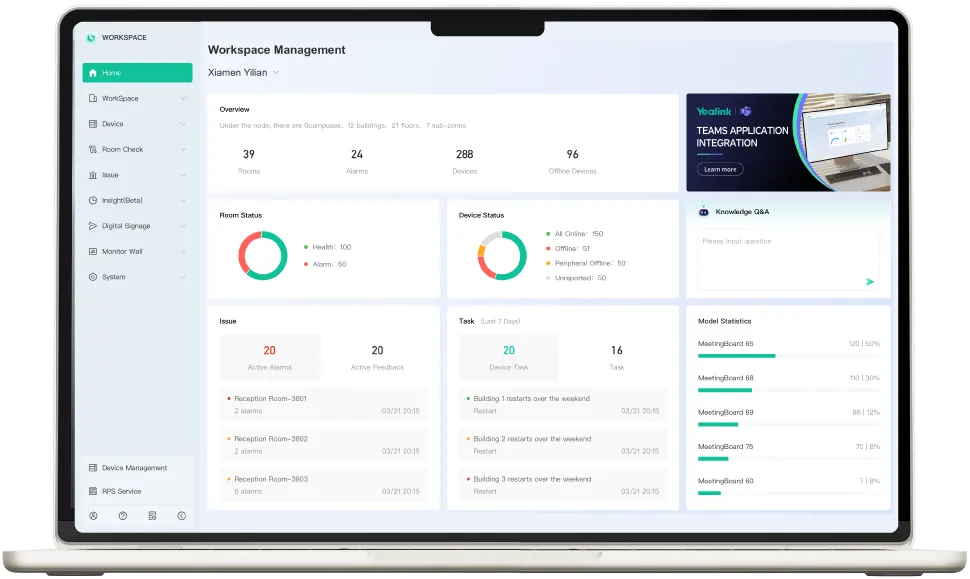
Yealink Management Cloud Service (YMCS) is a cloud-hosted, graphical platform for managing Yealink devices across hybrid workplaces. Instead of visiting each room or desk, an IT administrator can deploy, upgrade, monitor and troubleshoot phones, USB devices and room systems from one console. This listing is the Standard edition. Because it is management software rather than a display or camera, it is licensed to run alongside the Yealink hardware you already own or plan to buy.
Bulk upgrades, scheduling and alarms
Firmware and resource files for phones and USB devices can be applied in bulk, so a whole fleet is updated from one job rather than unit by unit. Tasks can be scheduled for off-hours, and the result of each task can be reviewed afterwards. For a school or campus, upgrades can be planned for holidays or quiet periods, keeping classrooms and meeting rooms available during the working day.
The platform raises alarms for conditions such as poor call quality and failed firmware upgrades, and notification emails can be set so administrators do not miss an alarm. Alarms and user feedback can also be synchronised with ServiceNow, letting IT teams track and resolve faults through their existing service process.
Microsoft 365, Teams and room booking
For organisations that run Microsoft 365, YMCS can sync with O365 and Exchange to show real-time room availability and allow two-way booking through Outlook or RoomPanel. Rooms and devices can also be managed inside Microsoft Teams, including shutdown, reboot and factory reset. Floor plans and Yealink Room Sensor occupancy and headcount data can be synced to Microsoft Places, giving a single view of desk and room use.
Security, licensing and what to check
The platform is built on Microsoft Azure, and the manufacturer describes a multi-layered defence across physical, network, application and data layers. Single sign-on is supported for secure administrator access, with sub-admin management that follows your directory structure. Licences come in three plans: a licence business plan, a Room Device and Workspace plan, and a Phone and Headset Device plan. Before choosing, confirm which data residency option suits your organisation.
Where it fits in Qatar
A private school in Al Wakrah with classroom phones and conferencing kits across two campuses could manage every device from one console and schedule firmware work outside term time. A government ministry in Doha with meeting rooms on several floors could sync room booking with Outlook so calendars and room panels stay matched. A company in Lusail with hot desks could use the Microsoft Places integration to show desk and room occupancy. A free site survey helps confirm device counts per building before rollout, and schools and public bodies can order through an LPO or government tender.
Request a quote from SmartRooms Qatar with your device list and number of sites, and the quotation will match the right licence plan to your fleet.
Highlights
- Bulk firmware upgrades for phones and USB devices
- Off-hours task scheduling with recorded task results
- Alarms for poor call quality and failed upgrades
- Two-way room booking sync through Outlook and RoomPanel
- Hosted on Microsoft Azure with three licence plans
Room fit
Tell us the room size and platform (Teams, Zoom or BYOD) and we confirm the right combination with your quotation.
Estimated timeline
Quotation within 1 working day · delivery timing depends on stock availability, and we confirm it with your quotation.
Specifications
Source: manufacturer · checked Oct 2026
The full specification and datasheet for this model are available on request; we send them with your quotation.
Downloads
0 files from the manufacturerNo downloadable files are listed for this model yet. Ask us and we will send the datasheet.
Questions about Yealink Management Cloud Service
What is Yealink Management Cloud Service used for?
It is a cloud-based, graphical platform for managing Yealink devices in hybrid workplaces. IT administrators can deploy, upgrade, monitor and troubleshoot phones, USB devices and room systems from one console instead of visiting each unit. It suits IT teams at Qatari schools, universities, ministries and companies that run several rooms or sites with Yealink equipment.
Which devices can the platform manage?
The source material describes management of Yealink phones, headsets, USB devices and room devices. Licensing is split into a Room Device and Workspace plan and a Phone and Headset Device plan. Before requesting a quote, send SmartRooms Qatar your Yealink models and quantities so the right licence plan can be matched to each device type.
How does bulk firmware upgrading work?
Phones and USB devices can be upgraded in bulk by specifying the firmware and resource files you want to apply, so you do not update each unit by hand. For a school in Al Wakrah with classroom phones and USB conferencing kits spread across several buildings, one managed job replaces many manual updates, and the result of each task is recorded.
What alarms will IT staff receive?
The platform generates alarms for events such as poor call quality and firmware upgrade failures. Notification emails can be configured so administrators do not miss an alarm. Alarms and user feedback can also be synchronised with ServiceNow, so faults are logged and resolved through the helpdesk rather than only when a user reports them from a meeting room.
Can maintenance run outside office hours?
Yes. Management tasks can be scheduled to run during off-hours, and the execution result of each task can be reviewed afterwards. A private school in Al Wakrah could plan firmware upgrades for the Friday and Saturday weekend or the school holidays, so classrooms are not affected during term time.
Does it work with Outlook and Microsoft 365 room booking?
Yes. It can sync with O365 and Exchange to show real-time room availability and allow two-way booking through Outlook or RoomPanel. A government ministry in Doha that books meeting rooms through Outlook can keep calendars and room panels matched without updating each booking by hand.
Can IT staff manage rooms from Microsoft Teams?
Yes. The source describes managing rooms and devices directly inside Teams, including shutdown, reboot and factory reset, with real-time alarms and feedback. This suits a university in Education City running lecture theatres, labs and meeting rooms, where support staff can restart a system without going to the room.
How does it connect with Microsoft Places and room sensors?
Floor plans can be created in the platform and synced to Microsoft Places, and occupancy and headcount data from the Yealink Room Sensor can be synced in real time. A business centre in Lusail with hot desks could use this to see which desks and rooms are in use. Ask SmartRooms Qatar which sensors your deployment needs before confirming quantities.
How is the service hosted and how is data protected?
YMCS is built on Microsoft Azure. The manufacturer describes a multi-layered defence across physical, network, application and data layers, and the source also mentions localised data residency. Ask the SmartRooms Qatar team to confirm which data residency option applies to your organisation before you buy, especially if government or regulated data policies apply.
What licence plans are available?
The manufacturer lists three plans: a licence business plan, a Room Device and Workspace plan, and a Phone and Headset Device plan. The choice depends on the devices you manage. An organisation focused on meeting rooms may need the room plan, while a call centre with many desk phones would more likely need the phone plan.
Do we need a site survey before rollout?
SmartRooms Qatar offers a free site survey that helps establish which Yealink devices are installed in each building, which rooms should be onboarded first and how many units of each type are needed. This is useful for a company spread over several floors in West Bay or Msheireb, where devices may be located in different areas.
Can we buy it through an LPO or a government tender?
Yes. SmartRooms Qatar accepts purchase orders (LPOs) and supports government tenders, including Monaqasat. Payment can be made by bank transfer, cheque or purchase order. A school or public body buying several licences can send an LPO with the device list, and the quotation is usually issued within one working day.