Biamp
MAX Connect Auditorium Mode License
Biamp MAX Connect Auditorium Mode License 900-10004 Software
Yealink USB Connect
Yealink USB Connect Device Management Software
Priceon request
QuotationWithin 1 working day
DeliveryConfirmed with your quote, based on stock
Overview
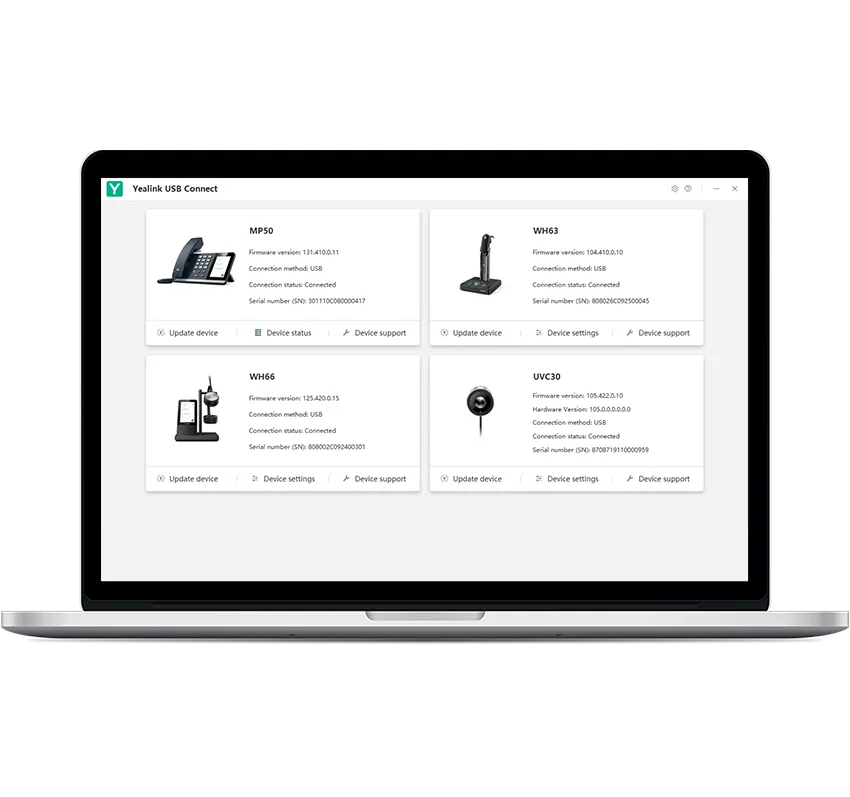
Yealink USB Connect is a management application for Yealink USB headsets, speakerphones and webcams. IT teams can apply settings across several devices, run one-click upgrades, reset or restart hardware, and collect device logs to diagnose faults. It suits organisations in Qatar running many Yealink USB peripherals across offices, meeting rooms and call centres. Request a quote to plan deployment.
What Yealink USB Connect does for your USB audio and video devices
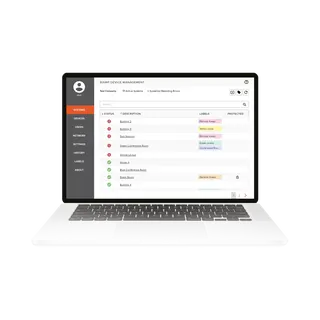
Yealink USB Connect is a single application for managing Yealink USB headsets, speakerphones and webcams. Rather than configuring each peripheral on its own, an IT or facilities team can review and change settings from one place. This matters most for organisations that run several meeting rooms, contact desks and offices at the same time.
Settings, upgrades and recovery from one application
Feature settings for supported devices are handled inside the application. The manufacturer's example is the WH66 headset, where both basic and premium functions can be configured through the same tool.
- Multi-device control: headsets, speakerphones and webcams managed together.
- One-click setup and upgrade: keeps connected hardware up to date and gives access to the latest features.
- One-click reset or restart: helps recover a device that stops responding.
Fault checks and audio logging for faster diagnosis
Support staff can quickly check for device problems and collect log data for IT maintenance. For audio peripherals, the logging level can be selected and specific audio can be recorded, which supports accurate analysis when a call problem needs investigating rather than guessing from a user's description.
Where it fits in Qatar
A ministry in Doha with a shared pool of headsets for its contact centre can apply consistent settings and upgrades without visiting every workstation. A private school in Al Wakrah fitting out classrooms with webcams and speakerphones for hybrid lessons can let its IT coordinator review each room's devices from one place. In a hospital administration office in Al Sadd, a one-click reset or restart can recover a device before an important meeting begins.
What to plan before rollout
Check the headset, speakerphone and webcam models you use against the current device list, and confirm that the operating systems on your workstations are compatible. Decide who will hold administrator rights for upgrades, and agree log-collection and audio-recording rules that match your organisation's privacy policy.
Request a quote from SmartRooms Qatar to cover the software and the Yealink devices together. We accept purchase orders (LPOs) and can supply for government tenders, including Monaqasat, and delivery to all 8 municipalities of Qatar is included in our service.
Highlights
- Manages Yealink headsets, speakerphones and webcams together
- Configures basic and premium headset functions in one application
- One-click setup and upgrade keeps connected hardware up to date
- One-click reset or restart for quick device recovery
- Quick device problem checks and log collection for IT teams
- Selectable logging levels and audio recording for fault analysis
Room fit
Tell us the room size and platform (Teams, Zoom or BYOD) and we confirm the right combination with your quotation.
Estimated timeline
Quotation within 1 working day · delivery timing depends on stock availability, and we confirm it with your quotation.
Specifications
Source: manufacturer · checked Oct 2026
The full specification and datasheet for this model are available on request; we send them with your quotation.
Downloads
0 files from the manufacturerNo downloadable files are listed for this model yet. Ask us and we will send the datasheet.
Questions about Yealink USB Connect
What is Yealink USB Connect used for?
Yealink USB Connect is a management application for Yealink USB headsets, speakerphones and webcams. It lets an IT or facilities team view and change device settings from one place instead of configuring each peripheral separately. It suits organisations in Qatar that run several Yealink USB devices across offices, meeting rooms or contact centres.
Which Yealink devices does it manage?
The application supports multiple Yealink USB devices, including headsets, speakerphones and webcams. The manufacturer's example is the WH66 headset, whose basic and premium functions can be set through the application. Before ordering, confirm your exact device models with the SmartRooms Qatar team so the rollout covers every peripheral you plan to use.
Can it keep my Yealink devices up to date?
Yes. One-click setup and upgrade keeps connected hardware up to date, so you can enjoy the latest features without visiting each desk. Upgrades can be run across the devices the application manages, which saves time for IT teams supporting a large number of headsets or webcams.
Does Yealink USB Connect require a specific operating system?
The source data does not list operating system or software version requirements, so SmartRooms Qatar cannot state them here. Before installing across a fleet of workstations, ask us to confirm compatibility with your current operating system builds. This avoids surprises during the rollout in offices, schools or government sites.
How does it help IT teams with device faults?
It allows staff to check quickly for device problems and collect log data for maintenance. These logs give the support team a record to examine, rather than relying only on a user's description of what happened during a call. This shortens the time needed to find out whether a fault lies with the headset, the speakerphone or the workstation.
Can it record audio to help troubleshoot calls?
For audio devices, the application lets you choose a logging level and record certain audio to support accurate problem analysis. Recording any conversation should follow your organisation's privacy and consent rules, so agree the policy before using it in a ministry, school or company office in Qatar.
How would a contact centre in Doha use it?
A customer service team with dozens of headsets can apply consistent settings and upgrades from one application instead of visiting each agent's workstation. Request a quote covering the headsets and the software together, and send a purchase order (LPO) if your procurement runs that way. Tell us the number of agents so the quotation matches your deployment.
Can it manage classroom webcams and speakerphones at a school in Education City?
The IT coordinator can review webcams and speakerphones across classrooms from one application. A one-click reset or restart can recover a device that stops responding before a lesson starts. Plan which rooms have which devices first, so the quotation reflects the full set of classrooms being fitted out.
Is it useful for boardroom speakerphones and webcams in West Bay?
Yes, where several boardrooms in an office tower use the same Yealink speakerphones and webcams and need matching settings. Staff can check a device before an important client call and collect logs if a problem keeps returning. Ask for a quote that lists every room, so the rollout is planned for the whole floor.
How would a hospital administration office in Al Sadd use it?
Administrative teams that use headsets for phone and video calls can have their devices checked and reset from one application. This reduces interruptions to scheduling and coordination calls. A free site survey can confirm where each device is used before the software is set up and the devices are supplied.
What are the purchasing options for a government or school project?
SmartRooms Qatar accepts purchase orders (LPOs), supplies government tenders including Monaqasat, and accepts payment by bank transfer, cheque or purchase order. Quotations are usually provided within one working day. Share the scope and device list early so the quotation can be prepared for your approval process.
Is Yealink USB Connect a hardware product?
No. It is software for managing compatible Yealink USB devices. Headsets, speakerphones and webcams are purchased separately, and the application is used with them to manage settings, upgrades, resets and logs. Request a quote to confirm which devices and software components your organisation needs.