Thursday, 22 October 2026 · 11 Jumada I 1448 AH Sun – Thu · 9:00 – 18:00
+971 56 914 9477 العربية
WhatsApp
This model is discontinuedThe manufacturer no longer makes it. Request a quote and we will propose the closest current replacement.
Suggested replacements ↓

ZVC800

Yealink ZVC800 Zoom Rooms Kit for Medium and Large Rooms

WhatsApp
Priceon request
QuotationWithin 1 working day
DeliveryConfirmed with your quote, based on stock
PDFDownload datasheet (Yealink ZVC500 & ZVC800 Datasheet.pdf)
Overview

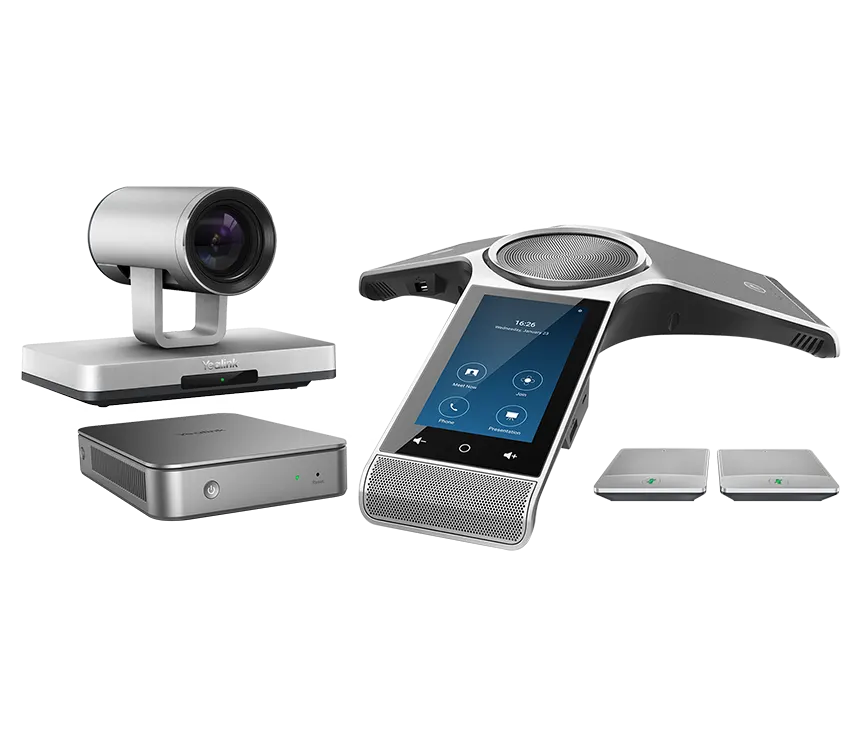
The Yealink ZVC800 is a Zoom Rooms kit for medium and large meeting rooms. It pairs a CP960 conference phone, a UVC80 optical PTZ camera and MCore mini-PC, with Zoom Rooms software and licence included. The CP960 picks up voices within a six-metre radius, extendable to twelve metres with wireless microphones. Discontinued by Yealink, it suits buyers who already run it or need a current equivalent; request a quote.

A complete Zoom Rooms system for larger rooms

The ZVC800 is a bundled video room system that puts audio, camera and a Zoom Rooms computer into one kit for medium and large meeting spaces. Instead of sourcing a camera, a conference phone and a mini-PC separately, a room gets a single combination built around the CP960 conference phone and UVC80 camera. The kit includes Zoom Rooms software and licence as described in the manufacturer's datasheet, so the room is ready for Zoom meetings once it is connected to the display and network.

Audio and camera specifications that matter

  • CP960 microphones: a three-microphone array with 360-degree pickup up to a six-metre radius.
  • Wireless extension: two optional CPW90 DECT microphones extend pickup to 12 metres without extra wiring.
  • Camera: 1920 x 1080 video at 60 frames per second, 12x optical zoom and a 78.5-degree diagonal field of view.
  • Camera control: auto-framing and presets, with pan, tilt and zoom controlled from the 5-inch touch screen.

Cabling, connectivity and deployment

The CP960 uses one-cable technology, which removes the need for a traditional USB cable from the television area to the conference table. The phone is powered over Ethernet (IEEE 802.3af, class 4) and has a 10/100M RJ45 port. The MCore mini-PC provides two HDMI video outputs with CEC support, four USB 3.0 Type-A ports, and Bluetooth and Wi-Fi. Setup requires the Yealink plug-in for Zoom Rooms and the Zoom Rooms app on the MCore.

Where the ZVC800 fits in Qatar

  • A boardroom in an office tower in West Bay, where Doha-based managers join calls with colleagues abroad and the far end needs to hear and see the whole table.
  • A conference room at a ministry or authority in Msheireb, bought through a purchase order or government tender, with several rooms fitted under one project.
  • A seminar room on a university campus in Education City, used for lectures and hybrid sessions with remote students.

Planning for Qatar's climate and the product's life cycle

The kit's stated operating temperature is 0 to 40°C, with humidity of 10 to 95 percent. Summer temperatures in Qatar often exceed 45°C, so the ZVC800 belongs in an air-conditioned room away from direct sun and window glare. Confirm the room's conditions during the free site survey before fixing a camera or ordering cabling.

Yealink discontinued the ZVC800 for sale on 12 January 2021, and its end-of-life date is 12 January 2026. After that date, support and services for this product end, so existing owners should plan a migration path now. The kit weighs 7.6 kg net and 8.7 kg gross, so allow for handling on delivery and storage.

Request a quote from SmartRooms Qatar for a current equivalent or a compatible replacement sized to your room. We supply and deliver to all eight municipalities of Qatar, provide professional installation, and can work with your purchase order (LPO).

Highlights

  • Zoom Rooms kit for medium and large meeting rooms
  • UVC80 optical PTZ camera with 12x optical zoom
  • CP960 conference phone with three-microphone array
  • Six-metre voice pickup, extendable to 12 metres
  • MCore mini-PC with 8GB memory and 128GB SSD
  • Discontinued; end-of-life date 12 January 2026

Room fit

Tell us the room size and platform (Teams, Zoom or BYOD) and we confirm the right combination with your quotation.

Estimated timeline

Quotation within 1 working day · delivery timing depends on stock availability, and we confirm it with your quotation.

Specifications

Source: manufacturer · checked Oct 2026
The full specification and datasheet for this model are available on request; we send them with your quotation.

Downloads

17 files from the manufacturer
PDF Datasheets Yealink ZVC500 & ZVC800 Datasheet.pdf 413 KB Yealink ZVC800 datasheets (PDF, 413 KB) PDF Datasheets · Opens on manufacturer site Yealink ZVC300 Datasheet.pdf Yealink ZVC800 datasheets (PDF) PDF Datasheets · Opens on manufacturer site Yealink ZVC400 Datasheet.pdf Yealink ZVC800 datasheets (PDF) PDF Datasheets · Opens on manufacturer site Yealink ZVC640 Datasheet.pdf Yealink ZVC800 datasheets (PDF) PDF Datasheets · Opens on manufacturer site Yealink ZVC840 Datasheet.pdf Yealink ZVC800 datasheets (PDF) PDF Datasheets · Opens on manufacturer site Yealink ZVC860 Datasheet.pdf Yealink ZVC800 datasheets (PDF) PDF Manuals & guides Zoom Room Quick Start Guide.pdf 628 KB Yealink ZVC800 manuals & guides (PDF, 628 KB) PDF Manuals & guides · Opens on manufacturer site Yealink ZVC Series Zoom Rooms Kit Deployment Guide V30.36.pdf Yealink ZVC800 manuals & guides (PDF) PDF Manuals & guides · Opens on manufacturer site Yealink ZVC400 Zoom Rooms System Quick Start Guide (EN, CN) V1.1.pdf Yealink ZVC800 manuals & guides (PDF) PDF Manuals & guides · Opens on manufacturer site Yealink ZVC640&ZVC300 Zoom Rooms Kit Quick Start Guide (EN, CN) V30.50.pdf Yealink ZVC800 manuals & guides (PDF) PDF Manuals & guides · Opens on manufacturer site Yealink ZVC840 Zoom Rooms System Quick Start Guide (EN&CN) V1.0.pdf Yealink ZVC800 manuals & guides (PDF) PDF Manuals & guides · Opens on manufacturer site Yealink ZVC860 Zoom Rooms System Quick Start Guide (EN, CN) V1.0.pdf Yealink ZVC800 manuals & guides (PDF) MP4 Other documents · Opens on manufacturer site Yealink Multi-Cam Solution V1.0.mp4 Yealink ZVC800 other documents (MP4) PDF Other documents · Opens on manufacturer site Yealink Regulatory Notice V1.2.pdf Yealink ZVC800 other documents (PDF) MP4 Other documents · Opens on manufacturer site Yealink ZVC400 Unboxing V1.0.mp4 Yealink ZVC800 other documents (MP4) MP4 Other documents · Opens on manufacturer site Yealink ZVC840 Unboxing V1.0.mp4 Yealink ZVC800 other documents (MP4) MP4 Other documents · Opens on manufacturer site Yealink ZVC860 Unboxing V1.0.mp4 Yealink ZVC800 other documents (MP4)

Questions about ZVC800

Who is the Yealink ZVC800 designed for?
The ZVC800 suits medium and large meeting rooms where remote participants need to see and hear the whole table. A typical fit is a boardroom in an office tower in West Bay or Lusail, where managers run regular calls with colleagues abroad. The kit is built around a CP960 conference phone, a UVC80 PTZ camera and an MCore mini-PC running Zoom Rooms.
What does the UVC80 camera offer?
The UVC80 is an optical PTZ camera with 1920 x 1080 video at 60 frames per second, 12x optical zoom and a 78.5-degree diagonal field of view. It supports auto-framing and camera presets, so a room operator can save shots of the presenter and the full table and switch between them during a meeting. The zoom helps frame a speaker at the far end of a long room.
Can the CP960 cover a long meeting table in a Lusail office?
Yes, within limits. The CP960 has a built-in three-microphone array with 360-degree pickup up to a six-metre radius. For a long table, adding two optional CPW90 wireless microphones, which use DECT with up to 50 metres of distance, extends voice pickup to 12 metres without extra wiring. Yealink Noise Proof Technology is designed to reduce background noise.
What is included in the ZVC800 kit?
The kit includes a UVC80 optical PTZ camera, a CP960 conference phone with a 5-inch 720 x 1280 touch screen, and an MCore mini-PC with an 8th-generation Intel quad-core i5, 8GB memory and a 128GB SSD. Zoom Rooms software and licence are included, as described in the manufacturer's datasheet. Optional CPW90 wireless microphones can be added to extend voice pickup.
Can we avoid running a long USB cable in a meeting room at a Doha office?
Yes. CP960 one-cable technology removes the traditional USB cable run from the television area to the conference table. The CP960 is powered over Ethernet using IEEE 802.3af class 4 and communicates with the MCore on the same LAN. Fewer cable runs shorten installation, which helps in an occupied office where downtime needs to be kept low.
What connections does the MCore mini-PC provide?
The MCore has two HDMI video outputs with CEC support, four USB 3.0 Type-A ports, and Bluetooth and Wi-Fi. The two HDMI outputs let you connect the room display and a second display, depending on how the room is set up. Check display inputs and cable lengths during the site survey before placing an order.
Can the ZVC800 go in a lobby or outdoor area in Al Sadd in summer?
No. The stated operating temperature is 0 to 40°C, with humidity of 10 to 95 percent. Qatar summer temperatures often exceed 45°C, so the kit belongs in an air-conditioned meeting room, away from direct sun and window glare. For a lobby or shaded terrace, ask the SmartRooms Qatar team to confirm conditions before ordering.
What should we plan before installing a ZVC800 in a Doha office?
Plan the camera position above the display, the CP960 position on the table, the cable route to the MCore, and power and network points. SmartRooms Qatar offers a free site survey to check room temperature, ceiling height and table layout. The kit weighs 7.6 kg net and 8.7 kg gross, so arrange suitable handling for delivery and installation.
Can IT teams manage the ZVC800 remotely?
Yes. The Yealink Device Management Platform, or its cloud service, lets administrators configure devices remotely, upgrade firmware, monitor status and diagnose faults. Through Windows Update, users can get the latest UVC camera driver and the Yealink plug-in for Zoom Rooms. For a school or ministry running several rooms, remote management reduces return visits to site.
Is the ZVC800 still available from Yealink?
Yealink discontinued the ZVC800 for sale on 12 January 2021, and its end-of-life date is 12 January 2026, after which support and services for this product end. Owners should plan a migration now. SmartRooms Qatar can quote a current equivalent or a compatible replacement that suits your room size and meeting platform.
What should a ministry in Msheireb check when replacing a ZVC800?
Start with room size, because the ZVC800 was built for medium and large rooms, and confirm the replacement supports the meeting platform your ministry uses. If several rooms need refitting, count them together, since government buyers often raise one LPO or tender for the whole project. SmartRooms Qatar can quote each room size separately.
How do I request a quote and pay in Qatar?
Send the room size, the meeting platform you use and the number of rooms, and SmartRooms Qatar usually issues a quotation within one working day. Supply and delivery cover all eight municipalities of Qatar, with professional installation available. You can pay by bank transfer, cheque or purchase order, and government buyers can work through LPOs and Monaqasat tenders.

Suggested replacements

Yealink MVC S60 Yealink MVC S60 Microsoft Teams Rooms System with 360° Camera
360°
Yealink CM-MountKIT Yealink CM-MountKIT Ceiling Mic Deployment Kit for CM20
Room kits & bundles
Yealink CMKit-121 Yealink CMKit-121 Ceiling Audio Kit for Conference Rooms
Room kits & bundles
Yealink CTP25 Mount Kits Yealink CTP25 Mount Kits for CTP25 Touch Console
Room kits & bundles
Yealink MCore Kit Yealink MCore Kit AI PC and Touch Panel Room Bundle
Room kits & bundles

Similar models

Biamp Evoko Liso Wall Mount Kit Biamp Evoko Liso Wall Mount Kit (910-01930) for Room Scheduling Displays
TAA Compliant
Email Call