Thursday, 22 October 2026 · 11 Jumada I 1448 AH Sun – Thu · 9:00 – 18:00
+971 56 914 9477 العربية
WhatsApp
This model is discontinuedThe manufacturer no longer makes it. Request a quote and we will propose the closest current replacement.
Suggested replacements ↓

ZVC860

Yealink ZVC860 Zoom Rooms Video Conferencing Kit

Pickup range
81dBFS
WhatsApp
Priceon request
QuotationWithin 1 working day
DeliveryConfirmed with your quote, based on stock
PDFDownload datasheet (Yealink ZVC 860-C5 Datasheet.pdf)
Overview

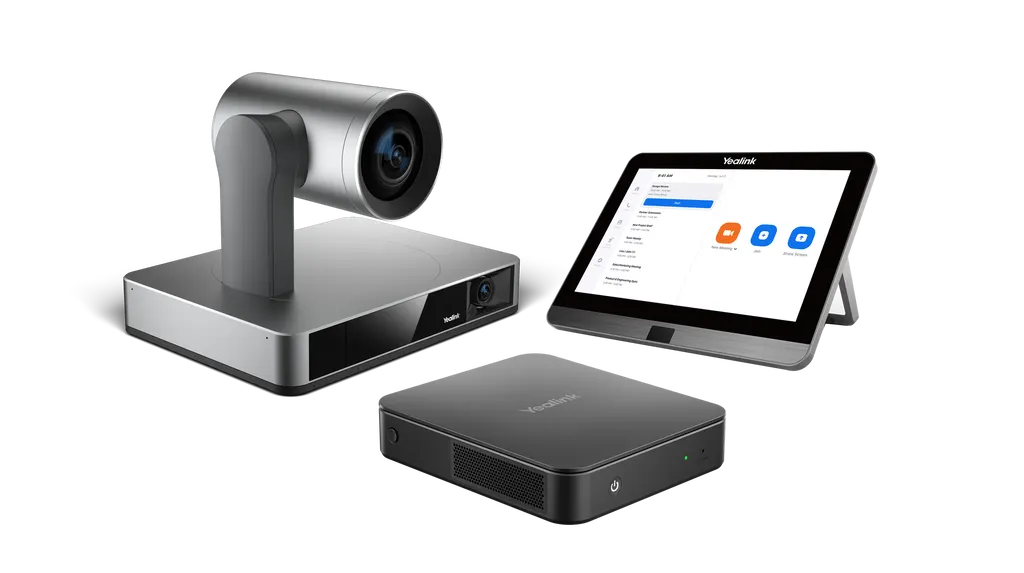
The Yealink ZVC860 is a discontinued Zoom Rooms bundle for medium and large meeting rooms. It pairs a UVC86 4K camera with 12x optical zoom, an 11.6-inch MTouch Plus touch panel, an MCore Pro Gen-3 mini-PC and a VCM35 microphone array in its -710 configuration. Yealink has discontinued this model, so organisations in Qatar that already run it, or are comparing it with newer kits, should request a quote for a current equivalent or compatible replacement.

What the ZVC860 kit includes

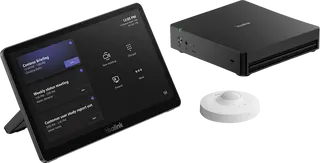
The Yealink ZVC860 is a bundled room kit for medium and large meeting rooms. It brings together a UVC86 PTZ camera, an MCore Pro Gen-3 mini-PC, an MTouch Plus touch console and a RoomSensor. Configuration ZVC860-C5-000 covers those four core items. Configuration ZVC860-C5-710 adds a VCM35 microphone array, an MSpeaker II soundbar and an RCH40 unit, so check the configuration code against your room plan before requesting a quote.

Camera framing for larger rooms

The UVC86 is a 4K camera with 12x optical zoom, which the data rates at 20.4x combined with 1.7x digital zoom. It has a panoramic lens for overall room coverage and a telephoto lens for closer framing. Auto-framing, speaker tracking and presenter tracking keep the camera on whoever is speaking or presenting, and presenter tracking can be triggered by a defined area or by gestures. Up to nine preset positions can be stored for different seating layouts, and picture-in-picture is supported.

Microphones, soundbar and touch control

The VCM35 has a built-in three-microphone array with 360-degree pickup and a 6 m pickup radius. It supports full-duplex operation, acoustic echo cancelling and noise-proof processing, and it has a touch mute key with a two-colour LED. Ceiling and wireless options, including the VCM38, VCM36-W and CPW65, are listed as optional accessories. The MSpeaker II provides stereo output with a 3.5mm line-in and a frequency response of 106Hz to 20 kHz.

The MCore Pro runs an 11th Gen Intel Core i5 with 8 GB of memory and a 128 GB SSD. It has three HDMI outputs with CEC support, a built-in EDID adapter, four USB 3.0 Type-A ports and Wi-Fi supporting 802.11 a/b/g/n/ac/ax. The MTouch Plus has an 11.6-inch IPS display at 1920 x 1080, can sit on a desk or mount on a wall, and tilts between 30 and 70 degrees. Wireless content sharing uses the optional WPP30 pod. The manufacturer lists multi-panel control and third-party screen sharing as features for future versions, so confirm them before you specify the kit.

Planning an installation for a discontinued kit

Because Yealink has discontinued this model, confirm availability and compatibility with SmartRooms Qatar before designing a room around it. A site survey is recommended before wall-mounting the touch panel or fixing the camera, so cable routes, sightlines and table layout are confirmed in advance. The manufacturer describes a single CAT5e run between the TV area and the table area that carries data and power for the connected equipment.

The RoomSensor is rated for 0 to 40 degrees Celsius and 10 to 95 percent humidity, and runs on battery for a four-year life. Summer temperatures in Qatar can exceed 45 degrees Celsius, so keep sensors inside air-conditioned meeting rooms and away from windows and direct sunlight.

Where it fits in Qatar

  • A ministry or authority boardroom in West Bay running Zoom meetings with teams abroad, where the camera follows speakers around a long table.
  • A faculty meeting room or seminar room in Education City hosting hybrid sessions with partner universities, with the touch panel placed where the presenter can control calls.
  • A hotel conference room in Lusail hosting visiting delegations, where a simple touch console lets the host manage the meeting.

To check whether the ZVC860 suits your room, or to identify a current equivalent or compatible replacement, request a quote from SmartRooms Qatar. Send your room dimensions, seating capacity and the configuration you need, and our team will respond with a quotation, usually within one working day.

Highlights

  • UVC86 4K camera with 12x optical zoom
  • Auto-framing plus speaker and presenter tracking
  • Three HDMI outputs with CEC on MCore Pro
  • 11.6-inch 1920 x 1080 IPS MTouch Plus panel
  • VCM35 microphone with 360-degree, 6 m pickup
  • Discontinued by Yealink; request a quote for a replacement

Room fit

Tell us the room size and platform (Teams, Zoom or BYOD) and we confirm the right combination with your quotation.

Estimated timeline

Quotation within 1 working day · delivery timing depends on stock availability, and we confirm it with your quotation.

Specifications

52 specifications · Source: manufacturer · checked Oct 2026
Package Content1
Details
MCore Pro, Gen-3 Mini-PC MTouch Plus, Gen-3 touch panel UVC86 USB PTZ camera RoomSensor MSpeaker II (optional) VCM35 Array microphone (optional) VCM36-W Wi-Fi wireless microphone (optional) VCM38 Ceiling array microphone (optional) CPW65 DECT wireless microphone (optional) WPP30 wireless presentation pod (optional)
Preload1
Details
Windows 11 IoT Enterprise X64 Windows 11 IoT Enterprise License Zoom Rooms App Yealink RoomConnect *Windows 11 will be supported in 23H2
MCore Pro, Gen-3 Mini-PC5
Memory
8 GB (2 x 4GB)
Storage
128 GB SSD
Wi-Fi
IEEE 802.11 a/b/g/n/ac/ax
Bluetooth
BT 5.2
Details
11th Gen Intel® Core i5 3x HDMI video output with CEC supported TPM2.0 Kernel DMA EDID 1 x Yealink MTouch port (RJ45), connect to MTouch Plus/MTouch E2 4 x USB 3.0 Type-A 1 x 10/100/1000M Ethernet port 1 x Power port 1 x Security lock slot, Integrated cable management
MTouch Plus1
Details
11.6-inch narrow bezel IPS display 1920 x 1080 video resolution Angle between screen and desktop (30° ~ 70°) Adjustable angle of support frame (50° ~ 180°) Support wired and wireless (with WPP30) content sharing Support multi-screen control* Support third-party screen sharing* Support external PD power supply to power the sharing device Support HDMI/USB-C video input Support desktop placement, desktop fixed, wall-mounted deployment *This feature will be supported in future versions
RoomSensor5
Detection angle
120°
Adjustable detection angle
±20°
Operating temperature
0-40℃
Operating humidity
10-95%
Power
Battery powered, 4 year life
UVC86 USB PTZ Camera3
Horizontal rotation
200°
Vertical rotation
130°
Details
4K Sensor 20.4 × HD zoom (12x optical, 1.7x digital) Angle of view: - 90° DFOV, 81° HFOV, 50° VFOV ( Telephoto lens) - 120° DFOV, 110° HFOV, 78° VFOV (Panoramic lens) Auto-framing Speaker tracking Presenter tracking, support area trigger and gesture control Multi-focus Picture-in-picture Up to 9 preset positions can be set 1 x HDMI output 1 x Yealink microphone port(RJ-45) 1 x USB 3.0 Type-B port 1 x USB 2.0 Type-A Port 1 x Power Port 1 x Security Lock 1 x Reset Hole
MSpeaker II(optional)5
Frequency response
106Hz-20 KHZ
Maximum Loud Pressure level
88±3dB@8W / 1M
Sensitivity
79±3dB@1W/1M
S/N
≥70dB
Details
3.5mm linear input interface
VCM35(optional)7
Signal to noise ratio
60dB SPL@1KHz, A-weighted
Loudest Pressure level
115dB@1KHz, THD
Equivalent noise
-105dBFS(A)
Dynamic range
81dBFS
Sensitivity
-45dB±2
Frequency response
100Hz-8KHz
Details
Built-in three-microphone matrix 360° omnidirectional pickup 2m radius full duplex range 6m pickup radius Support star cascading Two-color LED capacitive touch mute key
VCM38(optional)7
Signal-to-noise ratio
65dB SPL@1KHz, A-weighted
Maximum sound pressure level
110dB@1KHz, THD
Equivalent Noise
-110dBFS(A)
Dynamic Range
81dBFS
Sensitivity
-45dB±2
Frequency Response
100Hz-8KHz
Details
Built-in six-mic matrix 360° omnidirectional pickup 2m radius full duplex range 6m pickup radius Up to 8 units can be cascaded Two-color LED capacitive touch mute key
VCM36-W(optional)7
Signal to Noise ratio
60dB SPL@1KHz, A-weighted
Loudest Pressure level
115dB@1KHz, THD< 3%
Equivalent noise
-105dBFS(A)
Dynamic range
81dBFS
Sensitivity
-45dB±2
Frequency response
100Hz-8KHz
Details
Built-in three-wheat matrix 360° omnidirectional pickup 2-meter radius full duplex range 6 m pickup radius 2450mAh battery with wireless charging 7 days standby time, up to 12 hours of continuous use Two-color LED capacitive touch mute button
CPW65(optional)7
Signal-to-noise ratio
65dB SPL@1KHz,A-weighted
Loudest Pressure level
110dB@1KHz, THD< 3%
Equivalent noise
-110dBFS(A)
Dynamic range
81dBFS
Sensitivity
-32db+/-2
Frequency response
100Hz-8KHz
Details
360° omnidirectional pickup 2-meter radius full duplex range 6 m pickup radius Use Yealink WDD60 for pairing Two-color LED capacitive touch mute button
Package Features3
N.W/CTN
6.88 kg
G.W/CTN
7.54 kg
Carton Meas
420mm x 275mm x 387mm

Downloads

102 files from the manufacturer
PDF Datasheets Yealink ZVC 860-C5 Datasheet.pdf 489 KB Yealink ZVC860 datasheets (PDF, 489 KB) PDF Datasheets Yealink ZVC860 Datasheet.pdf 6.4 MB Yealink ZVC860 datasheets (PDF, 6.4 MB) PDF Datasheets · Opens on manufacturer site Yealink ZVC300 Datasheet.pdf Yealink ZVC860 datasheets (PDF) PDF Datasheets · Opens on manufacturer site Yealink ZVC400 Datasheet.pdf Yealink ZVC860 datasheets (PDF) PDF Datasheets · Opens on manufacturer site Yealink ZVC500 & ZVC800 Datasheet.pdf Yealink ZVC860 datasheets (PDF) PDF Datasheets · Opens on manufacturer site Yealink ZVC640 Datasheet.pdf Yealink ZVC860 datasheets (PDF) PDF Datasheets · Opens on manufacturer site Yealink ZVC840 Datasheet.pdf Yealink ZVC860 datasheets (PDF) PDF Manuals & guides Yealink ZVC860 Zoom Rooms System Quick Start Guide (EN, CN) V1.0.pdf 12.9 MB Yealink ZVC860 manuals & guides (PDF, 12.9 MB) PDF Manuals & guides Yealink ZVC860-C5-710 Quick Start Guide (EN, DE, FR, ES) V1.0.pdf 12.1 MB Yealink ZVC860 manuals & guides (PDF, 12.1 MB) PDF Manuals & guides Zoom Room Quick Start Guide.pdf 628 KB Yealink ZVC860 manuals & guides (PDF, 628 KB) 1X Manuals & guides · Opens on manufacturer site 802.1x Yealink ZVC860 manuals & guides (1X) URL Manuals & guides · Opens on manufacturer site AirPlay Content Sharing Yealink ZVC860 manuals & guides (URL) URL Manuals & guides · Opens on manufacturer site Audio Diagnostics Yealink ZVC860 manuals & guides (URL) URL Manuals & guides · Opens on manufacturer site Audio Parameter Adjustment Yealink ZVC860 manuals & guides (URL) URL Manuals & guides · Opens on manufacturer site Audio Settings Yealink ZVC860 manuals & guides (URL) URL Manuals & guides · Opens on manufacturer site Auto Framing Yealink ZVC860 manuals & guides (URL) URL Manuals & guides · Opens on manufacturer site BIOS Update Yealink ZVC860 manuals & guides (URL) URL Manuals & guides · Opens on manufacturer site Basic Settings Yealink ZVC860 manuals & guides (URL) URL Manuals & guides · Opens on manufacturer site CEC Yealink ZVC860 manuals & guides (URL) URL Manuals & guides · Opens on manufacturer site Camera Preset Yealink ZVC860 manuals & guides (URL) URL Manuals & guides · Opens on manufacturer site Camera Preset Yealink ZVC860 manuals & guides (URL) URL Manuals & guides · Opens on manufacturer site Change Device Password Yealink ZVC860 manuals & guides (URL) URL Manuals & guides · Opens on manufacturer site Connect Device to YDMP or YMCS Yealink ZVC860 manuals & guides (URL) URL Manuals & guides · Opens on manufacturer site Connect YRC to YDMP or YMCS Yealink ZVC860 manuals & guides (URL) URL Manuals & guides · Opens on manufacturer site Controller Quick User Guide for Zoom Yealink ZVC860 manuals & guides (URL) URL Manuals & guides · Opens on manufacturer site Crestron Module Deployment Guide Yealink ZVC860 manuals & guides (URL) URL Manuals & guides · Opens on manufacturer site Device Firmware Update Yealink ZVC860 manuals & guides (URL) URL Manuals & guides · Opens on manufacturer site Direct Sharing in Zoom Rooms Yealink ZVC860 manuals & guides (URL) URL Manuals & guides · Opens on manufacturer site Export Log Yealink ZVC860 manuals & guides (URL) URL Manuals & guides · Opens on manufacturer site Feedback Yealink ZVC860 manuals & guides (URL) URL Manuals & guides · Opens on manufacturer site Framing Mode Yealink ZVC860 manuals & guides (URL) URL Manuals & guides · Opens on manufacturer site Group Layout Yealink ZVC860 manuals & guides (URL) URL Manuals & guides · Opens on manufacturer site Image Settings Yealink ZVC860 manuals & guides (URL) URL Manuals & guides · Opens on manufacturer site Instant Meeting Yealink ZVC860 manuals & guides (URL) URL Manuals & guides · Opens on manufacturer site Join Meeting Yealink ZVC860 manuals & guides (URL) URL Manuals & guides · Opens on manufacturer site LLDP Yealink ZVC860 manuals & guides (URL) URL Manuals & guides · Opens on manufacturer site Language Yealink ZVC860 manuals & guides (URL) URL Manuals & guides · Opens on manufacturer site Lens Calibration Yealink ZVC860 manuals & guides (URL) URL Manuals & guides · Opens on manufacturer site Local Camera Yealink ZVC860 manuals & guides (URL) URL Manuals & guides · Opens on manufacturer site Local Microphone Yealink ZVC860 manuals & guides (URL) URL Manuals & guides · Opens on manufacturer site Local Speaker Yealink ZVC860 manuals & guides (URL) URL Manuals & guides · Opens on manufacturer site Log In Yealink ZVC860 manuals & guides (URL) URL Manuals & guides · Opens on manufacturer site Manage Participants Yealink ZVC860 manuals & guides (URL) URL Manuals & guides · Opens on manufacturer site Manual Controls Yealink ZVC860 manuals & guides (URL) URL Manuals & guides · Opens on manufacturer site Manual Controls Yealink ZVC860 manuals & guides (URL) URL Manuals & guides · Opens on manufacturer site Meeting Layout Yealink ZVC860 manuals & guides (URL) URL Manuals & guides · Opens on manufacturer site Miracast Content Sharing Yealink ZVC860 manuals & guides (URL) URL Manuals & guides · Opens on manufacturer site Multi-Focus Yealink ZVC860 manuals & guides (URL) URL Manuals & guides · Opens on manufacturer site Multiple Monitors Mode Yealink ZVC860 manuals & guides (URL) URL Manuals & guides · Opens on manufacturer site Network Check Yealink ZVC860 manuals & guides (URL) URL Manuals & guides · Opens on manufacturer site Picture-in-Picture (PiP) Mode Yealink ZVC860 manuals & guides (URL) URL Manuals & guides · Opens on manufacturer site Presenter Tracking Yealink ZVC860 manuals & guides (URL) URL Manuals & guides · Opens on manufacturer site Proxy Server Yealink ZVC860 manuals & guides (URL) URL Manuals & guides · Opens on manufacturer site Recovery Mode Yealink ZVC860 manuals & guides (URL) URL Manuals & guides · Opens on manufacturer site Remote Management Yealink ZVC860 manuals & guides (URL) URL Manuals & guides · Opens on manufacturer site Screen and Energy Saver Yealink ZVC860 manuals & guides (URL) URL Manuals & guides · Opens on manufacturer site Separate Microphone Mute Control Yealink ZVC860 manuals & guides (URL) URL Manuals & guides · Opens on manufacturer site Share Content via Zoom APP Yealink ZVC860 manuals & guides (URL) URL Manuals & guides · Opens on manufacturer site Speaker Tracking Yealink ZVC860 manuals & guides (URL) URL Manuals & guides · Opens on manufacturer site Switch Account Yealink ZVC860 manuals & guides (URL) URL Manuals & guides · Opens on manufacturer site Time and Date Yealink ZVC860 manuals & guides (URL) URL Manuals & guides · Opens on manufacturer site Troubleshoot Yealink ZVC860 manuals & guides (URL) URL Manuals & guides · Opens on manufacturer site VLAN Yealink ZVC860 manuals & guides (URL) URL Manuals & guides · Opens on manufacturer site Video Diagnostics Yealink ZVC860 manuals & guides (URL) URL Manuals & guides · Opens on manufacturer site Video Fence (Yealink UVC Camera) Yealink ZVC860 manuals & guides (URL) URL Manuals & guides · Opens on manufacturer site Windows Update Yealink ZVC860 manuals & guides (URL) URL Manuals & guides · Opens on manufacturer site Wired Content Sharing Yealink ZVC860 manuals & guides (URL) URL Manuals & guides · Opens on manufacturer site Wired Network Yealink ZVC860 manuals & guides (URL) URL Manuals & guides · Opens on manufacturer site Wireless Content Sharing Yealink ZVC860 manuals & guides (URL) URL Manuals & guides · Opens on manufacturer site Yealink Deployment Tool User Guide Yealink ZVC860 manuals & guides (URL) PDF Manuals & guides · Opens on manufacturer site Yealink ZVC Series Zoom Rooms Kit Deployment Guide V30.36.pdf Yealink ZVC860 manuals & guides (PDF) PDF Manuals & guides · Opens on manufacturer site Yealink ZVC400 Zoom Rooms System Quick Start Guide (EN, CN) V1.1.pdf Yealink ZVC860 manuals & guides (PDF) PDF Manuals & guides · Opens on manufacturer site Yealink ZVC640&ZVC300 Zoom Rooms Kit Quick Start Guide (EN, CN) V30.50.pdf Yealink ZVC860 manuals & guides (PDF) PDF Manuals & guides · Opens on manufacturer site Yealink ZVC840 Zoom Rooms System Quick Start Guide (EN&CN) V1.0.pdf Yealink ZVC860 manuals & guides (PDF) URL Manuals & guides · Opens on manufacturer site Zoom Rooms App Update Yealink ZVC860 manuals & guides (URL) URL Other documents · Opens on manufacturer site Audio Input and Output Compatibility Lists Yealink ZVC860 other documents (URL) URL Other documents · Opens on manufacturer site Basic Description of the Central Control Yealink ZVC860 other documents (URL) URL Other documents · Opens on manufacturer site DSP Device Compatible List Yealink ZVC860 other documents (URL) URL Other documents · Opens on manufacturer site Deployment Yealink ZVC860 other documents (URL) URL Other documents · Opens on manufacturer site Features Yealink ZVC860 other documents (URL) URL Other documents · Opens on manufacturer site HTTPS API Yealink ZVC860 other documents (URL) MP4 Other documents · Opens on manufacturer site How to Share Content with USB Cable V1.0.mp4 Yealink ZVC860 other documents (MP4) MP4 Other documents · Opens on manufacturer site How to Share Content with WPP30 V1.0.mp4 Yealink ZVC860 other documents (MP4) MP4 Other documents · Opens on manufacturer site How to Use Auto Framing and Speaker Tracking V1.0.mp4 Yealink ZVC860 other documents (MP4) MP4 Other documents · Opens on manufacturer site How to Use Picture-in-Picture Mode V1.0.mp4 Yealink ZVC860 other documents (MP4) MP4 Other documents · Opens on manufacturer site How to Use Presenter Tracking V1.0.mp4 Yealink ZVC860 other documents (MP4) MP4 Other documents · Opens on manufacturer site How to Use UVC86 Multi Focus V1.0.mp4 Yealink ZVC860 other documents (MP4) URL Other documents · Opens on manufacturer site Introduction Yealink ZVC860 other documents (URL) URL Other documents · Opens on manufacturer site Mic and Camera Linkage Central Control Commands Yealink ZVC860 other documents (URL) URL Other documents · Opens on manufacturer site Room Control Yealink ZVC860 other documents (URL) URL Other documents · Opens on manufacturer site Rooms Accessories Compatibility Lists Yealink ZVC860 other documents (URL) URL Other documents · Opens on manufacturer site Rooms Product Family Yealink ZVC860 other documents (URL) URL Other documents · Opens on manufacturer site Rooms Supported Features List Yealink ZVC860 other documents (URL) URL Other documents · Opens on manufacturer site Socket API Yealink ZVC860 other documents (URL) URL Other documents · Opens on manufacturer site System Requirements Yealink ZVC860 other documents (URL) MP4 Other documents · Opens on manufacturer site Yealink Multi-Cam Solution V1.0.mp4 Yealink ZVC860 other documents (MP4) PDF Other documents · Opens on manufacturer site Yealink Regulatory Notice V1.2.pdf Yealink ZVC860 other documents (PDF) MP4 Other documents · Opens on manufacturer site Yealink UVC86 PT Segment Tracking V1.0.mp4 Yealink ZVC860 other documents (MP4) MP4 Other documents · Opens on manufacturer site Yealink Video Fence Feature Demo V1.0.mp4 Yealink ZVC860 other documents (MP4) MP4 Other documents · Opens on manufacturer site Yealink ZVC400 Unboxing V1.0.mp4 Yealink ZVC860 other documents (MP4) MP4 Other documents · Opens on manufacturer site Yealink ZVC840 Unboxing V1.0.mp4 Yealink ZVC860 other documents (MP4) MP4 Other documents · Opens on manufacturer site Yealink ZVC860 Unboxing V1.0.mp4 Yealink ZVC860 other documents (MP4)

Questions about ZVC860

What is the Yealink ZVC860 and who is it for?
The Yealink ZVC860 is a Zoom Rooms video conferencing kit built for medium and large meeting rooms. It combines a UVC86 4K PTZ camera, an MCore Pro mini-PC, an MTouch Plus 11.6-inch touch console and a RoomSensor. In Qatar it suits boardrooms, training rooms and lecture rooms that join Zoom meetings with teams abroad and need the camera to follow the speaker without a camera operator.
Is the ZVC860 still available from SmartRooms Qatar?
No. Yealink has discontinued the ZVC860, so treat it as a model to replace rather than a new order. If your organisation already runs this kit, SmartRooms Qatar can quote a current equivalent or a compatible replacement, and the quotation can list the parts needed to match your existing room layout. Request a quote to start that comparison.
What is the difference between ZVC860-C5-000 and ZVC860-C5-710?
The ZVC860-C5-000 contains the UVC86 camera, MCore Pro, MTouch Plus and RoomSensor. The ZVC860-C5-710 adds a VCM35 microphone array, an MSpeaker II soundbar and an RCH40 unit to that set. If your room already has suitable audio, the first configuration may be enough; otherwise the second gives a complete audio chain. Confirm the configuration code when you request a quote.
How does the UVC86 camera track speakers and presenters?
The UVC86 supports auto-framing, speaker tracking and presenter tracking. Presenter tracking can be triggered by a defined area or by gesture control, so tracking starts when the presenter enters the chosen zone. The camera offers 12x optical zoom, up to nine preset positions for different seating layouts, and picture-in-picture support.
Does the VCM35 microphone cover a large conference table?
The VCM35 has a built-in three-microphone array with 360-degree pickup and a 6 m pickup radius, plus full-duplex operation, acoustic echo cancelling and noise-proof technology. It has a two-colour LED touch mute key. If the room needs ceiling placement, the VCM38 ceiling array is listed as an optional accessory, so compare table and ceiling options before deciding.
Can the kit serve a West Bay boardroom that meets teams abroad?
Yes, this is the scenario the kit is built for. The MCore Pro runs the Zoom Rooms app and drives displays through three HDMI outputs, while the UVC86 follows whoever is speaking across the table. Before quotation, confirm the seating capacity, room dimensions and whether the display will be fed from the MCore Pro's HDMI outputs.
Which Education City room would suit the ZVC860?
A faculty meeting room or seminar room in Education City that hosts hybrid sessions with partner universities suits the ZVC860, provided the room is medium or large. The MTouch Plus can be placed on the table or fixed to a wall, so the presenter can control the call from the front of the room. Ask SmartRooms Qatar to confirm the layout during the site survey before ordering.
How many displays can the MCore Pro drive, and what connections are needed?
The MCore Pro has three HDMI video outputs with CEC support, so a room can connect more than one display and control them through CEC. Its MTouch port is an RJ45 connection to the MTouch Plus. It also has four USB 3.0 Type-A ports and a 10/100/1000M Ethernet port. Plan the display count, HDMI cable runs and network connection before installation.
Is Zoom Rooms preinstalled on the ZVC860?
The preload list includes the Zoom Rooms App, Windows 11 IoT Enterprise X64 with its licence, and Yealink RoomConnect. Because the software is preloaded, the room can be prepared for Zoom meetings without installing a separate operating system. Your IT team should still check Zoom account, network and security policies against the versions they plan to use.
What should we plan before mounting the touch panel on a wall in a new Lusail boardroom?
Book a site survey before mounting. The MTouch Plus supports desktop placement, desktop fixed and wall-mounted deployment, and its support frame adjusts between 50 and 180 degrees. Check the wall structure, the CAT5e route between the TV area and the table area, and how far the panel must sit from the seats. Fix mounting positions during the survey, not on installation day.
Can the RoomSensor be placed in a hot or unconditioned space in Qatar?
The RoomSensor is rated for an operating temperature of 0 to 40 degrees Celsius and humidity of 10 to 95 percent. Summer temperatures in Qatar can exceed 45 degrees Celsius, so place it inside an air-conditioned meeting room, away from windows and direct sunlight, and not in lobbies, courtyards or unconditioned stores. It runs on battery for a four-year life. Confirm any unusual site with SmartRooms Qatar before quotation.
Can we buy the ZVC860 through an LPO or a government tender?
Yes. SmartRooms Qatar accepts purchase orders (LPOs) and government tenders, including those on Monaqasat, and accepts payment by bank transfer, cheque or purchase order. A school, ministry or company ordering this kit should write the exact configuration code, such as ZVC860-C5-710, on the purchase order so the replacement quotation can be checked against it. Products are covered by the manufacturer's warranty.

Suggested replacements

Yealink MVC S60 Yealink MVC S60 Microsoft Teams Rooms System with 360° Camera
360°
Yealink CM-MountKIT Yealink CM-MountKIT Ceiling Mic Deployment Kit for CM20
Room kits & bundles
Yealink CMKit-121 Yealink CMKit-121 Ceiling Audio Kit for Conference Rooms
Room kits & bundles
Yealink CTP25 Mount Kits Yealink CTP25 Mount Kits for CTP25 Touch Console
Room kits & bundles
Yealink MCore Kit Yealink MCore Kit AI PC and Touch Panel Room Bundle
Room kits & bundles

Similar models

Biamp Evoko Liso Wall Mount Kit Biamp Evoko Liso Wall Mount Kit (910-01930) for Room Scheduling Displays
TAA Compliant
Email Call