Thursday, 22 October 2026 · 11 Jumada I 1448 AH Sun – Thu · 9:00 – 18:00
+971 56 914 9477 العربية
WhatsApp
This model is discontinuedThe manufacturer no longer makes it. Request a quote and we will propose the closest current replacement.
Suggested replacements ↓

HT002

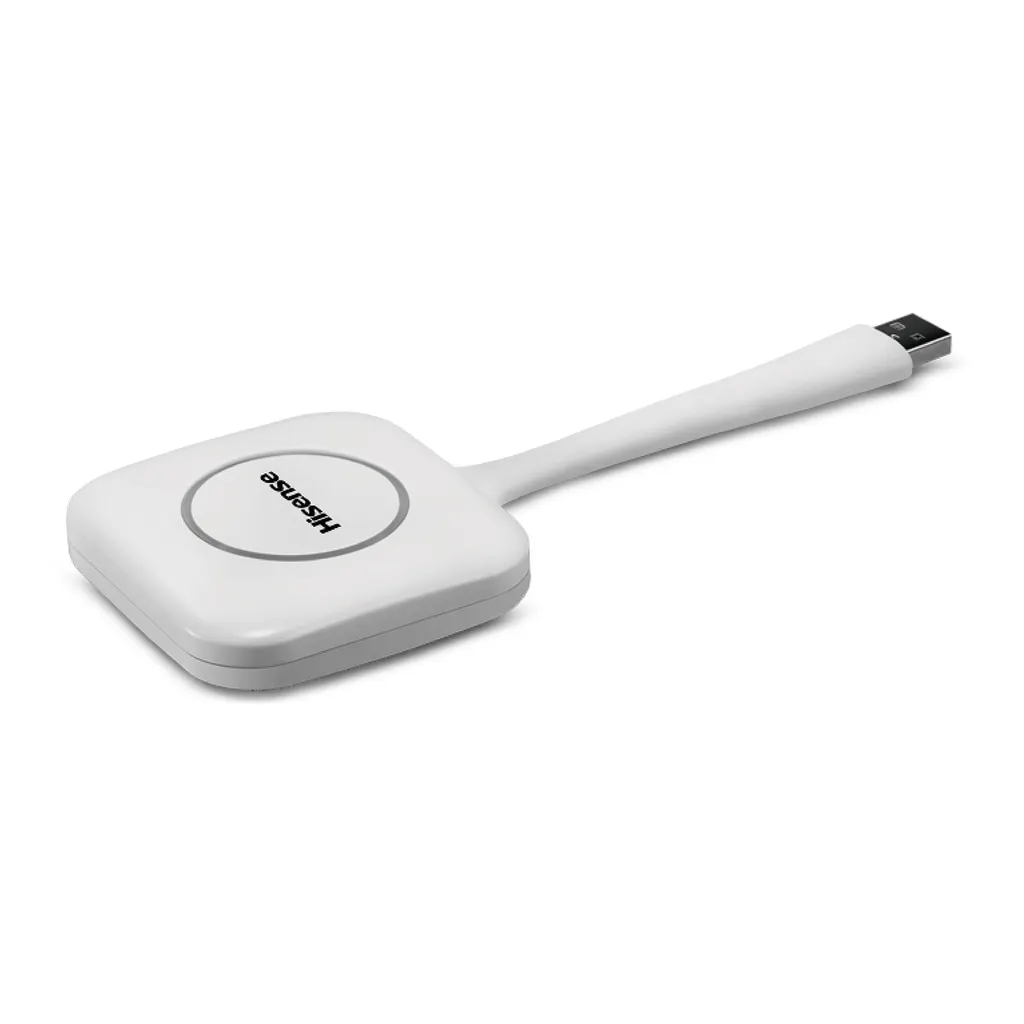
Hisense HT002 Wireless Screen Transmission Dongle

Resolution
FHD 60Hz
WhatsApp
Priceon request
QuotationWithin 1 working day
DeliveryConfirmed with your quote, based on stock
PDFDownload datasheet (HT002A_Datasheet_V1.pdf)
Overview

The Hisense HT002 is a wireless screen transmission dongle that plugs into a device's USB 2.0 port and shares its screen to a digital whiteboard with one button press. It supports iOS, Android, Windows and Mac, streams at FHD 60Hz across 15m, and suits classrooms and meeting rooms. Hisense has discontinued this model, so SmartRooms Qatar can quote a compatible replacement.

How the HT002 gets a screen onto the whiteboard

The HT002 is a small white dongle built for one job: moving what is on a presenter's screen onto a digital whiteboard in the room. You plug it into a USB 2.0 Type-A port on the presenting device, press its single button, and the image appears on the board. There is no cable run from the laptop to the panel and no need to pass a memory stick around the room, which suits lessons and meetings where several people take turns presenting.

Because it supports iOS, Android, Windows and Mac, a teacher using a tablet, a visiting consultant on a Windows laptop and a staff member on a MacBook can all use the same board. The dongle receives one device at the same time, so the current presenter must finish before the next person connects.

Specifications that matter for planning

  • Video output: FHD at 60Hz
  • Transmission distance: rated at 15m
  • Connection: one USB 2.0 Type-A port, with hot-plug and plug-and-play support
  • Power: 5V working voltage
  • Operating range: -10°C to +45°C, humidity up to 95%
  • Indicator light: blinks while connecting, stays white during use
  • Certification: CE and CB
  • Colour: white, with Hisense branding

Hot-plug support means the dongle can be inserted while the presenting device is already running. The indicator light gives a quick check: blinking means the link is still being set up, while a steady white light means it is in use.

Where it fits in Qatar

A private school in Al Wakrah fitting out classrooms with new interactive boards will find that teachers who present from their own laptops or tablets each need a dongle for that device. Count the presenting devices rather than the boards, and plan one unit per device that will present.

An office in West Bay running meetings in Arabic and English side by side can use the HT002 so a visiting team member shares a presentation from their own laptop without searching for adapters at the start of the meeting. Shared rooms work best with a short agreed handover order.

A training centre in Education City running short workshops with rotating trainers can give each trainer a direct route to the board without changing the room. Keep the presenting position within the 15m rating so the connection stays reliable.

Planning points before you order

Confirm the whiteboard or panel model before buying, because the product data does not include a board compatibility list. Qatar summers regularly push temperatures past 45°C, which is the top of the dongle's rated range. Keep it in an air-conditioned room, away from sunlit windowsills and hot lobbies. If you are unsure of the environment, SmartRooms Qatar offers free site surveys. Measure the distance from the presenting position to the board and check it against the 15m figure. Ask your IT team whether a dongle that does not list a Wi-Fi module fits your network policy.

Discontinued model: request a current equivalent

Hisense has discontinued the HT002 and lists it among its end-of-life products. If your organisation already owns one and needs a replacement, or you are comparing it with newer wireless sharing options, SmartRooms Qatar can quote a current compatible replacement. Purchase orders, LPOs and government tenders, including Monaqasat, are accepted, and quotations are usually returned within one working day. Send us your board model, the devices your presenters use and a rough room layout, and request a quote.

Highlights

  • Plugs into a USB 2.0 Type-A port on the presenting device
  • Single button starts sharing to the digital whiteboard
  • FHD 60Hz video with a rated 15m transmission distance
  • Supports iOS, Android, Windows and Mac devices
  • Receives one device at the same time
  • Operating range -10°C to +45°C, humidity up to 95%

Estimated timeline

Quotation within 1 working day · delivery timing depends on stock availability, and we confirm it with your quotation.

Specifications

16 specifications · Source: manufacturer · checked Oct 2026
General16
Color
White
Logo
Hisense
Connect Number
1 received device (same time)
Button
1
Port
USB2.0 A type
Working Voltage
5V
Video Resolution
FHD 60Hz
Transmission Distance
15m
Main
IC RK3036
Plug and Play
Support
WiFi Module
NA
Indicator Light
1. Blinking when connecting, 2.White color when using
Certification
CE/CB
Hot Plug
Support
Working Temperature
-10°C ~ +45°C
Working Humidity
≤95%

Downloads

3 files from the manufacturer

Questions about HT002

Is the Hisense HT002 still sold new by Hisense?
No. Hisense lists the HT002 under its discontinued and end-of-life products, so the model is no longer in production. SmartRooms Qatar can still quote a current compatible replacement for schools and offices that need wireless screen transmission to a digital whiteboard. Send us your whiteboard model and the devices your presenters use, and we will confirm what fits before you order.
What does the HT002 do in a classroom or meeting room?
It is a wireless screen transmission dongle. You plug it into a USB 2.0 Type-A port on your device, press the single button, and the on-screen content is shown on the digital whiteboard. It is rated for FHD 60Hz video over a 15m transmission distance, and it suits lessons where a presenter moves between a laptop or tablet and the board.
Which devices can send a screen to the HT002?
The HT002 supports iOS, Android, Windows and Mac devices. Because it plugs into a USB 2.0 Type-A port, each presenting device needs a free port of that type or a suitable adapter. Before buying, check the ports on the laptops and tablets your staff or teachers actually use, especially newer machines that may only have USB-C ports.
Can several staff use one board in a shared Doha meeting room?
Only one device can be received at the same time. In a government or corporate meeting room in Doha where several departments present in turn, the current presenter must finish before the next person connects. Agree a simple handover order before the meeting, and keep the dongle with the room's presenting device so it does not get lost between sessions.
Will the HT002 cope with Qatar summer heat in a classroom?
The operating range is -10°C to +45°C with humidity up to 95%. Qatar summer temperatures can exceed 45°C, so keep the dongle in an air-conditioned room and out of direct sunlight, and do not leave it in a hot car or on a sunlit windowsill. If the room is hotter than the rated range at any time, confirm the installation with the SmartRooms Qatar team.
Is the HT002 compatible with my digital whiteboard or interactive panel?
The manufacturer describes the HT002 as a dongle that transmits to a digital whiteboard, but the product data does not include a board compatibility list. Before ordering, tell SmartRooms Qatar the exact whiteboard or panel model so the team can confirm that it is compatible with your installation.
Does the HT002 connect through my office Wi-Fi network?
The source data lists no Wi-Fi module for the HT002, so do not assume it joins your office network. Its listed connection is a USB 2.0 Type-A port on the presenting device, with a transmission distance rated at 15m. If your IT team needs to check it against your network security policy, ask SmartRooms Qatar before ordering.
How would a training centre in Education City use it?
A training centre in Education City running short workshops with visiting trainers can give each trainer a direct route to the board without changing the room setup. Each trainer plugs the HT002 into a laptop or tablet and presses the button, so sessions start in seconds. Plan the presenting spot within the 15m transmission distance of the board, and ask each trainer to bring a device with a free USB 2.0 Type-A port.
What should a school in Al Wakrah count when refitting classrooms?
Count the presenting devices rather than the boards. Each teacher who presents from a personal laptop or tablet needs a dongle for that device, and the HT002 receives only one device at a time. A school refitting several classrooms should check how many teachers share each room, then request a quote using that count and the board models.
Can a conference room in Lusail host visiting speakers with the HT002?
Yes, if the speakers present from their own devices that have a USB 2.0 Type-A port or a suitable adapter. A visiting speaker plugs in, presses the button, and the content appears on the board without a cable run. Because only one device is received at a time, schedule speakers in sequence and measure the distance from the lectern to the board against the 15m rating.
Can the dongle be plugged in while a presentation is already running?
Yes. The HT002 supports hot plug, so it can be inserted while the device is running. The indicator light blinks while it connects and turns white during use, which tells the presenter when the link is active. Ask presenters to check the light before they start, especially when a session has been paused and resumed.
What should we do if an HT002 fails, given the model is discontinued?
Hisense has discontinued the HT002, so a failed unit should be replaced with a current compatible model rather than a like-for-like part. Record the make, model and the board each dongle serves on your asset list, then request a quote from SmartRooms Qatar. Purchase orders and LPOs are accepted, and the team usually returns quotations within one working day.

Suggested replacements

Hisense 65MR61DE-E Hisense 65MR61DE-E 65-inch GoBoard Pro Interactive Display
65″ 3840 x 2160 Android 13.0
Hisense 65MR6DE-E Hisense 65MR6DE-E 65-inch GoBoard Interactive Display
65″ 3840 x 2160 Android 13.0
Hisense 65WE3FE Hisense 65WE3FE 65-inch Advanced Interactive Display
65″ 3840x2160 Android 14.0
Hisense 65WM5GE Hisense 65WM5GE 65-inch 4K Advanced Interactive Display
65″ 3840 x 2160 Android 13.0
Hisense 65WM6FE Hisense 65WM6FE 65-inch GoBoard Live Pro Interactive Display
65″ 3840 x 2160 Android 13.0

Similar models

BenQ CM7505 BenQ Board CM7505 75-inch Interactive Display
75″ UHD 3840 × 2160 pixels Ultra Precision IR
SMART SBID-6286S-V3 SMART Board 6086S-V3 86-inch Interactive Display with iQ
86″ 4K UHD (3840 × 2160) HyPr Touch with InGlass
SMART SBID-6286S-V3-P SMART Board 6086S-V3 Pro 86-inch Interactive Display with iQ
86″ 4K UHD (3840 × 2160) HyPr Touch with InGlass
Clevertouch Clevertouch Edge 65" Clevertouch Edge 65" 4K Interactive Display with Camera and Speakers
65″ 4K UHD (3840x2160 @60Hz) Android 15
Clevertouch Clevertouch Edge 86" Clevertouch Edge 86" 4K Interactive Flat Panel
86″ 4K UHD (3840x2160 @60Hz) Android 15
Email Call