Touchscreen TL6 Education 65
OneScreen Touchscreen TL6 Education 65-inch Interactive Display
- Screen size
- 65″
- Resolution
- 3840x2160
- Touch
- IR Infrared
- System
- Full access to Android Apps…
The OneScreen Touchscreen TL6 Education 65 is a 65-inch 4K interactive display for classrooms and training rooms, built around a 3840x2160 LG panel, 350 cd/m2 brightness and 20-point infrared touch. It runs Android 8.0 with annotation, screen-sharing and OPS PC options. The manufacturer has discontinued this model, so schools and offices that already own it, or want a current equivalent, can request a quote from SmartRooms Qatar.
The OneScreen Touchscreen TL6 Education 65 is a 65-inch interactive display for teaching and training rooms. The manufacturer has discontinued this model, and the page below is written for existing owners, buyers comparing options and anyone seeking a replacement.
What the 65-inch panel delivers in daily use
The 3840x2160 resolution gives 4K detail across the whole screen. The LG LED-backlit panel is rated at 350 cd/m2 brightness with 1200:1 typical contrast. Its 10-bit colour depth and 60Hz refresh rate suit slides, maps, documents and classroom video. The viewing angle is quoted at 178° / 178°, which helps content stay visible from seats off to the side of the room.
Touch, annotation and sharing features that matter
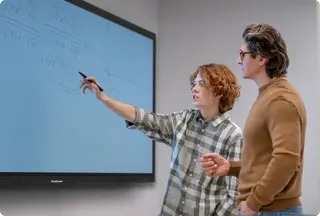
The infrared touch system supports 20 touch points, with a response time under 8 ms and touch accuracy under 2 mm, which matters when several people write at once. Palm erase, two-finger zoom and pan, and pen-thickness-based recognition let a teacher switch between writing and navigating without a separate tool.
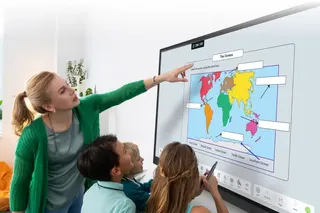
OneScreen Annotate provides the whiteboard and annotation layer, and OneScreen Write lets users mark up any content, save it and send it by QR code or email. EShare allows up to nine screens to share at the same time and can pass view-only or view-and-control access to student devices. Authentication and password protection control who can share.
Android 8.0 gives access to Chrome, YouTube, a document viewer and the Google Play Store with multi-user login. Bluetooth 4.1 supports file sharing and external Bluetooth devices, and OPS PC options are available for i5 and i7 systems. Two 15 W speakers with surround sound and an equaliser are built in.
Where it fits in Qatar
- Private schools in Al Wakrah or Al Sadd refitting a classroom where pupils work in Arabic and English and need annotation on the same board.
- Training centres in Msheireb or Lusail running small-group courses where attendees share from their own laptops through EShare.
- Government and corporate meeting rooms in West Bay where authenticated screen sharing and password protection keep control of who presents.
Planning power, heat and wall mounting
Rated power consumption is 180 W or less, standby is under 1 W, and the rated voltage range is 100-240VAC at 50/60Hz, which includes Qatar's 240 V, 50 Hz supply. Confirm the socket and cable arrangement during the site survey, and plan circuits for the number of units in each room.
The rated operating temperature is -10°C to 50°C, with ambient humidity of 10% to 90%. Summer temperatures in Qatar can exceed 45°C, so place the display in air-conditioned rooms, away from direct sun and unventilated cabinets. The display shows its internal temperature in the menu and shuts itself down if it overheats or fails.
The VESA pattern is 500x400, the product measures 58.46 x 3.60 x 35.33 inches and weighs 99.2 lbs, with a shipping weight of 130 lbs. Arrange a free site survey before wall mounting so the wall and fixings can be checked against that weight.
Discontinued model: getting the right replacement
Because the manufacturer has discontinued the TL6 Education 65, buyers should define the size, mounting, software and power they need, then compare a current equivalent or compatible replacement against them. Schools and public bodies can issue an LPO or use a Monaqasat tender, and payment can be made by bank transfer, cheque or purchase order.
To compare a replacement with your existing unit or a new room layout, request a quote from SmartRooms Qatar. Quotations are usually returned within one working day.
Highlights
- 65-inch 4K display with 3840x2160 resolution on an LG panel
- 350 cd/m2 brightness and 1200:1 typical contrast
- 20-point infrared touch with response time under 8 ms
- EShare shares up to nine screens with password protection
- OPS PC options available for i5 and i7 systems
- Discontinued by the manufacturer; request a quote for a replacement
Classroom fit
At 65″ the farthest student should sit within about 4.9 m (6× the screen height).
Estimated timeline
Quotation within 1 working day · delivery timing depends on stock availability, and we confirm it with your quotation.
Specifications
Touchscreen TL6 Education 6545
- size_inch
- 65
- datasheet
- datasheets/OneScreen-TL6-Education-65-Sales-Sheet.pdf
- datasheet_url
- https://partnerportal.onescreensolutions.com/resources/OneScreen-TL6-Education-65-Sales-Sheet.pdf
- specs · Applications · Interactive Whiteboard
- OneScreen Annotate is interactive whiteboard and annotation software
- specs · Applications · Screen Share & Stream
- EShare software, multi-device screen share & streaming
- specs · Applications · Annotation
- OneScreen Write software, write on any content, save, transfer via QR code or email
- specs · Applications · Android Applications
- Full access to Android Apps including Chrome, Youtube, Document viewer and more
- specs · Applications · Google Play Store
- Full access to Google play store with multi-user login support
- specs · Other Parameters · BlueTooth
- Bluetooth 4.1 (supports file sharing and external Bluetooth devices)
- specs · Other Parameters · OPS PC Support
- OPS PC supported (options are available for i5 and i7 PCs)
- specs · Other Parameters · Speakers
- 2x 15W Speakers with surround sound and equalizer
- specs · Other Functions · EShare
- Share up to 9 screens simultaneously on the OneScreen. Screen mirroring back to student devices now allows teacher to pass view only and view and control access. Authenticate users before letting them share screens. Password protection available
- specs · Other Functions · Temperature Detection Function
- Display the internal temperature of the machine on the all-in-one menu interface and automatically shut down if there is a failure or the temperature exceeds the standard
- specs · Other Functions · Gestures
- Palm erase, two finger zoom in/zoom out, pan, pen thickness based touch recognition
- specs · Help & Training · Free Help & Training
- Unlimited Screen Skills Guru help & training available in one click on video or by chat, phone or email
- specs · Product Series · Series
- TL6
- specs · Product Series · Model No
- OneScreen Touchscreen TL6-65
- specs · Product Series · Inside Bezel Dimensions
- 56.23” (W) × 31.63” (H)
- specs · Size & Weight · Product Dimensions
- 58.46" x 3.60" x 35.33"
- specs · Size & Weight · Product Weight
- 99.2 lbs
- specs · Size & Weight · Shipping Dimensions
- 65.20" x 8.46" x 40.74"
- specs · Size & Weight · Shipping Weight
- 130 lbs
- specs · Size & Weight · VESA Mount
- 500x400
- specs · Panel Spec · BackLight Source
- LED
- specs · Panel Spec · Refresh
- 60HZ
- specs · Panel Spec · Color Depth
- 10BIT/1.07 G
- specs · Panel Spec · Brightness
- 350cd/m2
- specs · Panel Spec · Panel Brand
- LG
- specs · Panel Spec · Contrast
- 1200 : 1 (Typ.)
- specs · Panel Spec · Resolution
- 3840x2160
- specs · Panel Spec · Viewing Angle
- 178°/ 178°
- specs · Power Supply Parameters · Rated Power Consumption
- ≤ 180W
- specs · Power Supply Parameters · Standby Power
- < 1W
- specs · Power Supply Parameters · Rated Voltage
- 100-240VAC 50/60HZ
- specs · Touch System · Touch Type
- IR Infrared
- specs · Touch System · Touch Resolution
- 32768 x 32768
- specs · Touch System · Touch Points
- 20
- specs · Environmental Requirement · Operating Temperature
- -10°C-50°C
- specs · Environmental Requirement · Operating Ambient Humidity
- 10%-90%
- specs · Environmental Requirement · Storage Temperature
- -20°C-60°C
- specs · Environmental Requirement · Storage Humidity
- 10%-90%
- specs · Drive System Parameters · CPU
- Cortex A73x2 A53x2 1.5GHz
- specs · Drive System Parameters · RAM
- 3G DDR3
- specs · Drive System Parameters · Flash
- 32GB (Standard)
- specs · Drive System Parameters · System
- Android 8.0