ETV-65
Yealink ETV-65 65-inch Dual-Screen Touch Display
- Resolution
- 3840 x 2160
- Touch
- 20 points
- Brightness
- 350cd/ ㎡
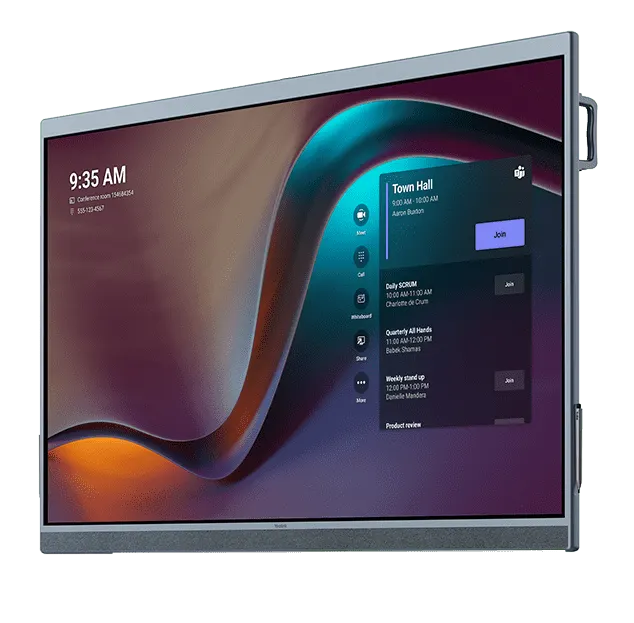
The Yealink ETV-65 is a 65-inch 4K extension touch display built to pair with the Yealink MeetingBoard 65-inch, creating a dual-screen setup for meeting rooms. It offers 3840 x 2160 resolution at 60 Hz, infrared touch with 20 touch points and 40 ms writing latency. The manufacturer has discontinued this model, so Qatar organisations extending an existing MeetingBoard or seeking a replacement should request a quote.
What the ETV-65 adds to a MeetingBoard 65-inch
The Yealink ETV-65 is a 65-inch touch display made to sit alongside a Yealink MeetingBoard 65-inch, turning one wall position into two working screens. A room that once relied on a single panel can show participants or the main discussion on one screen while documents, notes or a whiteboard occupy the other. Because it extends an existing MeetingBoard, the ETV-65 is designed around that pairing rather than as a standalone screen.
Display and touch figures that matter in meetings
The panel offers 3840 x 2160 (4K) resolution at a 60 Hz refresh rate, with a zero-gap bonded screen, an anti-glare finish, 99% sRGB colour coverage, 1.07 billion displayable colours, 1,200:1 contrast and 350 cd/m² maximum brightness. Its 178° horizontal and vertical viewing angles let people at the edges of a room read the same content. The built-in infrared touch recognises pen tips, pen tops, fingers and hands, with 20 touch points, 1 mm precision and 40 ms writing latency.
- Extends or duplicates the MeetingBoard screen for flexible layouts.
- Dual-screen display resolution of 4K plus 1080p when paired.
- Managed through the MeetingBoard using the Yealink Device Management Platform.
- Supports firmware upgrades, configuration import and export, and system log export.
Where it fits in Qatar
A boardroom in West Bay that needs a second screen for shared documents while the main display runs a video conference is a natural fit for the dual-screen layouts this panel supports. In a university meeting room in Education City, research teams holding hybrid sessions with partners abroad can sketch ideas on both screens at once. For a government office in Msheireb where agendas are written in Arabic and presentations in English, the two screens let each language sit side by side without constant switching.
Planning the installation, power and room conditions
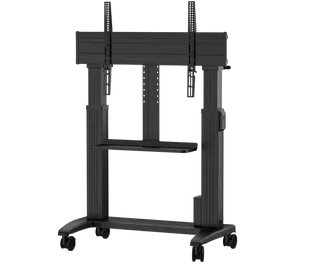
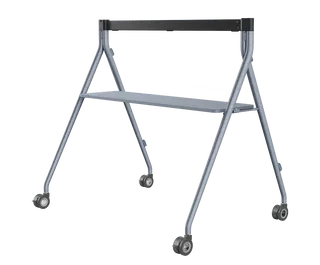
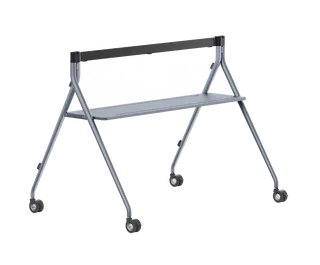
Measure the wall before ordering. The ETV-65 measures 1512 mm x 953 mm x 92 mm, with 600 mm x 400 mm VESA holes and a net weight of 48 kg (63.5 kg gross). A wall-mounted bracket is supplied, and optional floor stands include a single-screen stand and a dual-screen stand for the 65-inch model. The unit has one HDMI video input, one USB-B touch input and one AC power port. Its power input is rated 100-240 V at 50/60 Hz, with 175 W consumption.
Room conditions need attention. The operating range is 0 to 40°C with 10 to 95% humidity, which is below the summer heat outside buildings in Qatar, where temperatures can pass 45°C. Keep the display in air-conditioned rooms away from direct sunlight through glazing, and confirm the room with the SmartRooms Qatar team during a free site survey. Schools and organisations ordering several units can raise a purchase order (LPO) or respond to a government tender, and SmartRooms Qatar delivers to all 8 municipalities with professional installation.
A discontinued model: the right next step
Yealink has discontinued the ETV-65. If your room already runs a MeetingBoard 65-inch with this extension, send us the model details so we can confirm compatibility and advise on the setup. If you are starting a new dual-screen project, request a quote for a current equivalent or a compatible replacement, so the MeetingBoard and the second screen are matched from the start.
Request a quote for the ETV-65 or a replacement by sending your MeetingBoard model and room dimensions. Quotations are usually returned within one working day.
Highlights
- 65-inch 4K panel (3840 x 2160) at 60 Hz for dual-screen setups
- Built-in infrared touch with 20 touch points
- 40 ms writing latency and 1 mm writing precision
- Pairs with Yealink MeetingBoard 65-inch; 4K plus 1080p dual-screen output
- HDMI input, USB-B touch input and AC power port
- Operating range 0 to 40°C; humidity 10 to 95%
- Discontinued by Yealink; request a quote for a current equivalent
Estimated timeline
Quotation within 1 working day · delivery timing depends on stock availability, and we confirm it with your quotation.
Specifications
Package Content1
- Details
- ETV Extended Touch Display Stylus Pens x 2 Wall Mounted Bracket Optional Component: - Single Screen Floor Stand - Dual Screen Floor Stand (65-inch only)
Screen15
- - ETV 65
- 65 inch
- - ETV 86
- 86 inch
- Resolution
- 3840 x 2160
- Color Gamut
- 99% sRGB
- Number of Displayable Colors
- 1.07 billion
- Contrast
- 1200:1
- Maximum Brightness
- 350cd/ ㎡
- Refresh Rate
- 60 Hz
- - Horizontal
- 178°
- - Vertical
- 178°
- Screen Type
- Infrared screen
- Max. Screen Sensing Range
- 2 mm
- Precision
- 1 mm
- Number of Touch Points
- 20 points
- Details
- Size: Anti-glare Screen Viewing Angle: Zero-Gap Bonding Screen
Audio output (ETV86)6
- - Frequency Domain
- 90 Hz-20 KHz
- - Maximum Sound Level
- 95 dB SPL @ 1 W, 0.5 m
- - Total Harmonic Distortion(THD)
- 1 kHz
- - Speaker Sampling Frequency
- 48 kHz
- - Rated Power
- 30 W
- Details
- Built-in 6-unit stereo speakers - Speaker Unit: 4 x full frequency speaker 2 x high frequency speaker
Management1
- Details
- Yealink Device Management Platform Firmware Upgrade Configuration Import/Export System Log Export
Compatible Endpoint2
- - Dual Screen Display Resolution
- 4K+1080p
- Details
- MeetingBoard - Dual Screen Touch - Configure or Upgrade ETV via MeetingBoard* - Simultaneous Playback on Dual Screens (ETV86 only)
Physical Port1
- Details
- 1 x HDMI Video Input 1 Pair of RCA Linear Input (ETV86) 1 x USB-B Touch Input Port 1 x AC Power Port
Buttons, Indicators and Sensors1
- Details
- Power Button Home Button Reset Button Volume +/- Buttons (ETV86)
Other Physical Features15
- - ETV Dimensions (W.H.D)
- 1512 mm x 953mm x 92 mm; 1967 mm x 1205 mm x 96 mm
- - Carton Meas (W.H.D)
- 1660 mm x 1075mm x 280 mm; 2090 mm x 1320 mm x 280 mm
- - ETV with Floor Stand Dimensions (W.H.D)
- 1512 mm x 1885 mm x 720 mm; 1967 mm x 2040 mm x 820 mm
- - VESA Hole Dimensions(L.W)
- 600 mm x 400 mm; 800 mm x 600 mm
- - N.W
- 48 kg; 85.3 kg; 12 kg; 15 kg
- - G.W
- 63.5 kg; 109.4 kg; 15.2 kg; 19 kg
- - Floor Stand Dimensions (W.H.D)
- 1160 mm x 1193 mm x 653 mm; 1474 mm x 1142 mm x 750 mm
- - Carton Meas
- 1225 mm x 743 mm x 148 mm; 1425 mm x 843 mm x 148 mm
- Power Input
- 100-240V/50 Hz/60 Hz
- - ETV 65
- 175 W
- - ETV 86
- 325.75 W
- Operating Humidity
- 10-95%
- Operating Temperature
- 0 to 40°C
- Storage Temperature
- -30 to +70°C
- Details
- ETV 65: - Dimensions: - Weight: ETV 86: - Dimensions: - Weight Floor Stand (Optional): - MB-FloorStand-650: - Dimensions (W.H.D): - Weight: - MB-FloorStand-860: - Dimensions (W.H.D): - Weight: Maximum Power Consumption