Thursday, 22 October 2026 · 11 Jumada I 1448 AH Sun – Thu · 9:00 – 18:00
+971 56 914 9477 العربية
WhatsApp
This model is discontinuedThe manufacturer no longer makes it. Request a quote and we will propose the closest current replacement.
Suggested replacements ↓
IAdea Video Conferencing Discontinued

WDB-001-A

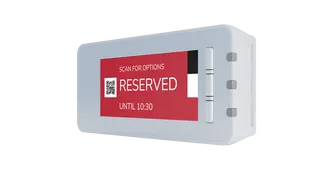
IAdea WDB-001-A Desk Booking Device for Hot-Desking

WhatsApp
Priceon request
QuotationWithin 1 working day
DeliveryConfirmed with your quote, based on stock
Overview

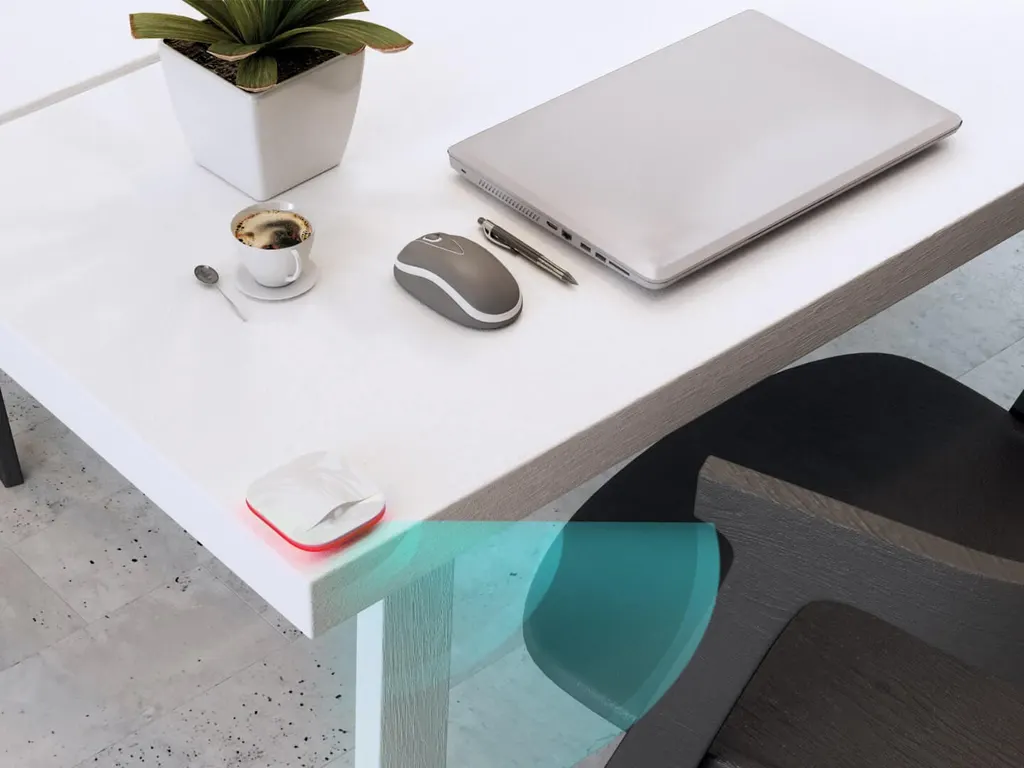
The IAdea WDB-001-A is a discontinued desk booking device from the WDB-001 series. It sits at a desk, lets staff reserve or check in by scanning a workplace ID, and uses a built-in PIR occupancy sensor to release unused desks automatically. Qatar organisations that already run this system, or are comparing hot-desking options, can request a quote for a current equivalent or compatible replacement.

What the WDB-001-A does at each desk

The IAdea WDB-001-A is a desk booking device from the WDB-001 Desk Booking System series. It supports hot-desking and desk-hoteling in open offices by letting staff reserve a space from a mobile device, through reception, or directly at the workstation where the unit is fitted. The manufacturer has discontinued this model, so this page is written for organisations that already own it, buyers comparing it with other models, and anyone searching for a replacement.

Each unit reports real-time occupancy, so people can see which spaces are free before they walk the floor. Facilities managers can also use the booking data to judge how well each space is used.

Scan-in, sensing and automatic release

Check-in relies on the workplace-issued ID. Staff scan their card at the device to verify a booking, check in or check out, which reduces the need to queue at reception. Cancellations and extensions must be made with the same ID, so one employee cannot alter another employee's reservation.

  • ID verification: scanning confirms who is using the desk.
  • Occupancy sensing: a built-in PIR sensor watches each desk for unverified use.
  • Automatic release: an absent reservation frees the desk for the next user.

The sensor helps when someone steps out for a break or a meeting. If the reservation is not confirmed, the system releases the space and updates its status, so colleagues do not find a desk that looks taken when nobody is there.

Model differences and the WDG-001 gateway

The comparison table in the manufacturer data lists the WDB-001 with a push button, lights and a PIR sensor. The WDB-001-A is grouped with the WDB-001-H, and both carry NFC and HID markers in that table. The data does not state which marker belongs to which letter in the pair, so confirm the exact reader setup with the SmartRooms Qatar team before ordering spares or a replacement.

The desk units are controlled by the WDG-001 gateway, which has its own page. Its data gives a PoE+ rating of 25.5 W, six USB host ports, Android 7.1, a Quad A9 CPU, 1 GB of RAM and 8 GB of storage, and it is programmed through the IAdea Desk Booking Framework 1.0 API. One gateway connects up to six desk units over USB, so larger floors need several gateways.

Planning a replacement or new installation

Start with a count of desks and the number of gateways required. A 30-desk floor, for example, would need five gateways at six units each. Check that the ID cards staff already carry work with the verification process, and agree the installation environment with the team, because the source data does not give an operating temperature range.

SmartRooms Qatar offers a free site survey to check desk spacing, mounting positions and cable routes before you order. We supply and deliver to all 8 municipalities of Qatar, arrange professional installation, and accept purchase orders (LPOs), government tenders including Monaqasat, and payment by bank transfer, cheque or purchase order. Products are covered by the manufacturer's warranty.

Because this model is discontinued, the most useful next step is a quote that compares the units you need with a current equivalent or compatible replacement. Request a quote from SmartRooms Qatar and our team will reply with options, usually within one working day.

Highlights

  • Reserve from a mobile device, reception or directly at the desk
  • Workplace ID scan for check-in, check-out and booking changes
  • Built-in PIR occupancy sensor releases unused reservations automatically
  • T-bar design with back-cover magnet for easier mounting
  • Works with the WDG-001 gateway over USB, up to six units
  • Discontinued by the manufacturer; quotes for replacements available

Room fit

Tell us the room size and platform (Teams, Zoom or BYOD) and we confirm the right combination with your quotation.

Estimated timeline

Quotation within 1 working day · delivery timing depends on stock availability, and we confirm it with your quotation.

Specifications

12 specifications · Source: manufacturer · checked Oct 2026
Desk Booking Series7
PoE+
25.5 W
Ports
Six USB host ports
Programming
IAdea Desk Booking Framework 1.0 API
Android
7.1
CPU
Quad A9
RAM
1 GB
Storage
8 GB
WDB-001-A5
Desk Booking Series · Push button
●
Desk Booking Series · Lights
●
Desk Booking Series · PIR sensor
●
Desk Booking Series · NFC
A
Desk Booking Series · HID
H

Downloads

0 files from the manufacturer
No downloadable files are listed for this model yet. Ask us and we will send the datasheet.

Questions about WDB-001-A

What is the IAdea WDB-001-A used for?
It is a desk booking device that lets staff reserve a space or check in at a workstation in an open-plan office. Staff can book from a mobile device, through reception or at the desk itself. It suits organisations running hot-desking or desk-hoteling, such as a government office in West Bay sharing floors between departments. The manufacturer has discontinued the model, so it mainly suits buyers who already own it.
Is the WDB-001-A still available from SmartRooms Qatar?
The manufacturer has discontinued this model. SmartRooms Qatar can quote a current equivalent or a compatible replacement for organisations that already run the IAdea desk booking system. Tell us your desk count and how many gateways you have, and our team will prepare options. Quotations usually arrive within one working day of your request.
How does check-in work with a workplace ID?
The device verifies the user by scanning a workplace-issued ID, which speeds up direct booking and check-in and check-out at the desk. Cancellations and extensions must be made with the same ID, which stops one person from changing another person's booking. This suits offices where staff already carry access cards. Confirm with the SmartRooms Qatar team that your staff ID cards work with the scanning process.
What happens if someone books a desk and does not turn up?
The built-in PIR occupancy sensor monitors the desk. If it detects that a reservation is absent, the booking system releases the space and updates its occupancy status so another user can book it. The sensor also flags unverified use of a desk. In a Doha office where staff leave for client meetings and return later, this keeps free desks visible without manual clean-up.
What is the difference between the WDB-001, WDB-001-A and WDB-001-H?
The manufacturer's table lists the WDB-001 with a push button, lights and a PIR sensor. The WDB-001-A and WDB-001-H are grouped together and carry NFC and HID markers. The data does not say which marker belongs to which letter, so ask the SmartRooms Qatar team to confirm the exact reader configuration before you order. The WDB-001-A has its own page, and the WDB-001 and WDB-001-H do too.
What power and connectivity does the WDB-001-A need?
The source data does not give a separate power or network specification for this device. The PoE+ rating of 25.5 W is listed for the WDG-001 gateway, which controls up to six WDB-001 desk devices over a USB connection. Before planning cabling, confirm with SmartRooms Qatar how your installation will be powered and connected, including how each desk unit links to its gateway.
How many desks can one gateway serve?
According to the manufacturer data, one WDG-001 gateway controls up to six desk booking devices through a simple USB connection. The gateway has six USB host ports, runs Android 7.1 on a Quad A9 CPU, and has 1 GB of RAM and 8 GB of storage. A floor of 30 desks would therefore need five gateways, and your quotation should include the gateway count alongside the desk units.
How is the device mounted at the desk?
Its T-bar design and the built-in magnet on the back cover let installers pivot the unit, adjust it horizontally and vertically, and hold it in position during fitting. This helps set the angle at each workstation before it is fixed. We recommend a free site survey so the team can check desk spacing, mounting positions and cable routes in your building before you place an order.
Which Qatar setting suits this device best?
Shared floors where desks are not assigned suit it best. A government ministry in Msheireb or West Bay, where staff from different departments use the same floor on different days, is a typical case. A university or training centre in Education City, or a consultancy in Lusail or The Pearl, can use it for shared project desks used only part of the week.
Can a school in Qatar use this for staff workspaces?
It can suit a school whose teachers share workspace, such as a private school in Al Wakrah or Lusail with shared staff rooms. The device is designed around workplace-issued IDs and desk booking, so check that your staff ID cards and room layout match the system before ordering. Send your staff count and room plan with your quote request so the team can advise on the number of units.
How can a government body or school order this through a tender or LPO?
SmartRooms Qatar supplies government tenders, including those on Monaqasat, and accepts purchase orders (LPOs). Payment can be made by bank transfer, cheque or purchase order. Delivery covers all 8 municipalities of Qatar. Include the desk unit and gateway quantities in your LPO or tender submission. Because the model is discontinued, specify whether you want this model or a current equivalent so the quotation matches your approval.

Suggested replacements

IAdea Booking for Outlook IAdea Booking for Outlook Room Booking Software
Control & scheduling
IAdea WBD-0500 IAdea WBD-0500 5-inch Workspace Booking Dock
5″ Control & scheduling
IAdea WBP-130 IAdea WBP-130 e-Paper Desk Booking Panel
Control & scheduling
IAdea WBP-160 IAdea WBP-160 Tricolor E-Paper Desk Booking Panel
Control & scheduling
IAdea WRP-1000-A IAdea WRP-1000-A 10.1-inch Room Booking Panel with NFC
10.1″ ● CE / FCC / RoHS

Similar models

Biamp Evoko Kleeo Power Supply Biamp Evoko Kleeo Power Supply 910-00800 for Kleeo Desk Manager
Control & scheduling
Biamp Evoko Liso Power Supply Biamp Evoko Liso Power Supply 910-11936 for Liso Room Manager
Control & scheduling
Email Call