Biamp
MAX Connect Auditorium Mode License
Biamp MAX Connect Auditorium Mode License 900-10004 Software
LOImage on request
CollabOS
Logitech CollabOS Video Collaboration Operating System
Priceon request
QuotationWithin 1 working day
DeliveryConfirmed with your quote, based on stock
Overview
CollabOS is Logitech's operating system for video collaboration, running on select Logitech meeting room devices including Rally Bar and RoomMate. It runs your preferred video conferencing service directly on the device, so no separate PC is needed. IT teams can monitor, update and configure rooms remotely. Suited to Qatari organisations standardising meeting rooms. Request a quote.
What CollabOS does on a meeting room device
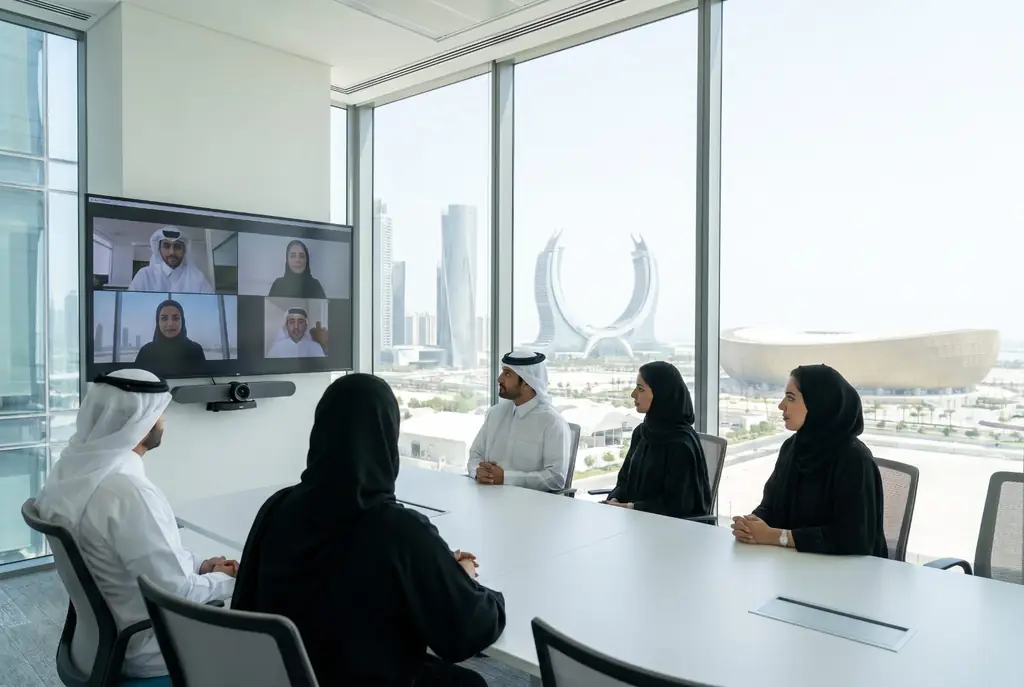
CollabOS is an operating system built specifically for video collaboration. It runs on select Logitech devices, including the Rally Bar, Rally Bar Mini, Rally Bar Huddle and RoomMate, and takes over the role a dedicated computer would otherwise play. Instead of installing a PC and configuring a video application on it, your team runs its chosen conferencing service straight on the appliance.
The result is a meeting room that behaves the same way from one space to the next, because the software layer is common across these devices. That consistency applies whether the room is a small huddle space or a larger meeting room.
Faster setup without a separate computer
CollabOS shortens deployment. Guided setup and a simpler user interface reduce the number of steps needed to bring a device online, and the separate PC a room would normally need is removed from the plan. When a ministry or school equips several rooms, that means fewer machines to purchase, mount, cable and maintain, and fewer configuration tasks on each room.
Settings can be reached directly on the device screen or on a connected display, so room administrators have a straightforward route to basic adjustments.
Managing many rooms from one place
Native integration with Sync lets IT teams treat rooms as a single fleet. Through Sync, administrators can check room health, update devices and change settings remotely. Sync Insights adds a view of how each meeting space is used over time, which helps a university decide which rooms should be opened for wider booking, or helps a facilities manager spot rooms that sit idle.
Ask the SmartRooms Qatar team to confirm the Sync requirements for your site before the project scope is agreed.
Security, updates and flexible meetings
CollabOS uses enterprise-grade security technology to protect the device and the data passing through it. It receives software updates regularly, which keeps the device and its video applications current. BYOD mode lets staff start or join meetings on services other than the room's designated video platform, which is useful when a Doha team needs to join a partner's meeting hosted on a different platform.
The software also includes video and audio features developed with video conferencing service providers, aimed at more equitable and productive meetings.
Where it fits in Qatar
A ministry that holds joint sessions with overseas agencies can standardise its boardrooms on CollabOS devices, so every room runs the same meeting software and the same management tools. A university campus in Education City setting up study rooms for Arabic- and English-speaking students can run one platform across many smaller rooms. A company in West Bay with offices in Doha and the Industrial Area can use BYOD mode when some staff prefer a different meeting service.
What to plan before you deploy
- Choose which Logitech device will run CollabOS in each room, since the software runs on select models only.
- Confirm that your preferred video conferencing service is supported on the chosen appliance.
- Plan network and management access so Sync can reach every room.
- Agree who manages the rooms and which settings staff are allowed to change.
SmartRooms Qatar offers free site surveys, so we can check each room's layout and network before installation. Request a quote and the SmartRooms Qatar team will usually respond within one working day with a proposal for your rooms.
Highlights
- Runs video conferencing services directly on the device, no PC needed
- Works on select Logitech devices, including Rally Bar and RoomMate
- Guided setup reduces the number of steps to deploy
- Remote room health checks, updates and settings through Sync
- Sync Insights shows how meeting spaces are used over time
- Regular software updates and enterprise-grade security
Room fit
Tell us the room size and platform (Teams, Zoom or BYOD) and we confirm the right combination with your quotation.
Estimated timeline
Quotation within 1 working day · delivery timing depends on stock availability, and we confirm it with your quotation.
Specifications
Source: manufacturer · checked Oct 2026
The full specification and datasheet for this model are available on request; we send them with your quotation.
Downloads
1 file from the manufacturerQuestions about CollabOS
What is Logitech CollabOS?
CollabOS is Logitech's operating system built for video collaboration. It runs on select Logitech video collaboration devices and lets a meeting room run its preferred video conferencing service directly on the appliance, so the room does not need a separate PC. It suits organisations that want standard, manageable meeting rooms rather than a set of individually configured computers.
Which devices run CollabOS?
The manufacturer data names Rally Bar, Rally Bar Mini, Rally Bar Huddle and RoomMate as CollabOS appliances. CollabOS runs on select Logitech devices, so not every Logitech product supports it. Before requesting a quote, confirm the exact model you need with the SmartRooms Qatar team to avoid choosing a device that does not run the software.
Do we still need a PC inside the meeting room?
No. CollabOS runs the video conferencing service directly on the appliance, and the product information states that no PC is needed. That removes a computer that would otherwise need mounting, cabling and configuration in every room. For a school or government office equipping several rooms, this simplifies both installation and ongoing support.
Can we use our own video conferencing service?
Yes. CollabOS is designed to run your preferred video conferencing service directly on the device. BYOD mode also lets staff start or join meetings on services other than the room's designated video platform. Before ordering, check that the service your organisation uses is supported on the device you choose.
How does CollabOS help IT teams manage many rooms?
Native integration with Sync lets IT teams monitor room health, update devices and modify settings remotely. A company with meeting rooms spread across Doha and Lusail can review the whole estate from one place rather than attending each room for routine changes. The exact management options depend on the Sync requirements for your site, which SmartRooms Qatar can confirm.
What does Sync Insights show?
Sync Insights shows how meeting spaces are utilised over time. On a university campus in Education City or a corporate campus in Lusail, that history helps identify the most used rooms, decide whether a room should be opened to wider booking, or judge whether a new room is needed. Ask SmartRooms Qatar which Sync features apply to your project when you request a quote.
Is CollabOS secure enough for a government ministry?
Logitech describes CollabOS as a secure operating system purpose-built for video collaboration, using enterprise-grade security technology to safeguard devices and data. A ministry should still review these details against its own information security policy before approving a purchase order. Put your specific security questions to the SmartRooms Qatar team before you commit to a quantity of devices.
How are software updates delivered?
CollabOS receives software updates regularly, so the device and the video conferencing applications on it stay current. In managed rooms, updates can be monitored and applied remotely through Sync. If your organisation has a required update schedule or change-control process, state it in your request so it is reflected in the deployment plan.
Can staff change room settings without involving IT?
Settings can be accessed directly on the device screen or on a connected display, and the product information describes configuration as simple. Even so, administrators should decide which settings users may change, because Sync also allows settings to be modified remotely. In a school where classrooms and halls are shared, agree these permissions before the rooms are handed over.
Does CollabOS support Arabic on the interface?
The product information does not state Arabic language support, so we cannot confirm it from the available data. Ask the SmartRooms Qatar team to check the interface language options before you request a quote, especially if your staff work in Arabic and English side by side.
How long does deployment take?
CollabOS reduces setup time through guided setup and fewer steps. SmartRooms Qatar does not commit to fixed installation dates. Lead times are estimates, based on stock, and are confirmed in your quotation. A free site survey before installation helps plan the rollout room by room.
Do we need a site survey before installing CollabOS rooms?
SmartRooms Qatar offers free site surveys before installation. For CollabOS rooms, the survey can check the room layout, where the device will sit, and the network each room will use for video conferencing and Sync management. This is especially useful for a facilities team in Msheireb or Al Sadd planning several rooms at once.