Thursday, 22 October 2026 · 11 Jumada I 1448 AH Sun – Thu · 9:00 – 18:00
+971 56 914 9477 العربية
WhatsApp
This model is discontinuedThe manufacturer no longer makes it. Request a quote and we will propose the closest current replacement.
Suggested replacements ↓

ATLAS

Newline ATLAS 4K Interactive Display, 65 to 86-inch (Discontinued)

Screen size
65" | 75" | 86"
Resolution
4K | 4K | 4K
Touch
IR | IR | IR
WhatsApp
Priceon request
QuotationWithin 1 working day
DeliveryConfirmed with your quote, based on stock
PDFDownload datasheet (Atlas_Specsheet_Newline_EN_21_Web.pdf)
Overview

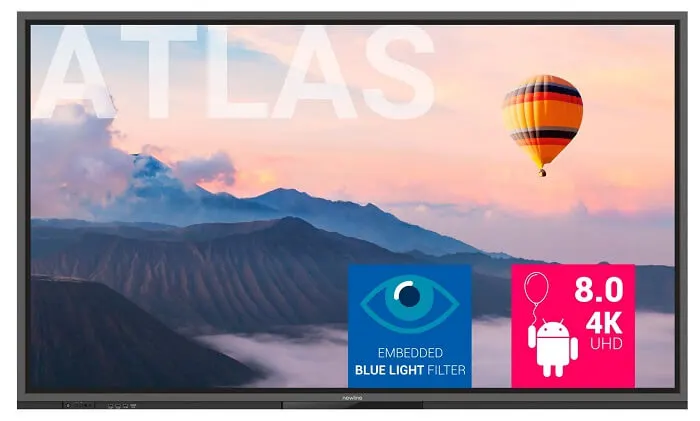
The Newline ATLAS is a 4K interactive display for classrooms, available in 65, 75 and 86-inch sizes. Its infrared touch supports up to 20 points on Windows, a four-microphone array picks up voices up to 8 m away, and a native Android 8.0 interface runs lessons without extra hardware. Newline has discontinued this model, so SmartRooms Qatar quotes a current equivalent or compatible replacement for schools and training centres across Qatar.

What the Newline ATLAS offers a teaching room

The Newline ATLAS is an interactive display built for classrooms, with a 4K UHD panel at 3840 x 2160 in a 16:9 frame. It was sold in three sizes: the 65-inch TT-6520ER, the 75-inch TT-7520ER and the 86-inch TT-8620ER. Newline has discontinued the ATLAS, so this page serves schools and training providers that already run these panels, buyers comparing them with other displays, and anyone looking for a replacement.

Picture and touch facts that matter in a classroom

The LED-backlit panel delivers at least 400 cd/m² brightness and a dynamic contrast ratio of 4000:1, with a 178° viewing angle, so students seated at the sides can read the same content. The anti-glare tempered glass with an anti-fingerprint treatment helps cut reflections from windows and ceiling lights. The infrared touch layer registers up to 20 touch points on Windows and 10 on Android, letting several students write or annotate at the same time. The listed writing pen type is a fine pen.

Android, connectivity and wireless casting

The ATLAS runs a native Android 8.0 interface on a four-core processor with 4 GB RAM and 64 GB storage. Its built-in Wi-Fi covers the 2.4G and 5G bands and can run Wi-Fi and hotspot at the same time. Teachers can cast a screen wirelessly to share content or start a lesson without cables. The OPS slot supports 4K at 60 Hz, and the datasheet lists an OPS PC option. The rear panel adds LAN (RJ45), RS232, a microphone input, HDMI output and a USB-C port for a Newline soundbar, which carries sound over one cable. The front-port layout is not identical across all three sizes, so confirm the exact ports for your chosen model.

Microphones and sound for lessons and remote teaching

The four-microphone array uses echo cancellation, beamforming and noise reduction, with an 8 m pickup distance. That suits a teacher speaking from the front of a classroom or a presenter in a small meeting room. Voice-to-text software can use the built-in microphone during remote lessons. Two 15 W speakers face downward with 8 Ω rated impedance.

Where each size fits across Qatar

  • 65-inch: a primary classroom in Al Sadd, Al Rayyan or Al Wakrah, where the 1428 x 804 mm display area suits a room of moderate size and power draw is up to 250 W.
  • 75-inch: a secondary classroom or meeting room in West Bay, with a 1650 x 928 mm display area and an 800 x 400 mm VESA pattern.
  • 86-inch: a lecture hall at Education City or a boardroom in Msheireb, where the 1895 x 1066 mm display area fills a wide wall. At 70.5 kg net, the wall needs checking before fixing.

Planning power, mounting and room conditions

The working voltage is listed as 100-240 V at 50/60 Hz with a maximum current of 3.0 A. Normal consumption is up to 250 W, 300 W and 400 W for the 65, 75 and 86-inch sizes, and standby draw is below 0.5 W. Net weights are 42.5 kg, 55 kg and 70.5 kg. The 65-inch uses a 600 x 400 mm VESA mount, while the 75 and 86-inch use 800 x 400 mm. The source data gives no operating temperature range, so confirm conditions with the SmartRooms Qatar team before installing near a sunlit window or in an unconditioned space. A free site survey is advisable before drilling into a wall, especially for the 86-inch model.

Request a quote for the ATLAS or a current replacement

Because the ATLAS is discontinued, the most useful step is a quote for the size you need or for a current equivalent or compatible replacement. SmartRooms Qatar supplies all eight municipalities of Qatar, provides professional installation and usually issues quotations within one working day. We accept purchase orders and government tenders, including Monaqasat, with payment by bank transfer, cheque or purchase order. Send your room size and mounting type, and request a quote today.

Highlights

  • 4K UHD panel with 178° viewing angle
  • Infrared touch: up to 20 points on Windows
  • Four-microphone array with 8 m pickup distance
  • Native Android 8.0 with 4 GB RAM and 64 GB storage
  • OPS slot supporting 4K at 60 Hz
  • Sold in 65, 75 and 86-inch sizes; model discontinued

Estimated timeline

Quotation within 1 working day · delivery timing depends on stock availability, and we confirm it with your quotation.

Specifications

7 specifications · Source: manufacturer · checked Oct 2026
General7
Size
65" | 75" | 86"
Display area (mm)
1428 x 804 | 1650 x 928 | 1895 x 1066
Touch Technology
IR | IR | IR
Resolution
4K | 4K | 4K
Viewing Angle
178° | 178° | 178°
Backlight
LED | LED | LED
Weight (kg)
42.5 | 55 | 70.5

Downloads

3 files from the manufacturer

Questions about ATLAS

Is the Newline ATLAS still sold by the manufacturer?
Newline has discontinued the ATLAS, so it is no longer in the current range. SmartRooms Qatar can quote a current equivalent or a compatible replacement that matches your screen size, mounting pattern and power requirements. This is especially useful for schools already running ATLAS panels that need to add or replace a unit. Send your room size and quantity, and we will recommend the closest option, usually within one working day.
Which sizes and model codes were available?
The ATLAS came in three sizes: the 65-inch TT-6520ER, the 75-inch TT-7520ER and the 86-inch TT-8620ER. Active display areas are 1428 x 804 mm, 1650 x 928 mm and 1895 x 1066 mm. Use the model code when comparing quotations, because weight, power draw and mounting pattern differ between the sizes.
Which size suits a primary classroom in Qatar?
For a primary classroom in Al Sadd, Al Rayyan or Al Wakrah, the 65-inch TT-6520ER usually suits a room of moderate size. It draws up to 250 W, weighs 42.5 kg net and mounts on a 600 x 400 mm VESA pattern. Check that the wall can carry the load and that pupils in the back row can read the content comfortably.
Is the 86-inch model suitable for a lecture hall?
The 86-inch TT-8620ER gives a 1895 x 1066 mm display area, which suits a lecture hall at Education City or a boardroom in Msheireb. It weighs 70.5 kg net and 88 kg gross, draws up to 400 W and needs an 800 x 400 mm VESA mount. Book a free site survey to confirm the wall structure and mounting height before installation.
Can the ATLAS run Windows as well as Android?
The ATLAS has a native Android 8.0 interface with 4 GB RAM and 64 GB storage. Its touch layer supports 20 points on Windows and 10 on Android. The datasheet lists an OPS PC option and an OPS slot rated 4K at 60 Hz, so an OPS PC module can be fitted. Confirm the exact OPS PC specification with the SmartRooms Qatar team before requesting a quote.
How does wireless screen sharing work on the ATLAS?
The ATLAS lets a teacher cast a screen wirelessly to share content or start a lesson, without connecting cables to other devices. The Wi-Fi module supports 2.4G and 5G bands and can run Wi-Fi and hotspot at the same time. Test the casting process with staff devices on your school network before rolling it out across all classrooms.
Will the built-in microphone pick up a teacher across the room?
The built-in array uses four microphones with echo cancellation, beamforming and noise reduction, with an 8 m pickup distance. This suits a teacher speaking from the front of a classroom or a presenter in a small meeting room. Very large halls may still need a dedicated microphone. The built-in microphone also supports voice-to-text software for remote lessons.
Does the ATLAS work with Qatar's 240 V power supply?
The listed working voltage is 100-240 V at 50/60 Hz with a maximum current of 3.0 A, a range that covers Qatar's 240 V, 50 Hz mains. Normal consumption is up to 250 W for the 65-inch, 300 W for the 75-inch and 400 W for the 86-inch, and standby draw is below 0.5 W. Plan the socket position near the mount, checking it against the BS 1363 outlets used in Qatar.
Can I connect a Newline soundbar with a single cable?
The rear panel has a USB-C port labelled for a Newline soundbar, which carries sound through one cable instead of separate speaker wiring. The built-in speakers are two 15 W units facing downward with 8 Ω impedance. Confirm soundbar model compatibility with the SmartRooms Qatar team before placing your order.
Can the ATLAS be installed in a hot or unconditioned space?
The source data does not give an operating temperature range for the ATLAS, so suitability for hot or unconditioned spaces cannot be assumed. Summer temperatures in Qatar exceed 45°C, so confirm room conditions, window position and ventilation with the SmartRooms Qatar team before installation. Keep the panel out of direct sunlight, and do not place it in a dusty entrance lobby until the environment has been checked.
How do schools and government bodies buy several panels?
Schools, ministries and government bodies can order through a purchase order (LPO) or a government tender, including Monaqasat. Payment is possible by bank transfer, cheque or purchase order. For a multi-room rollout, send a list of rooms with sizes and mounting types, and we will prepare a separate quotation for each site, usually within one working day.
What should I plan before installing the ATLAS?
Plan a free site survey, and confirm that the wall can carry the 70.5 kg net weight of the 86-inch model. The 65-inch needs a 600 x 400 mm VESA mount, while the 75 and 86-inch need 800 x 400 mm. Mark the positions of power, LAN and Wi-Fi outlets in advance, and review the front-port layout for your size, since it varies between models.

Suggested replacements

Newline 65" C Series Newline 65-inch C Series Interactive Display
65″ 3840 × 2160 (4K) Infrared Touch(IR)
Newline 75" C Series Newline 75-inch C Series 4K Interactive Display
75″ 3840 × 2160 (4K) Infrared Touch(IR)
Newline 86" C Series Newline 86-inch C Series 4K Interactive Display
86″ 3840 × 2160 (4K) Infrared Touch(IR)
Newline Elara Elite Newline Elara Elite Interactive Display
Interactive displays
Newline Elara Pro Newline Elara Pro Android 15 Interactive Display
Interactive displays

Similar models

BenQ CM7505 BenQ Board CM7505 75-inch Interactive Display
75″ UHD 3840 × 2160 pixels Ultra Precision IR
SMART SBID-6286S-V3 SMART Board 6086S-V3 86-inch Interactive Display with iQ
86″ 4K UHD (3840 × 2160) HyPr Touch with InGlass
SMART SBID-6286S-V3-P SMART Board 6086S-V3 Pro 86-inch Interactive Display with iQ
86″ 4K UHD (3840 × 2160) HyPr Touch with InGlass
Clevertouch Clevertouch Edge 65" Clevertouch Edge 65" 4K Interactive Display with Camera and Speakers
65″ 4K UHD (3840x2160 @60Hz) Android 15
Clevertouch Clevertouch Edge 86" Clevertouch Edge 86" 4K Interactive Flat Panel
86″ 4K UHD (3840x2160 @60Hz) Android 15
Email Call