Thursday, 22 October 2026 · 11 Jumada I 1448 AH Sun – Thu · 9:00 – 18:00
+971 56 914 9477 العربية
WhatsApp
This model is discontinuedThe manufacturer no longer makes it. Request a quote and we will propose the closest current replacement.
Suggested replacements ↓

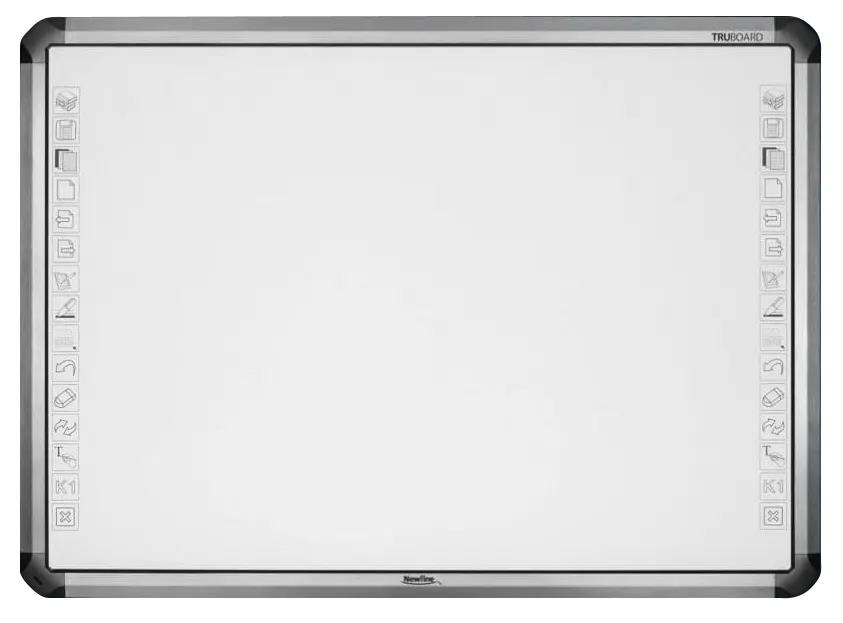
TRUBOARD R3-R5 Interactive Whiteboard

Newline TRUBOARD R3-R5 Interactive Whiteboard (Discontinued)

Touch
10 Points | 10 Points | 10…
WhatsApp
Priceon request
QuotationWithin 1 working day
DeliveryConfirmed with your quote, based on stock
PDFDownload datasheet (Flyer_Newline_TRUBOARD.pdf)
Overview

The Newline TRUBOARD R3-R5 is a projector-based interactive whiteboard series in four models, with active areas from 78.8 to 92.2 inches. It offers 10-point multi-touch through an IR sensor, tech-free pens, and an optional pen tray on the R5 models. The manufacturer has discontinued this series, so SmartRooms Qatar can quote a current equivalent or compatible replacement for schools, meeting rooms and boardrooms in Qatar.

What the TRUBOARD R3-R5 is

The Newline TRUBOARD R3-R5 is a projector-based interactive whiteboard that can also be used as a classic magnetic whiteboard. Its 10-point multi-touch works with an IR touch sensor and connects to a computer through a USB A-B link. The low-gloss writing surface keeps notes readable for people seated at the far end of a room. Newline has discontinued this series, so this page is written for organisations that already own one and for buyers who need a current equivalent.

Four models and what separates them

The series has four models. They differ in size, aspect ratio, weight and pen tray availability:

  • R3-800: 78.8-inch active area, 4:3, 16 kg, no intelligent pen tray
  • R3-1000W: 88-inch active area, 16:10, 18 kg, no intelligent pen tray
  • R5-800: 81.9-inch active area, 4:3, 20 kg, optional intelligent pen tray
  • R5-900: 92.2-inch active area, 16:10, 22 kg, optional intelligent pen tray

The R3 models suit buyers who want a board without a tray, while the R5 models add the option of a tray that recognises pen colour.

Pens, tray and touch

The board is used with tech-free pens rather than electronic styluses that need pairing. On R5 models you can add an intelligent tray that uses colour recognition to identify the colour in use, so the board knows what the presenter is writing with. Ten touch points allow more than one person to write or annotate at the same time, which helps group workshops and classroom activities where several learners work at the board.

Connecting to a computer and projector

Setup uses two links. A USB A-B connection carries touch signals from the board to the computer and saves them there. The computer's image reaches the projector over HDMI, so the whole room sees the same content on the board. The manufacturer says the board works with regular throw, short throw and ultra short throw projectors, so the projector should follow the room layout rather than the other way round.

Where it fits in Qatar

  • A private school in Al Wakrah fitting out a classroom or small seminar room would look at the R3-800 for its compact 78.8-inch area.
  • A team in a West Bay office running meetings with colleagues abroad might choose the 88-inch R3-1000W for its wider 16:10 writing area.
  • A boardroom in Lusail or a training centre in Education City with a long table would consider the R5-900, the largest model at 92.2 inches, with the optional pen tray.

Planning a purchase of a discontinued model

Each model weighs between 16 kg and 22 kg, so wall structure and mounting height should be checked before delivery. SmartRooms Qatar offers free site surveys and professional installation, and delivery to all eight municipalities of Qatar. The source data does not give an operating temperature range, so confirm room conditions with the team, especially for rooms near windows or lobbies exposed to heat and dust. Also confirm the surface finish supplied for Qatar, since the manufacturer describes its porcelain steel surface as a USA option, and confirm the licence arrangement for the IdeaMax software.

Because the series is discontinued, the quickest route is a quotation for a current equivalent or compatible replacement. Share your room size, the board size you need and whether you want a pen tray, then request a quote. Purchase orders, LPOs and government tenders including Monaqasat are accepted, and payment can be made by bank transfer, cheque or purchase order. Products are covered by the manufacturer's warranty.

Highlights

  • Four models with 78.8, 88, 81.9 and 92.2-inch active areas
  • 10-point multi-touch with IR touch sensing
  • Optional intelligent pen tray on R5-800 and R5-900
  • Tech-free pens; the tray recognises pen colour
  • USB A-B for touch data; HDMI from computer to projector
  • Works with regular, short and ultra short throw projectors
  • Discontinued by manufacturer: quote for a current replacement

Estimated timeline

Quotation within 1 working day · delivery timing depends on stock availability, and we confirm it with your quotation.

Specifications

7 specifications · Source: manufacturer · checked Oct 2026
General7
Active Area Size
78.8” | 88” | 81.9” | 92.2”
Weight (kg)
16 | 18 | 20 | 22
Aspect Ratio
4:3 | 16:10 | 4:3 | 16:10
Multi-Touch
10 Points | 10 Points | 10 Points | 10 Points
Intelligent pen tray
X | X | Optional | Optional
Touch Sensor
IR | IR | IR | IR
Interface
USB A-B | USB A-B | USB A-B | USB A-B
Downloads

2 files from the manufacturer

Questions about TRUBOARD R3-R5 Interactive Whiteboard

What is the Newline TRUBOARD R3-R5 and who is it for?
The TRUBOARD R3-R5 is a projector-based interactive whiteboard series from Newline, built for meeting rooms, classrooms and training spaces where teams write and share ideas on a large board. It combines a magnetic, low-gloss writing surface with 10-point multi-touch, so it suits organisations that want a whiteboard that also works as an interactive surface. Because the manufacturer has discontinued this series, it mainly suits existing owners and buyers looking for a current equivalent.
Which size suits a classroom or training room in Qatar?
For a smaller classroom or training room, the R3-800 is the most compact model in the series, with a 78.8-inch active area and a weight of 16 kg. A private school in Al Wakrah fitting out a 4:3 classroom would start with this model. For larger rooms, the 88-inch R3-1000W offers a wider 16:10 writing area. Confirm the room dimensions and projector throw distance with SmartRooms Qatar before ordering.
How do the R3 and R5 series differ?
The R3 models, the R3-800 and R3-1000W, do not have an intelligent pen tray and weigh 16 kg and 18 kg. The R5 models, the R5-800 and R5-900, weigh 20 kg and 22 kg and offer an optional intelligent pen tray. The R5-800 has an 81.9-inch active area in 4:3, while the R5-900 has a 92.2-inch active area in 16:10. All four models use IR touch sensing with 10 points of multi-touch and a USB A-B interface.
Does the TRUBOARD need a projector?
Yes. The whiteboard is designed to work with a projector, which shows the computer image on the board. The manufacturer says it works with regular throw, short throw and ultra short throw projectors, so you can match the projector to the room layout. The source data does not list a projector as part of the package, so confirm with SmartRooms Qatar which projector is included in your quotation and how far it must sit from the board.
Is the intelligent pen tray included on every model?
No. The intelligent pen tray is not fitted on the R3-800 or R3-1000W. On the R5-800 and R5-900 it is an optional extra, so you must specify it in your quotation if you want it. The tray uses colour recognition to detect the colour being written or drawn with, so the board can tell which colour is in use. This matters most in lessons or reviews where colour coding is part of the work.
Do users need special pens?
No. The board comes with tech-free pens, so presenters write and draw without an electronic stylus that must be paired with the board. This keeps setup simple in meetings and training sessions where people change presenters often. Ask SmartRooms Qatar to confirm the pen accessories included in your quotation, so you know what is supplied for each board you order.
How is the board connected to a computer and projector?
The setup uses two links. A USB A-B connection carries touch signals from the board to the computer and saves them there. An HDMI connection carries the image from the computer to the projector, which displays it on the board. Each installation therefore needs cable routes between the board, the computer and the projector. Plan these during the free site survey, especially where furniture is fixed or the computer sits far from the wall.
Can the board be used as a normal whiteboard?
Yes. The manufacturer describes it as usable as a classic whiteboard, with a magnetic surface that it says passes a car key scratch test without marks. The low-gloss finish helps people seated across the room read what is written. The manufacturer describes the surface as porcelain steel but notes that this option is for the USA market, so confirm the surface finish supplied to Qatar in your quotation before you approve the order.
How heavy are the models and what should we plan for the wall?
The R3-800 weighs 16 kg, the R3-1000W 18 kg, the R5-800 20 kg and the R5-900 22 kg. Confirm the wall structure before delivery, particularly for the 92.2-inch R5-900 in a boardroom. SmartRooms Qatar offers free site surveys and professional installation. The survey is the right moment to check wall condition, mounting height and the path of cables from the board to the projector.
Is it suitable for hot or dusty areas, such as lobbies near windows?
The source data does not give an operating temperature range or an environmental rating, so we cannot confirm suitability for hot or dusty locations. In Qatar, summer temperatures can exceed 45°C and dust storms occur, so lobbies and window-facing rooms need careful checking. Ask SmartRooms Qatar to confirm the installation environment before you order, and treat an air-conditioned meeting room as the default unless the manufacturer's documentation says otherwise.
Is the TRUBOARD still available from Newline?
No. Newline has discontinued the TRUBOARD R3-R5 series, so it is not part of the current range. If your organisation already owns one, or you are comparing it with a newer model, SmartRooms Qatar can quote a current equivalent or a compatible replacement. Send the room size, the board size you need and whether you want a pen tray, and the team will usually reply with a quotation within one working day.
Does the IdeaMax software come with the board?
The manufacturer pairs the TRUBOARD with its IdeaMax software and describes the board as designed to use it, but the source data does not set out the licence terms for each unit. Ask SmartRooms Qatar whether a licence is included in your quotation or must be added, and whether it will run on your existing computers. Payment can be made by bank transfer, cheque or purchase order.

Suggested replacements

Newline 65" C Series Newline 65-inch C Series Interactive Display
65″ 3840 × 2160 (4K) Infrared Touch(IR)
Newline 75" C Series Newline 75-inch C Series 4K Interactive Display
75″ 3840 × 2160 (4K) Infrared Touch(IR)
Newline 86" C Series Newline 86-inch C Series 4K Interactive Display
86″ 3840 × 2160 (4K) Infrared Touch(IR)
Newline Elara Elite Newline Elara Elite Interactive Display
Interactive displays
Newline Elara Pro Newline Elara Pro Android 15 Interactive Display
Interactive displays

Similar models

BenQ CM7505 BenQ Board CM7505 75-inch Interactive Display
75″ UHD 3840 × 2160 pixels Ultra Precision IR
SMART SBID-6286S-V3 SMART Board 6086S-V3 86-inch Interactive Display with iQ
86″ 4K UHD (3840 × 2160) HyPr Touch with InGlass
SMART SBID-6286S-V3-P SMART Board 6086S-V3 Pro 86-inch Interactive Display with iQ
86″ 4K UHD (3840 × 2160) HyPr Touch with InGlass
Clevertouch Clevertouch Edge 65" Clevertouch Edge 65" 4K Interactive Display with Camera and Speakers
65″ 4K UHD (3840x2160 @60Hz) Android 15
Clevertouch Clevertouch Edge 86" Clevertouch Edge 86" 4K Interactive Flat Panel
86″ 4K UHD (3840x2160 @60Hz) Android 15
Email Call