Thursday, 22 October 2026 · 11 Jumada I 1448 AH Sun – Thu · 9:00 – 18:00
+971 56 914 9477 العربية
WhatsApp
This model is discontinuedThe manufacturer no longer makes it. Request a quote and we will propose the closest current replacement.
Suggested replacements ↓

Cast

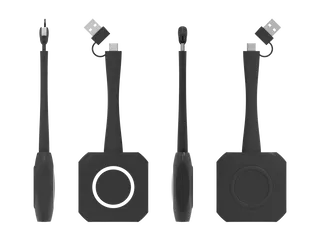
OneScreen Cast Wireless 4K Screencasting Dongle for Interactive Displays

Resolution
Up to 3840 x 2160 @ 30fps
WhatsApp
Priceon request
QuotationWithin 1 working day
DeliveryConfirmed with your quote, based on stock
PDFDownload datasheet (OneScreen-Cast-Spec-Sheet.pdf)
Overview

Built as a first-generation wireless casting dongle, the OneScreen Cast lets a laptop share its screen in up to 4K with a compatible interactive display, and it can carry a 1080p UVC camera feed. It also supports touch reverse control of the laptop. The manufacturer has discontinued this model and succeeded it with Cast2. Schools, government offices and meeting rooms across Qatar with existing units or replacement needs can request a quote from SmartRooms Qatar.

What the dongle does on an interactive display

The OneScreen Cast is a small first-generation wireless casting dongle. It connects to a compatible interactive display, and a laptop can then share its screen wirelessly at up to 3840 x 2160 at 30fps. According to the manufacturer's data, sharing starts without installing an application or pairing through the network, so a presenter can connect quickly at the start of a session.

The dongle also brings a laptop camera into the session. It supports a UVC camera at up to 1920 x 1080 at 30fps with H.264 video, so a presenter can join a remote meeting without running cables across the room.

Facts that matter before you specify it

  • Latency: an average of 150 ms, comfortable for slides and documents but noticeable in fast video.
  • Reverse control: touch on the display can control the connected laptop or mobile.
  • Range: up to 100 ft (30m), with a recommended range of 26 ft (8m).
  • Operating systems: Windows 7 and above, and macOS 10.8 and above.
  • Power and controls: Type-C input at 5V / 500mA, 2.5W typical, one start/stop button and one LED indicator.
  • Certification: FCC.

Where it fits in Qatar

A government office in Msheireb with interactive displays in its meeting rooms can let staff share from their own laptops without cables. A private school in Al Wakrah fitting out classrooms may find the dongle useful for teachers who move between rooms, provided the display in each room is compatible. A training company in the Industrial Area or Lusail can send the camera feed to trainees abroad, which helps when Doha teams meet colleagues in other time zones.

What to plan for before ordering

The source data lists an operating temperature of 20 °C or below, so do not place this dongle in a hot or unconditioned space. Qatar summers can exceed 45°C, so confirm the room environment with the SmartRooms Qatar team before installation. Check the operating systems on every laptop, measure the distance from the presenter's position to the display against the 8m recommendation, and confirm how the 5V / 500mA input will be powered in each room, as the data does not name a power adapter. Government buyers and schools can issue a purchase order or LPO, and SmartRooms Qatar usually quotes within one working day.

Replacement and next steps

The manufacturer has discontinued this first-generation model and succeeded it with Cast2. If your rooms already use OneScreen Cast units, request a quote for a Cast2 or another compatible replacement to keep them working. Send your display model, room layout and laptop operating systems to the SmartRooms Qatar team so compatibility can be confirmed. We supply and deliver to all 8 municipalities of Qatar, so request a quote today.

Highlights

  • Wireless screen sharing up to 3840 x 2160 at 30fps
  • Average latency of 150 ms
  • UVC camera support up to 1920 x 1080 at 30fps
  • Touch reverse control of the connected laptop
  • Windows 7 and above, macOS 10.8 and above
  • Discontinued by the manufacturer; succeeded by Cast2

Estimated timeline

Quotation within 1 working day · delivery timing depends on stock availability, and we confirm it with your quotation.

Specifications

18 specifications · Source: manufacturer · checked Oct 2026
Features3
Wireless 4K UHD Screencasting
Wirelessly Screencast in 4K to share your laptop screen with ease. No network pairing or application installation is required
Wireless connection with Camera
Wirelessly access the 1080p FHD camera through your laptop without any complicated cabling
Reverse contol
When sharing to an interactive display, easily control your laptop or mobile using touch
Screen Share2
Screen Sharing Resolution
Up to 3840 x 2160 @ 30fps
Average Latency
150 ms
Wireless Camera3
Supported Camera Resolution
Up to 1920 x 1080 @ 30fps
Supported Camera Type
UVC camera
Video Format
H.264
SC15
Input Power Supply
5V / 500mA
Power
2.5W (Typical)
Interface
1x Type-C
Buttons
1x Start / Stop Button
LED Indicator
1x
Miscellaneous5
Operating Range
Up to 100 ft (30m). Recommended range 26 ft (8m)
Operating Temperature
≤20 °C
Included Parts
Power Cable (Type C-C) Switch Cable (Type C-A) HDMI Cable HDMI to Type C converter
Supported Systems
Windows 7 and above, MacOS 10.8 and above
Certifications
FCC

Downloads

2 files from the manufacturer

Questions about Cast

What is the OneScreen Cast used for?
It is a wireless casting dongle for compatible interactive displays. A laptop can share its screen at up to 3840 x 2160 at 30fps, so a teacher or presenter can show slides, documents and web pages without cables. Because this model is discontinued, the page mainly serves organisations that already own it and buyers looking for a replacement.
Has the manufacturer discontinued it?
Yes. The first-generation OneScreen Cast has been discontinued and succeeded by Cast2. SmartRooms Qatar can quote the Cast2 or another compatible replacement. Send us your display model and the laptops that will connect so the team can confirm compatibility before you issue a purchase order.
Do I need to install software or set up the network?
According to the manufacturer's data, sharing does not require installing an application or pairing the dongle through the network. This keeps setup quick in meeting rooms without on-site IT staff, although it is still sensible to test one laptop in the room before rolling the dongle out to every presenter.
Which operating systems are supported?
The data lists Windows 7 and above, and macOS 10.8 and above. Government offices or schools still running older systems on some laptops should verify those machines before ordering a batch, because the dongle is only useful if every presenter's computer can connect.
What resolution and latency should I expect?
Screen sharing reaches 3840 x 2160 at 30fps with an average latency of 150 ms. That is comfortable for presenting slides and documents, but a delay of that size is noticeable in fast video. A training room in Lusail that shows video clips should test a sample clip during the site survey.
Can the laptop camera be used through the dongle?
Yes. The data lists support for a UVC camera up to 1920 x 1080 at 30fps with H.264 video. A presenter in a Doha boardroom can use a camera for a remote call without extra cabling. Confirm that your specific camera is UVC-compatible before ordering.
How does touch reverse control work?
When sharing to a compatible interactive display, touch on the panel can control the connected laptop or mobile. A teacher at a Doha school can open a file from the board instead of walking back to the desk. Ask the SmartRooms Qatar team to confirm how your display's touch function is set up.
How far can a presenter stand from the display?
The operating range is up to 100 ft (30m), with a recommended range of 26 ft (8m). For a hotel ballroom or a lecture hall in Education City, plan the laptop position within about 8 metres of the display for the most reliable performance.
What power and accessories come in the box?
The dongle takes a 5V / 500mA Type-C input, with 2.5W typical power consumption, one start/stop button and one LED indicator. The box includes a Type C-C power cable, a Type C-A switch cable, an HDMI cable and an HDMI to Type-C converter. The data does not name a power adapter, so confirm how the unit will be powered in your room.
What should a school in Al Wakrah check before ordering several units?
List the displays that need sharing, record the operating systems on teachers' laptops, and measure the distance from each teaching position to its display. Once the list is confirmed, the school can issue an LPO, and SmartRooms Qatar usually quotes within one working day. Confirm that each classroom meets the environment requirements before installation.
Can it be used in an unconditioned or outdoor space?
No. The source lists an operating temperature of 20 °C or below, and Qatar summers regularly exceed 45°C. Keep the dongle in an air-conditioned room and confirm the environment with the SmartRooms Qatar team before installation, especially for lobbies and rooms with large windows.

Suggested replacements

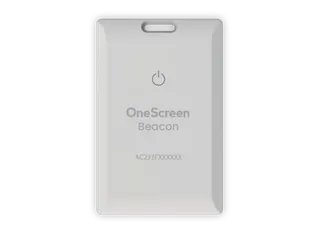
OneScreen Beacon Badge OneScreen Beacon Badge NFC Priority Notification Badge
Warranty is covered for as long…
OneScreen Cast2 OneScreen Cast2 Wireless Casting Adapter
4K UHD
OneScreen Sensor Box OneScreen Sensor Box Accessory for Interactive Touchscreens
Interactive displays
OneScreen Touchscreen Core 65 OneScreen Touchscreen Core 65 65-inch Education Interactive Display
65″ 3840 × 2160 128 GB
OneScreen Touchscreen Core 98 OneScreen Touchscreen Core 98-inch Interactive Display
98″ 3840 × 2160 128 GB

Similar models

BenQ CM7505 BenQ Board CM7505 75-inch Interactive Display
75″ UHD 3840 × 2160 pixels Ultra Precision IR
SMART SBID-6286S-V3 SMART Board 6086S-V3 86-inch Interactive Display with iQ
86″ 4K UHD (3840 × 2160) HyPr Touch with InGlass
SMART SBID-6286S-V3-P SMART Board 6086S-V3 Pro 86-inch Interactive Display with iQ
86″ 4K UHD (3840 × 2160) HyPr Touch with InGlass
Clevertouch Clevertouch Edge 65" Clevertouch Edge 65" 4K Interactive Display with Camera and Speakers
65″ 4K UHD (3840x2160 @60Hz) Android 15
Clevertouch Clevertouch Edge 86" Clevertouch Edge 86" 4K Interactive Flat Panel
86″ 4K UHD (3840x2160 @60Hz) Android 15
Email Call