Thursday, 22 October 2026 · 11 Jumada I 1448 AH Sun – Thu · 9:00 – 18:00
+971 56 914 9477 العربية
WhatsApp
This model is discontinuedThe manufacturer no longer makes it. Request a quote and we will propose the closest current replacement.
Suggested replacements ↓

UVC20

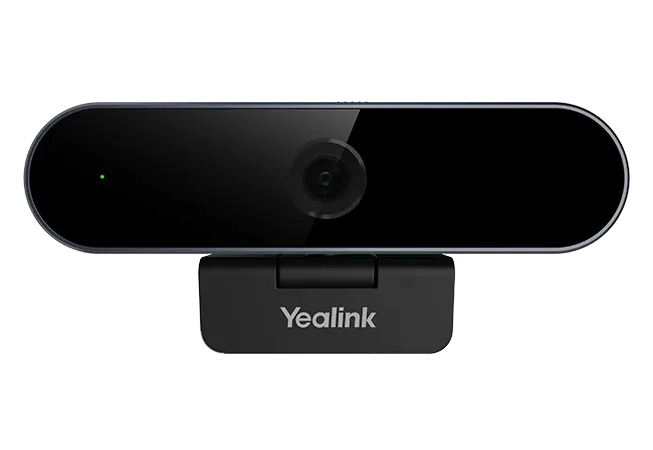
Yealink UVC20 1080p USB Webcam for Personal Desktops

WhatsApp
Priceon request
QuotationWithin 1 working day
DeliveryConfirmed with your quote, based on stock
PDFDownload datasheet (Yealink UVC20 Datasheet.pdf)
Overview

The Yealink UVC20 is a 1080p USB webcam for a single desk, with a 5-megapixel glass lens, an omnidirectional microphone with 180 degree pickup, auto focus, Smart Light and ePTZ control. Yealink has discontinued this model, so this page is for organisations that already own it, teams comparing it with newer cameras, and buyers who need a replacement. Request a quote for a current equivalent or compatible option.

A 1080p desk camera for one-to-one video

The Yealink UVC20 is a USB camera built for one person sitting in front of a personal computer. Its 5-megapixel sensor outputs 1080p video at 30 frames per second, and it can switch to 720p at 30 frames per second. Yealink positions it for remote working, distance education, training, live streaming and telemedicine, and it is intended for a single workstation rather than a meeting room.

Image and sound from a small footprint

  • Sensor: 1/2.7-inch CMOS, 5MP, F/2.0 aperture, 74 degree diagonal field of view
  • Focus and zoom: auto focus from 10 cm to 1.5 m, with 1.4x digital zoom and ePTZ control through software
  • Low light: minimum illumination rated at 0.5 lux in daylight and 0.1 lux at night
  • Microphone: built-in omnidirectional mic with 180 degree pickup up to 4.9 feet and a 100Hz to 12kHz frequency response

Smart Light detects faces automatically in low light or backlit conditions and compensates exposure on the face while keeping the overall image balanced. A built-in lens cap protects the lens when the camera is not in use, and an LED indicator shows when it is active.

Connection and management for IT teams

The camera connects through a 1.8 m USB 2.0 Type A cable and follows the UVC 1.0 protocol, so it is described as plug-and-play. Yealink lists support for Windows 7, Windows 10 and macOS 10.10 or higher. Yealink USB Connect lets administrators monitor usage, view device information, run diagnoses and perform firmware updates, which helps when several desks need consistent settings. The unit measures 100 mm by 43 mm by 41 mm.

Where the UVC20 fits in Qatar

  • A hybrid analyst in The Pearl joining meetings with teams abroad from a quiet home office on a Sunday to Thursday working week.
  • A trainer at a centre in Education City delivering remote sessions from a single desk, with the camera at eye level.
  • A consultation desk in a clinic in Al Sadd running video appointments, where the lens cap and privacy needs are reviewed first.
  • A teacher at a school in Al Wakrah preparing live lessons from a fixed desk in a classroom or library.

What to plan before you order

  • Cable reach: the 1.8 m cable limits how far the camera can sit from the computer, so plan a nearby USB port.
  • Lighting: the low-light ratings describe the sensor, not a replacement for good room lighting.
  • Heat and dust: the source data does not list an operating temperature range. Summer temperatures in Qatar can exceed 45 degrees Celsius and dust storms are common, so keep the camera indoors, away from direct sun, and confirm the environment with the SmartRooms Qatar team if it will sit near a window.
  • Multiple units: SmartRooms Qatar offers a free site survey, and schools and government buyers can order through a purchase order (LPO).

Discontinued status and support

Yealink ended sales of the UVC20 on 15 March 2024, and new orders are no longer accepted. Under Yealink's end-of-life policy, the first year after end of sale includes hardware and software technical support and security fixes. From the second to the fifth year, Yealink aims to provide software bug fixes only, and no new features are added. Hardware spares depend on local distributors and available inventory. If you need a current camera that performs the same role, request a quote and the SmartRooms Qatar team will recommend a compatible option for your room.

Highlights

  • 5-megapixel sensor delivering 1080p video at 30 frames per second
  • Omnidirectional microphone with 180 degree pickup up to 4.9 feet
  • Auto focus from 10 cm to 1.5 m, with ePTZ control
  • 1.8 m USB 2.0 Type A cable with UVC 1.0 protocol
  • Discontinued by Yealink; end of sale on 15 March 2024

Room fit

Tell us the room size and platform (Teams, Zoom or BYOD) and we confirm the right combination with your quotation.

Estimated timeline

Quotation within 1 working day · delivery timing depends on stock availability, and we confirm it with your quotation.

Specifications

27 specifications · Source: manufacturer · checked Oct 2026
Model1
Details
UVC20
Position1
Details
Personal computer
Camera Type1
Details
1/2.7'' CMOS, 5MP
UVC Protocol1
Details
UVC 1.0
USB Cable1
Details
1 x 1.8m USB2.0 Type A
Built-in Microphone1
Details
√
Microphone Type1
Details
Omnidirectional
Field of view(Diagonal)1
Details
74°
Effective Focus Length1
Details
10cm~1.5m
Aperture1
Details
F/2.0
PTZ1
Details
ePTZ
Zoom1
Details
√, with 1.4x Digital
Video Output1
Details
1080p30, 720p30
Maximum Resolution1
Details
1080P
Maximum FPS1
Details
30FPS
Min, Illumination1
Details
0.5 Lux (in daylight), 0.1 lux (at night)
Signal Noise Ratio (SNR)1
Details
39dB
Wide Dynamic Range1
Details
√
Auto Focus1
Details
√
Exposure1
Details
Auto
White Balance (WB)1
Details
ATW/Auto/Manual
Shutter Speed1
Details
1/60~1/10000 seconds
Pickup Range1
Details
180°, 4.9 feet
Frequency Response1
Details
100Hz~12kHz
LED Indicator1
Details
√
Dimensions1
Details
100mm x 43mm x 41mm
System Requirement1
Details
Windows 7, Windows 10, macOS 10.10 or higher
Downloads

11 files from the manufacturer

Questions about UVC20

Is the Yealink UVC20 still available to order?
No. Yealink discontinued the UVC20 and stopped accepting new orders after its end-of-sale date of 15 March 2024. SmartRooms Qatar can quote for a current equivalent or a compatible replacement that matches your desk setup, software needs and required video resolution. Send us your current setup and we will reply with a quotation, usually within one working day.
Who is the UVC20 designed for?
It is built for one person in front of a personal computer rather than for a meeting room. Its 74 degree diagonal field of view and 10 cm to 1.5 m focus range suit a single desk. A hybrid analyst in The Pearl joining meetings with teams abroad could use it at a personal workstation, but a larger room needs a different setup, so check the space before deciding.
What video resolution and frame rate does it deliver?
The UVC20 outputs 1080p and 720p video, both at 30 frames per second, from a 5-megapixel 1/2.7-inch CMOS sensor with an F/2.0 aperture. The data lists a maximum resolution of 1080P and a maximum frame rate of 30 FPS, and it offers 1.4x digital zoom. If your conferencing platform needs a higher resolution than this, ask our team before you place an order.
How does the microphone pick up voices?
The built-in omnidirectional microphone has a pickup range of 180 degrees up to 4.9 feet, with a frequency response of 100Hz to 12kHz. This suits one speaker sitting in front of the camera. For a group gathered around a table, a dedicated conference microphone is usually a better fit, so confirm the seating layout with the SmartRooms Qatar team before ordering.
Will it cope with a desk in front of a window in an office in Msheireb?
Smart Light is designed for this situation. It detects faces automatically in low light or backlit conditions and adjusts exposure on the face while keeping the overall image balanced. The data lists minimum illumination of 0.5 lux in daylight and 0.1 lux at night. Even so, place the camera so the window is not directly behind you, and add room lighting if the office is dim.
Which computers and video applications does it support?
The camera uses the UVC 1.0 protocol and is described as plug-and-play. Yealink lists Windows 7, Windows 10 and macOS 10.10 or higher as supported systems. Yealink describes the camera as compatible with virtually all video conferencing applications, but confirm your specific platform and operating system version before issuing a purchase order.
How can an IT team manage several units?
Yealink USB Connect lets administrators monitor usage, view device information, run diagnoses and perform firmware updates. This helps IT teams keep a set of desk cameras consistent. Because the UVC20 is discontinued, firmware support follows the end-of-life policy explained in the support answer below. Include your management requirements in the quotation request so we can advise on them.
How should a training coordinator in Education City plan the desk?
Start with the cable. The supplied USB 2.0 Type A cable is 1.8 m long, so the computer must sit within reach of it. Place the camera at eye level, keep the 10 cm to 1.5 m focus range in mind, and use the built-in lens cap when the camera is idle. The unit measures 100 mm by 43 mm by 41 mm, so it takes little desk space.
Can it sit near a window or in a hot space during a Qatar summer?
The source data does not list an operating temperature range, so we cannot confirm a limit for this model. Summer temperatures in Qatar can exceed 45 degrees Celsius and dust storms are common, so keep the camera indoors on a desk and away from direct sun. If you need it in a warm or dusty location, confirm the environment with the SmartRooms Qatar team before ordering.
Is it suitable for a telemedicine consultation desk at a clinic in Al Sadd?
It can support video consultations from a single desk. Yealink lists telemedicine among its uses, and the camera offers 1080p video with an omnidirectional microphone. For clinical rooms, check lighting, patient positioning and privacy requirements first, and use the built-in lens cap when the camera is idle. Because the model is discontinued, ask us for a current replacement if the clinic plans a long-term rollout.
What should a school in Al Wakrah consider when buying several cameras?
A school ordering several units usually needs a purchase order (LPO) and one quotation covering every desk. SmartRooms Qatar offers a free site survey, which lets us check USB port positions, cable routes and lighting in each classroom or office. Because the UVC20 is discontinued, we recommend requesting a current equivalent so that all units match.
What support is available now that the UVC20 is discontinued?
Yealink's end-of-life policy states that the first year after the 15 March 2024 end-of-sale date includes hardware and software technical support and security fixes. From the second to the fifth year, Yealink aims to provide software bug fixes only, with no new features. Hardware spares depend on local distributors and inventory. Ask our team what support remains for your units when you request a quote.

Suggested replacements

Yealink MD-PTZBracket Yealink MD-PTZBracket MeetingDisplay Mounting Bracket
Cameras
Yealink MSketch Yealink MSketch AI Whiteboard Camera for Meeting Rooms
Cameras
Yealink MTower Yealink MTower Center-View Intelligent Companion Camera
Cameras
Yealink SmartVision 40 Yealink SmartVision 40 All-in-One Conference Camera
Cameras
Yealink SmartVision 60 Yealink SmartVision 60 360° All-in-One Conference Camera
Cameras

Similar models

Biamp Vidi 100 Biamp Vidi 100 4K Conferencing Camera
Cameras
Biamp Vidi 150 Biamp Vidi 150 4K Conferencing Camera
Cameras
Biamp Vidi 250 Biamp Vidi 250 4K Conferencing Camera
120 Degrees Zoom Certified
Biamp Vidi 280 Biamp Vidi 280 4K Conferencing Camera with Dual Sensors
Ultrawide Lens Zoom Certified
Biamp Vidi Content Cam 250 Biamp Vidi Content Cam 250 4K Whiteboard Content Camera Kit
120° Up to 5x digital zoom
Email Call