Thursday, 22 October 2026 · 11 Jumada I 1448 AH Sun – Thu · 9:00 – 18:00
+971 56 914 9477 العربية
WhatsApp
This model is discontinuedThe manufacturer no longer makes it. Request a quote and we will propose the closest current replacement.
Suggested replacements ↓

UVC30 Desktop

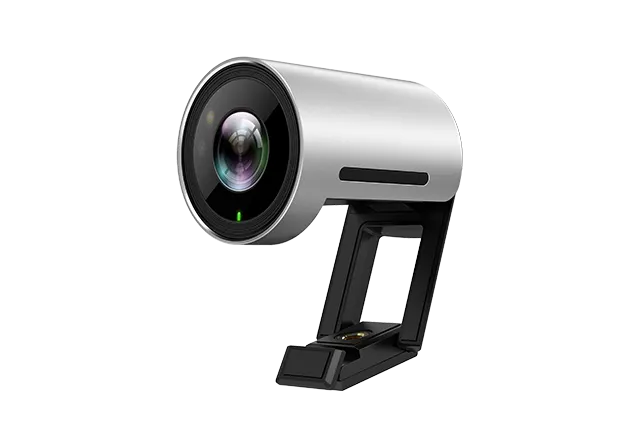
Yealink UVC30 Desktop 4K Webcam for PC (Discontinued)

WhatsApp
Priceon request
QuotationWithin 1 working day
DeliveryConfirmed with your quote, based on stock
PDFDownload datasheet (20220420025030430a43b767d43a5a1deeff4063c4af2.pdf)
Overview

The Yealink UVC30 Desktop is a 4K USB webcam for personal computers, and the manufacturer has discontinued it. It delivers 4K video at 30 frames per second, offers 70°, 90° and 120° fields of view, auto-framing and Windows Hello face login. It suits staff, teachers and presenters in Doha who need a sharp desk camera. Request a quote for a current equivalent or compatible replacement.

What the UVC30 Desktop is and who it suits

The Yealink UVC30 Desktop is a 4K USB camera built for daily use with a PC. It is no longer sold. Yealink discontinued the model with an end-of-sale date of 17 June 2024, and new orders are no longer accepted. This page is written for organisations that already own the camera, for buyers comparing it with newer options, and for anyone looking for a replacement for a desk video setup in Qatar.

The image, framing and audio facts that matter

  • Video: 4K at 30 fps, 1080p at 30 fps and 720p at 30 fps, from a 1/2.5-inch CMOS sensor with 8.51 megapixels.
  • Field of view: adjustable between 70°, 90° and 120°, with 3x digital zoom.
  • Auto-framing: face detection keeps people in frame within a depth of view of 0.5 m to 3 m.
  • Audio: an embedded microphone with a pickup range of up to 150° / 6.6 feet.
  • Low light: minimum illumination of 0.5 lux in daylight and 0.1 lux at night, with wide dynamic range.

Windows Hello certification means the infrared sensor and face recognition can sign staff in to Windows. The camera supports UVC 1.5 and UVC 1.0, and connects to the computer with a 1.6 m USB 3.0 cable.

Where it fits in Qatar

  • A ministry officer in Msheireb who joins calls with colleagues in other municipalities and needs a wider view when two people share the desk or a whiteboard sits beside them.
  • A training centre in Al Sadd where the trainer presents from a desk and moves around while speaking, so auto-framing follows faces within 3 m.
  • A private school in Al Wakrah equipping teachers' desks for remote lessons and parent meetings, where IT staff can use Yealink USB Connect to check usage and update firmware across units.

What to plan for before you order

Confirm the operating system first. The listed system requirements are Windows 7, Windows 10 and Mac OS 10.10 or higher. Check that the PC has a free USB port suited to the 1.6 m cable. The camera has a 1/4-inch-20 UNC thread and the manufacturer shows mounting on top of a TV, onto a TV stand or tripod, or on a wall. The body measures 59 mm by 45 mm in diameter, so it needs little space.

The source data does not give an operating temperature range, so we cannot confirm suitability for hot, dusty or non-air-conditioned areas. Ask the SmartRooms Qatar team to confirm the environment before installing in any such location. Yealink's end-of-life policy states that software support continues for a period after end of sale, while hardware spares depend on local distributors.

Request a quote for a current replacement

Because the UVC30 Desktop is discontinued, SmartRooms Qatar will quote a current equivalent or a compatible replacement that matches your operating systems, number of desks and room layout. Quotations are usually issued within one working day. We deliver to all eight municipalities of Qatar and accept purchase orders (LPOs) and government tenders. Request a quote and send us the number of units and the type of room they will serve.

Highlights

  • 4K, 1080p and 720p video at 30 frames per second
  • Adjustable 70°, 90° or 120° field of view with 3x digital zoom
  • Face-detection auto-framing within 0.5 m to 3 m
  • Windows Hello certified face login via infrared sensor
  • Embedded microphone with pickup up to 150° / 6.6 feet
  • 1.6 m USB 3.0 cable; Windows 7/10 and Mac OS 10.10+

Room fit

Tell us the room size and platform (Teams, Zoom or BYOD) and we confirm the right combination with your quotation.

Estimated timeline

Quotation within 1 working day · delivery timing depends on stock availability, and we confirm it with your quotation.
Specifications

Source: manufacturer · checked Oct 2026
The full specification and datasheet for this model are available on request; we send them with your quotation.

Downloads

2 files from the manufacturer

Questions about UVC30 Desktop

Is the Yealink UVC30 Desktop still on sale?
No. Yealink discontinued the UVC30 Desktop with an end-of-sale date of 17 June 2024, so the manufacturer no longer accepts new orders for it. SmartRooms Qatar can still quote for a current equivalent 4K desk camera or a compatible replacement. Tell us your operating system, how many desks need a camera and whether users will sign in with Windows Hello, and our team will suggest options. Quotations are usually issued within one working day.
What video resolutions and frame rates does it output?
The UVC30 Desktop outputs 4K at 30 frames per second, 1080p at 30 fps and 720p at 30 fps, so you can match the setting to your monitor or application. Its maximum resolution is 4K, and the image sensor is a 1/2.5-inch CMOS with 8.51 megapixels. For a single-person desk call over a slower connection, 1080p30 is often sufficient, while the 4K setting suits a larger display.
Can I change the field of view?
Yes. The UVC30 Desktop offers three fields of view: 70°, 90° and 120°. The datasheet says the field of view can be adjusted through Yealink USB Connect. A 70° setting suits one person seated close to the lens, while 120° gives a wider picture for a second participant or a whiteboard beside the desk. Test the setting in the actual room before you finish the installation.
How does auto-framing work, and where does it help?
Auto-framing uses face detection to keep people in the room within the frame. The camera has a depth of view of 0.5 m to 3 m, so the presenter should stay within that range. It helps a trainer at a training centre in Al Sadd who presents from a desk and moves while speaking, because the frame follows faces rather than needing manual adjustment during the session.
Does the UVC30 Desktop support Windows Hello sign-in?
Yes. The camera is Windows Hello certified and includes an infrared sensor with face recognition, so a user can sign in to a supported Windows PC by looking at the camera. In a shared office in Msheireb where staff log on many times a day, this offers an alternative to typing a password at each sign-in. Confirm your PC meets the listed system requirements before ordering.
Which computers and operating systems are supported?
The manufacturer lists Windows 7, Windows 10 and Mac OS 10.10 or higher as system requirements. The camera connects to the computer through a 1.6 m USB 3.0 cable and is positioned for personal computer use. Check that your laptop or desktop has a free USB port that suits the cable, especially if it has only USB-C ports, and plan an adapter before you order.
Does it have a built-in microphone, and is it enough for a large room?
It has an embedded microphone with a voice pickup range of up to 150° and 6.6 feet. For one user at a desk, the built-in microphone removes the need for a separate headset. In a larger room such as a classroom or boardroom in Education City, a desk camera's microphone may not cover everyone, so ask our team to recommend a separate audio option for the room.
How is it mounted, and how much desk space does it need?
The camera has a 1/4-inch-20 UNC thread. The manufacturer shows mounting on top of a TV, onto a TV stand or tripod, or on a wall. Its body measures 59 mm by 45 mm in diameter, so it takes up little space. For a wall position in a Lusail office, SmartRooms Qatar offers a free site survey to check the sight line and cable route before anything is fixed.
Can IT staff manage several units from one place?
Yes. Yealink provides Yealink USB Connect free of charge to manage Yealink USB devices, including this camera. The tool can monitor usage, show device information, support remote diagnoses and perform firmware updates. For a school or ministry deploying several cameras, this helps the IT team keep the fleet current without visiting every desk.
Can I rely on it in hot or dusty conditions, such as a site cabin in Mesaieed?
The source data does not give an operating temperature range for the UVC30 Desktop, so we cannot confirm one. Its positioning is personal computer use, so treat it as an office desk device. Before installing it in a site cabin, a warehouse office or a reception near a window in Mesaieed or the Industrial Area, ask the SmartRooms Qatar team to confirm the environment and suitability.
Is it suitable for a boardroom or lecture hall?
It is built as a personal computer camera with a depth of view of 0.5 m to 3 m, so it suits one person or a small group close to the lens. For a boardroom in West Bay or a lecture hall in Education City, a room camera with wider coverage is usually a better fit. Tell us the room size, seating plan and number of remote participants, and we will quote a suitable current option.
Can a government office or school buy it through a purchase order?
Yes. SmartRooms Qatar accepts purchase orders (LPOs) and government tenders, including those posted on Monaqasat, and accepts payment by bank transfer, cheque or purchase order. Delivery covers all eight municipalities of Qatar. Because the UVC30 Desktop is discontinued, we will confirm the closest current equivalent within the same quotation so the purchase order references a confirmed model.

Suggested replacements

Yealink MD-PTZBracket Yealink MD-PTZBracket MeetingDisplay Mounting Bracket
Cameras
Yealink MSketch Yealink MSketch AI Whiteboard Camera for Meeting Rooms
Cameras
Yealink MTower Yealink MTower Center-View Intelligent Companion Camera
Cameras
Yealink SmartVision 40 Yealink SmartVision 40 All-in-One Conference Camera
Cameras
Yealink SmartVision 60 Yealink SmartVision 60 360° All-in-One Conference Camera
Cameras

Similar models

Biamp Vidi 100 Biamp Vidi 100 4K Conferencing Camera
Cameras
Biamp Vidi 150 Biamp Vidi 150 4K Conferencing Camera
Cameras
Biamp Vidi 250 Biamp Vidi 250 4K Conferencing Camera
120 Degrees Zoom Certified
Biamp Vidi 280 Biamp Vidi 280 4K Conferencing Camera with Dual Sensors
Ultrawide Lens Zoom Certified
Biamp Vidi Content Cam 250 Biamp Vidi Content Cam 250 4K Whiteboard Content Camera Kit
120° Up to 5x digital zoom
Email Call