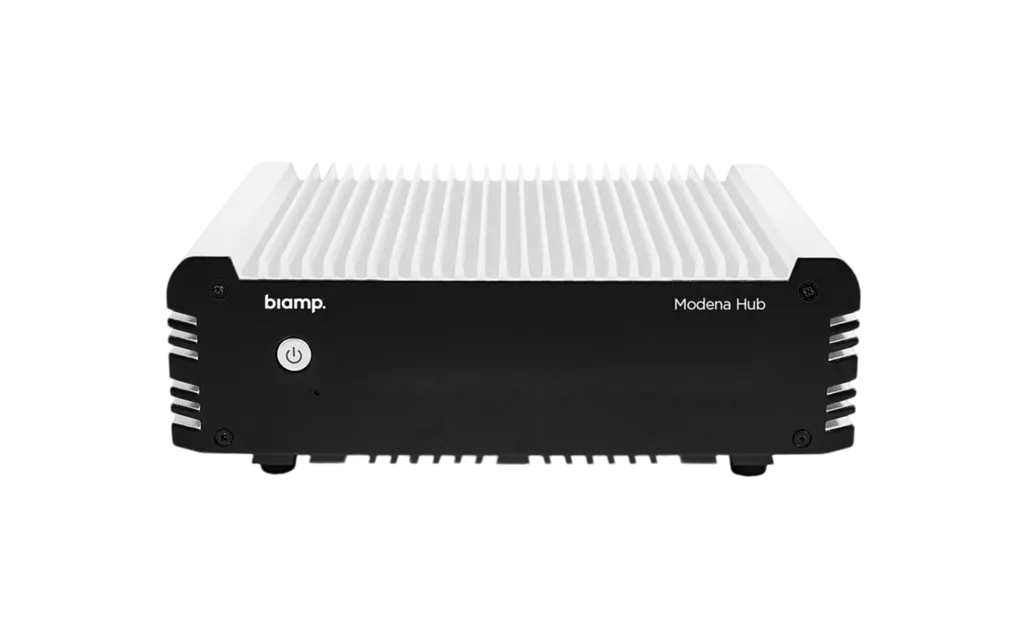
Modena Hub
Biamp Modena Hub 920-01736-00001 Wireless Presentation Hub (Discontinued)
The Biamp Modena Hub is a discontinued wireless presentation hub for BYOD meeting rooms. Laptops, tablets and phones can share content up to 1080p at 30fps, while a wireless USB feed reaches 720p and an HDMI port drives the screen. Biamp has replaced it with MAX Connect, so organisations in Qatar owning this unit or needing a current equivalent should request a quote from SmartRooms Qatar.
What the Modena Hub does in a meeting room
The Biamp Modena Hub is a compact wireless presentation hub built for rooms where participants arrive with their own devices. Instead of passing cables around the table, each person can send content to the room display from a personal laptop, tablet or phone, and the hub can also send audiovisual streams back to participants during a video conference. Biamp has discontinued this model and replaced it with MAX Connect, so this page is written for organisations that already run Modena Hubs, buyers comparing it with newer options, and anyone who needs a current equivalent.
Specifications that shape the buying decision
- Wireless presentation: up to 1080p at 30fps from supported devices.
- Wireless USB feed: up to 720p at 30fps, with a USB 2.0/3.0 port for peripherals.
- Connections: an HDMI media port for the display and an Ethernet RJ-45 port rated at 1000 Mbit/s.
- Capacity: Auditorium mode supports up to 150 users in large teaching spaces.
- Size and weight: 51 mm high, 160 mm wide, 132 mm deep and 1.1 kg.
- Power: external 12V DC power adaptor.
Network and client planning in Qatar
Wireless performance depends on the network. Each connected client needs at least 4 Mbps average and 15 Mbps peak, in the upstream direction when presenting and downstream when receiving. When the wireless USB feature is used, the videoconference host needs an additional 4 Mbps average and 15 Mbps peak. The hub supports 2.4GHz 802.11n and 5GHz 802.11ac Wi-Fi, with 5GHz recommended. Keep a minimum distance of about 1 metre between devices and the access point, and aim for a signal stronger than -65 dBm, with better than -60 dBm recommended. Client software runs on Windows 10, Mac OSX 10.11 or later, Android 8 or later, and iOS 11 or later.
Where it fits in Qatar
- A training room at a university in Education City, where students bring laptops to group sessions and the lecturer needs a setup for up to 150 users.
- A boardroom in West Bay or Lusail, where executives present from tablets while a video call with a team abroad runs on the same screen.
- A ministry office in Doha that wants a cable-free presenting option in a shared meeting room.
What to plan before ordering
The ambient operating range tops out at 40°C, with storage limits of -20 to 60°C and humidity from 0 to 95 percent non-condensing. Install the hub inside an air-conditioned room rather than in an unventilated AV rack, a hot cabinet or a window-facing area exposed to direct sun and dust, because Qatar summer temperatures can exceed 45°C. Plan a shelf or credenza close to the display and a ventilated spot for the adaptor with a power outlet within reach. SmartRooms Qatar offers free site surveys, which are useful for checking Wi-Fi coverage and cable routes before installation. Schools and government offices ordering several units can raise a purchase order (LPO).
Request a quote for this model or a current equivalent
If your organisation already runs the Modena Hub, or needs a wireless presentation hub to replace it, send SmartRooms Qatar the number of rooms, users and existing displays. The team will review the options and return a quotation, usually within one working day, with delivery across all 8 municipalities of Qatar. Request a quote today.
Highlights
- Wireless presentation up to 1080p at 30fps from supported devices
- Wireless USB feed up to 720p at 30fps with USB 2.0/3.0 port
- HDMI media port and 1000 Mbit/s Ethernet RJ-45 connection
- Auditorium mode configurable for up to 150 users
- Web management interface for IT administrators
- Discontinued by Biamp and replaced by MAX Connect
Room fit
Tell us the room size and platform (Teams, Zoom or BYOD) and we confirm the right combination with your quotation.
Estimated timeline
Quotation within 1 working day · delivery timing depends on stock availability, and we confirm it with your quotation.
Specifications
GENERAL4
- Height
- 2 inches (51 mm)
- Width
- 6.3 inches (160 mm)
- Depth
- 5.2 inches (132 mm)
- Weight
- 2.4 lbs (1.1 kg)
POWER1
- Power
- Power: External power adaptor 12V DC
NOTES1
- Specification Notes
- Modena client requirements: Desktop Client CPU: Intel® i5 equivalent or faster Web browser: Chrome™, Firefox™, Edge™ Windows® (presenter/viewer): Windows 10 .NET® Framework 4.5; Microsoft® Direct3D Mac OSX® (presenter/viewer): Mac OSX 10.11 or higher Mobile Client Android®: Android 8 or higher iOS®: iOS 11 or higher
CONFERENCING2
- Conferencing
- Modena Hub unit specifications: Wireless presentation resolution: Up to HD 1080p@30fps Wired network connection: Ethernet RJ-45 port, 1000 Mbit/s Media port: HDMI
- USB
- Wireless USB feed resolution: Up to HD 720p@30fps USB port: USB 2.0/3.0
NETWORK1
- Network Connection(s)
- Minimum Bandwidth: 4 Mbps average / 15 Mbps peak per connected client (upstream when presenting; downstream when receiving) Additional 4 Mbps average / 15 Mbps peak for the videoconference host when using the Wireless USB feature Wireless Connection: 2.4Ghz 802.11n compatible Wifi interface 5Ghz 802.11ac compatible Wifi interface (recommended) Minimum distance between device(s) and access point: ~ 3 feet (~ 1 meter) Signal Strength: RSSI on connected devices: stable above -65dBm (recommended > - 60dBm) SNR (RSSI - Noise) on connected devices: stable above 25dB (recommended > 35dB)
ENVIRONMENTAL3
- Ambient Operating Temperature Range
- Ambient Operating Temperature Range: 32 - 104° F (0 – 40° C) Ambient Storage Temperature Range: -4 - 140° F (-20 - 60° C)
- Humidity
- 0-95% relative humidity (non-condensing)
- Altitude
- 0-6,600 ft (0-2000m) MSL