Thursday, 22 October 2026 · 11 Jumada I 1448 AH Sun – Thu · 9:00 – 18:00
+971 56 914 9477 العربية
WhatsApp
This model is discontinuedThe manufacturer no longer makes it. Request a quote and we will propose the closest current replacement.
Suggested replacements ↓
Biamp Video Conferencing Discontinued

Modena Server

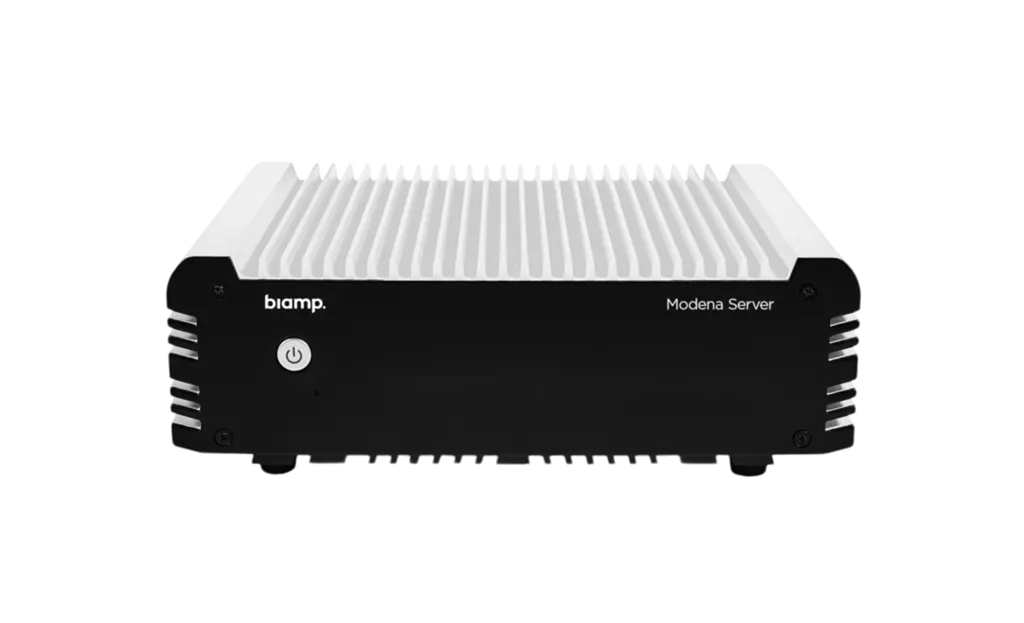
Biamp Modena Server Wireless Presentation Hub

WhatsApp
Priceon request
QuotationWithin 1 working day
DeliveryConfirmed with your quote, based on stock
PDFDownload datasheet (biamp_data_sheet_modena_server_may21.pdf)
Overview

The Biamp Modena Server is a multi-room wireless presentation hub that supports up to seven virtual meeting spaces from one device. Biamp has discontinued this model, so request a quote for a current equivalent or compatible replacement. It suits organisations in Qatar that already run Modena hubs or want shared wireless presenting across several meeting rooms, and the model carries a 5-year warranty.

What the Modena Server does across several rooms

The Biamp Modena Server is a multi-room wireless presentation device. A single unit supports up to seven collaboration spaces, so a floor of meeting rooms can share content from one central point instead of fitting each room with a separate system. It handles screen sharing, content rebroadcast and multi-camera BYOD conferencing, and it extends the capabilities of the Modena Hub and Hub+ devices.

Discontinued model. Biamp has discontinued the Modena Server, so this page is written for organisations that already own one, buyers comparing it with newer options, and anyone looking for a replacement. SmartRooms Qatar can quote a current equivalent or a compatible replacement for your rooms.

Facts that matter when you plan a deployment

  • Seven spaces per device: the server supports up to seven virtual meeting areas.
  • Browser-based access: participants connect through a web browser without installing a client.
  • Flexible display connection: a display can receive content from a computer running the web or software client, from an Android dongle, or directly through the Android TV app on a smart TV.
  • Personal device sharing: laptops, tablets and phones can send and receive presentations.
  • Central management: the server manages multiple Modena Hub and Hub+ devices in one environment.
  • Warranty: the listed manufacturer warranty for this model is 5 years.

The manufacturer data for this model does not list power, dimensions or port details, so confirm the hardware requirements with the SmartRooms Qatar team before ordering.

Where it fits in Qatar

A university in Education City running several seminar rooms and a shared study area can let students and staff present from their own laptops, with each room receiving content on its existing display. A government authority in West Bay with a floor of meeting rooms can move team presentations between rooms through the working week, Sunday to Thursday, without reconfiguring equipment in each room. A hotel meeting-room floor in Doha hosting conference groups can offer wireless presenting without running new cabling to every room.

What to plan before you order

Map the rooms first. Decide which rooms will have a display receiving content, whether each one will use a computer client, an Android dongle or the Android TV app, and how many Modena Hub or Hub+ devices the server will need to manage. Check with your IT team how personal devices connect to your network in each room. SmartRooms Qatar offers free site surveys before installation. Government and school buyers can order against a purchase order (LPO) or through a Monaqasat tender process.

Request a quote

Tell us how many rooms you want to cover and which Modena devices you already run, and SmartRooms Qatar will quote a current equivalent or compatible replacement. Quotations are usually issued within one working day. Request a quote today.

Highlights

  • Supports up to seven virtual meeting areas per device
  • Browser-based access with no client installation needed
  • Screen sharing, content rebroadcast and BYOD multicam conferencing
  • Manages multiple Modena Hub and Hub+ devices
  • Listed manufacturer warranty of 5 years
  • Discontinued by Biamp; request a quote for a replacement

Room fit

Tell us the room size and platform (Teams, Zoom or BYOD) and we confirm the right combination with your quotation.

Estimated timeline

Quotation within 1 working day · delivery timing depends on stock availability, and we confirm it with your quotation.

Specifications

1 specifications · Source: manufacturer · checked Oct 2026
GENERAL1
Warranty
5 years

Downloads

3 files from the manufacturer

Questions about Modena Server

What is the Biamp Modena Server used for?
The Modena Server is a multi-room wireless presentation device from Biamp. It is built for conferencing environments where several meeting rooms need to share content wirelessly from one central unit. It supports screen sharing, content rebroadcast and multi-camera BYOD conferencing. Organisations that want wireless presenting across a floor of rooms, rather than a separate system in each room, are its natural audience.
Is the Biamp Modena Server still available new from the manufacturer?
No. Biamp has discontinued the Modena Server, so it is no longer part of the current range. SmartRooms Qatar can quote a current equivalent or a compatible replacement based on how many meeting spaces you need to cover and which Modena devices, if any, are already in place. The warranty listed for this model is 5 years.
How many meeting rooms can one Modena Server support?
One Modena Server supports up to seven virtual meeting areas per device. A larger floor or campus will need planning around that limit, so the room layout should be confirmed before ordering. SmartRooms Qatar can review the number of rooms, the displays in each one and the users who will present, then recommend a suitable configuration in the quotation.
Do participants need to install software to share their screen?
No client installation is needed for participants, because the manufacturer describes a client-free experience through a web browser. Presenters in a Doha seminar room or a West Bay government meeting can share from laptops, tablets or mobile phones. Your IT team should still confirm that staff devices and browsers are allowed under your internal network and security policies.
How can a display in the room receive content from the server?
A display can receive content in three ways: from a computer running the web or software client, from an Android dongle, or by running the Android TV app directly on a smart TV. A school classroom in Lusail that already has a smart TV can use the app directly, while other rooms can use a computer or an Android dongle. Choose the method per room during planning.
Does the Modena Server work with Modena Hub and Hub+ devices?
Yes. The Modena Server expands the capabilities of the Modena Hub and Hub+ devices and can manage multiple Modena Hub and Hub+ units in one environment. A company in Msheireb that already has hubs in some meeting rooms can bring them under one central management point. Tell SmartRooms Qatar which hub models are in place so the quotation matches your current setup.
Does it support multi-camera BYOD conferencing?
Yes. The source data lists multi-camera BYOD conferencing as one of its functions, so people can join a conference from their own devices while camera feeds from the room are used. A training centre in Al Sadd running hybrid sessions with trainers abroad could let participants join from personal devices. Confirm the camera setup for each room during the site survey.
What size and mounting details does the Modena Server need?
The manufacturer data we hold for this model does not include physical dimensions, mounting options or port layout, so we cannot state them here. Before ordering for a Doha office or an Al Khor site, SmartRooms Qatar offers a free site survey to check the rooms, the displays and the network points. The survey results are used to confirm the installation plan before quoting.
Is the Modena Server compatible with Qatar's power supply?
The manufacturer data does not list power input or electrical specifications for the Modena Server. Do not assume compatibility with Qatar's 240 V, 50 Hz mains supply until the requirements are confirmed. SmartRooms Qatar will check the electrical requirements for this model as part of the quotation process, so you can plan power and sockets for each room before the equipment arrives.
Can it be used in rooms that get hot, such as those facing the sun?
The manufacturer data does not list an operating temperature range or environmental rating for this model. As a meeting-room device, it is intended for indoor use. Qatar summer temperatures can exceed 45 degrees Celsius, so check room conditions, air conditioning and ventilation before installing in rooms with direct sun or large windows. Ask SmartRooms Qatar to confirm the environment during the site survey.
How do government or school buyers in Qatar order this equipment?
SmartRooms Qatar supplies against purchase orders (LPOs) and can support government tenders, including those on Monaqasat. A school ordering for several classrooms or a ministry equipping several meeting rooms can request one quotation covering the full list. Payment can be made by bank transfer, cheque or purchase order. Quotations are usually issued within one working day.

Suggested replacements

Biamp MAX Connect Biamp MAX Connect 910-02278 Wireless Presentation System
CB
Clevertouch CleverCast Clevertouch CleverCast Wireless Presentation Device
Compatible
Clevertouch CleverHub 2 Clevertouch CleverHub 2 Wireless Presentation and Screen Sharing Device
Yes - CleverCast only NRCS
iiyama WP-D002C iiyama WP-D002C USB-C Wireless Presentation Dongle
Wireless presentation
iiyama WP-MEET03M iiyama WP-MEET03M Wireless Presentation Solution
Wireless presentation

Similar models

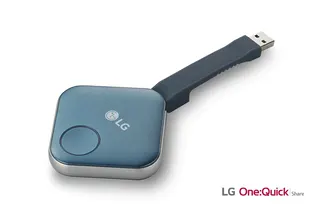
LG SC-00DA LG One:Quick Share SC-00DA Wireless Screen Sharing USB Dongle
USB 2.0 Type A (1)
Maxhub Wireless Box WB05 MAXHUB Wireless Box WB05 Wireless Presentation Box
Wireless presentation
Maxhub Wireless Dongle WT13 MAXHUB Wireless Dongle WT13 4K Wireless Screen Sharing Dongle
Wireless presentation
Newline Newline Click2Cast Newline Click2Cast Wireless Presentation Dongle for Interactive Displays
23QA
Email Call