Thursday, 22 October 2026 · 11 Jumada I 1448 AH Sun – Thu · 9:00 – 18:00
+971 56 914 9477 العربية
WhatsApp
This model is discontinuedThe manufacturer no longer makes it. Request a quote and we will propose the closest current replacement.
Suggested replacements ↓

LiteShow 4 DB+ (INLITESHOW4DB+)

InFocus LiteShow 4 DB+ (INLITESHOW4DB+) Wireless Presentation Device

WhatsApp
Priceon request
QuotationWithin 1 working day
DeliveryConfirmed with your quote, based on stock
PDFDownload datasheet (LiteShow4DBplus-User-Manual-1.pdf)
Overview

The InFocus LiteShow 4 DB+ (INLITESHOW4DB+) is a wireless presentation device from InFocus, listed in its video conferencing range under model code INLITESHOW4DB. InFocus has discontinued this model. SmartRooms Qatar can quote a current equivalent or a compatible replacement for organisations in Doha, Lusail and across Qatar that need wireless screen sharing in meeting rooms and classrooms. Request a quote and we will match options to your existing setup.

What the LiteShow 4 DB+ is and why its status matters

The InFocus LiteShow 4 DB+ (INLITESHOW4DB+) is a wireless presentation device listed in InFocus's video conferencing range, with the model code INLITESHOW4DB. InFocus has discontinued this model, so it is no longer offered as a new product by the manufacturer. Its user guide remains listed on the InFocus Global Support site, which makes identifying the model correctly worthwhile if your organisation already owns one.

What the source data confirms, and what it does not

The manufacturer information confirms the brand, model name, series, model code, category and discontinued status. It does not give the figures buyers usually compare, such as connection methods, supported operating systems, supported display resolutions, or power and environmental ratings. This page does not estimate those details. Check the user guide for your exact unit, and send the model code and any photo of the label to SmartRooms Qatar so we can match it to a current option.

Where a wireless presentation device fits in Qatar

Wireless presentation products let people share content on a display without swapping cables at the table. In practice this suits three kinds of room:

  • Meeting rooms in Doha and West Bay, where staff arrive with their own laptops and need to present within minutes.
  • Classrooms in Al Wakrah or Lusail, where a teacher moves around the room and presents from several positions.
  • Meeting spaces in hotels and serviced apartments at The Pearl, where event teams change the setup often and do not want to run new cables each time.

Planning a replacement

Because this model is discontinued, most buyers will be choosing a current wireless presentation product that fits the same room. Compare room size, the number of people who usually present, the operating systems on staff laptops, and whether the display is fixed or mobile. Check whether the room already has a suitable display input and network point. Government offices and schools ordering several units often work through a purchase order (LPO) or a government tender, and payment by bank transfer, cheque or purchase order is accepted.

Before any installation, a free site survey lets our team check the display, the table or wall position and the network in the room. Qatar mains power is 240 V, 50 Hz, so confirm the power requirements of any replacement against the sockets in the room before ordering. Delivery covers all eight municipalities of Qatar.

Send us the model code INLITESHOW4DB+, a short description of the room and the number of people who will present. SmartRooms Qatar usually replies with a quotation within one working day. Request a quote for a current equivalent or compatible replacement today.

Highlights

  • Discontinued InFocus model, model code INLITESHOW4DB
  • Listed under video conferencing, wireless presentation subcategory
  • User guide listed on InFocus Global Support site
  • Quotes for current equivalent or compatible replacements
  • Free site survey to confirm room and display fit

Room fit

Tell us the room size and platform (Teams, Zoom or BYOD) and we confirm the right combination with your quotation.

Estimated timeline

Quotation within 1 working day · delivery timing depends on stock availability, and we confirm it with your quotation.


Specifications

Source: manufacturer · checked Oct 2026
The full specification and datasheet for this model are available on request; we send them with your quotation.

Downloads

2 files from the manufacturer

Questions about LiteShow 4 DB+ (INLITESHOW4DB+)

Is the InFocus LiteShow 4 DB+ still sold by InFocus?
No. InFocus has discontinued the LiteShow 4 DB+ (INLITESHOW4DB+), so it is no longer offered as a new product by the manufacturer. Organisations in Qatar that still need wireless presentation can request a quote from SmartRooms Qatar for a current equivalent or a compatible replacement. Tell us the room type, the number of presenters and the systems in use, and we will match options to your requirement.
What does the model code INLITESHOW4DB mean when ordering?
INLITESHOW4DB is the model code that appears alongside the LiteShow 4 DB+ name in the manufacturer data. When you request a quote, include both the name and the code, plus a photo of the device label if you have one. This helps us confirm you have the exact unit and avoid matching it to a different model in the same range.
Where can I find the user guide for this model?
InFocus lists user guides for this model on its Global Support site under its wireless devices section. Use the guide for your exact unit to confirm the setup steps and the features it actually provides before making decisions. If you cannot locate the guide, send us the model code and we will help identify the documentation that matches your unit.
Can staff in a Doha meeting room share laptop screens with this device?
The manufacturer data does not state the operating systems or connection methods supported by this model, so laptop compatibility cannot be confirmed from the data alone. Check the user guide for the supported systems. If your staff use a mix of Windows and Mac laptops, compare any replacement against your IT policy and your team's devices before buying, and we will help you check that fit.
Is it suitable for a classroom where teachers present from different positions?
Wireless presentation products are designed so a presenter can share content without being tied to a fixed cable point, which suits a teacher moving around a classroom in Al Wakrah or Lusail. The data for this model does not confirm how many presenters it supports or which devices it accepts, so check the user guide. For a school fitting out several rooms, we recommend a free site survey first so each classroom is matched to its display and network.
A school wants to replace a unit in one classroom. What should we check first?
Start by noting the model code on the device label, the display it connects to, and the network arrangement in the room. Because this model is discontinued, compare current equivalents against the classroom display inputs and the school's wireless policy. A free site survey from SmartRooms Qatar can confirm the fit before installation, and the school can raise a purchase order to cover the work.
Can a government office order replacements through an LPO or tender?
Yes. SmartRooms Qatar supplies government offices and accepts purchase orders (LPOs) and government tenders, including Monaqasat. Payment can be made by bank transfer, cheque or purchase order. For this discontinued model, your procurement team should specify the meeting room use and the replacement requirement, and we will quote a current equivalent or compatible replacement for that space.
What power supply does the LiteShow 4 DB+ need?
The manufacturer data does not list the power supply or wattage for this model, so we cannot state them. Qatar mains power is 240 V, 50 Hz, with BS 1363 (Type G) sockets. Check the power details on the device label and in the user guide, and confirm the requirements of any replacement against the socket in the room before ordering.
Can it be wall-mounted in a boardroom in West Bay?
Mounting details for this model are not in the source data, so we cannot say whether it is designed for wall mounting. Many boardrooms keep this type of device on the table or in a cabinet. If you plan a wall-mounted display with a wireless presentation setup, arrange a free site survey first to check the wall, the cable routes and the display height.
How should it be placed given summer temperatures above 45°C?
The operating temperature range for this model is not given in the source data, so we cannot quote one. Summer temperatures in Qatar can exceed 45°C, so keep the device in an air-conditioned room, away from direct sunlight and window glare. Confirm the environmental specification in the user guide, and tell our team if the device would sit near a lobby or an outdoor-facing window.
Which replacement suits a hotel meeting room at The Pearl?
Hotel and serviced apartment meeting rooms at The Pearl often need quick setup between events, with presenters who bring their own laptops. Tell us the room size, typical attendee numbers and whether the display is fixed or mobile. We will match a current equivalent or compatible replacement to those needs and quote for supply and professional installation, so event teams can use the room without changing cables.
How soon will SmartRooms Qatar reply to a quote request?
SmartRooms Qatar usually sends a quotation within one working day. Please include the model code INLITESHOW4DB+, the room type and the number of people who will present. Delivery timing is an estimate confirmed in the quotation rather than a fixed date, and installation is arranged once you accept the quote.

Suggested replacements

Biamp MAX Connect Biamp MAX Connect 910-02278 Wireless Presentation System
CB
Clevertouch CleverCast Clevertouch CleverCast Wireless Presentation Device
Compatible
Clevertouch CleverHub 2 Clevertouch CleverHub 2 Wireless Presentation and Screen Sharing Device
Yes - CleverCast only NRCS
iiyama WP-D002C iiyama WP-D002C USB-C Wireless Presentation Dongle
Wireless presentation
iiyama WP-MEET03M iiyama WP-MEET03M Wireless Presentation Solution
Wireless presentation

Similar models

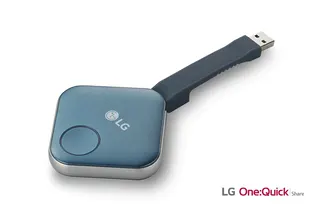
LG SC-00DA LG One:Quick Share SC-00DA Wireless Screen Sharing USB Dongle
USB 2.0 Type A (1)
Maxhub Wireless Box WB05 MAXHUB Wireless Box WB05 Wireless Presentation Box
Wireless presentation
Maxhub Wireless Dongle WT13 MAXHUB Wireless Dongle WT13 4K Wireless Screen Sharing Dongle
Wireless presentation
Newline Newline Click2Cast Newline Click2Cast Wireless Presentation Dongle for Interactive Displays
23QA
Email Call