Thursday, 22 October 2026 · 11 Jumada I 1448 AH Sun – Thu · 9:00 – 18:00
+971 56 914 9477 العربية
WhatsApp
This model is discontinuedThe manufacturer no longer makes it. Request a quote and we will propose the closest current replacement.
Suggested replacements ↓
Barco Video Conferencing Discontinued

wePresent WiPG-1000

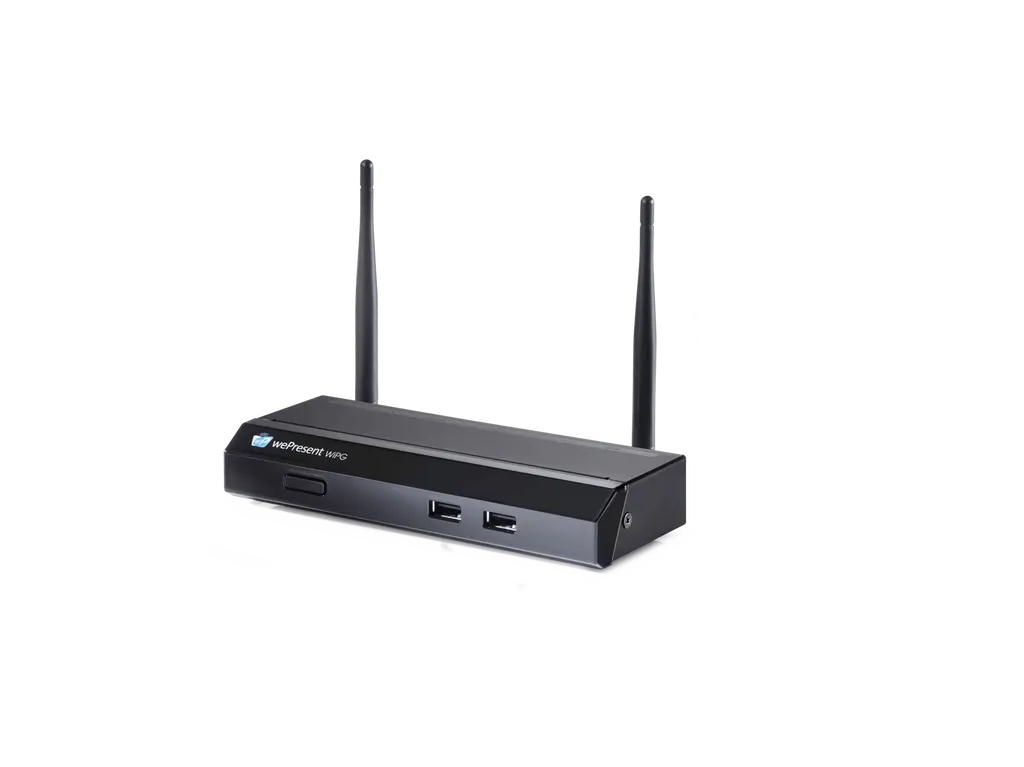
Barco wePresent WiPG-1000 1080p Wireless Presentation System (Discontinued)

Connectivity
15 pin VGA
WhatsApp
Priceon request
QuotationWithin 1 working day
DeliveryConfirmed with your quote, based on stock
PDFDownload datasheet (wePresent-WiPG-1000-en-Spec-sheet.pdf)
Overview

The Barco wePresent WiPG-1000 is a 1080p wireless presentation system. Up to 64 users can share screens from laptops, tablets and phones onto one display connected by HDMI or VGA. Barco has discontinued this model and replaced it with the ClickShare C-10. Buyers in Qatar who own WiPG-1000 units or need a like-for-like replacement should request a quote for a current equivalent.

What the WiPG-1000 does in a meeting room

The Barco wePresent WiPG-1000 is a 1080p wireless presentation unit from the wePresent series. Participants connect their own devices to it over Wi-Fi and show their screens on a display or projector attached to the unit, so nobody has to swap cables between speakers. Barco has discontinued this model and names the ClickShare C-10 as its replacement. This page is written for organisations that already run WiPG-1000 units and for buyers who need a system that does the same job in a room.

Connectivity, video and wireless performance

The unit provides one HDMI output and one VGA output, so it can feed a flat panel or projector with either input. Devices running Windows 7, 8, 10 and later, macOS 10.9 and later, Chromebook OS 74 and later, Android 4.1 and later, or iOS 9 and later can share their screens, and Apple AirPlay is supported natively. Up to 64 users can connect, and up to four sources can be shown at once in a fixed screen layout.

Output reaches up to 1080p at up to 30 frames per second. The wireless link works on 2.4G (802.11 b/g/n) or 5G (802.11 a/n), and the band can be switched, which helps a site move to the less crowded frequency. Authentication options are WEP and WPA/WPA2 PSK. The manufacturer's test notes describe four 1080p video streams over 2.4G Wi-Fi, but those results were measured under specific lab conditions, so a live room with many devices and interference may perform differently.

  • Audio leaves the unit through HDMI or a 3.5 mm analogue jack.
  • Ports include an RJ-45 connection, three USB 2.0 ports, a reset button and a stereo phone jack.

Where it fits in Qatar

  • A company meeting room in West Bay or Lusail: staff bring laptops and phones to a weekly review, and everyone shares to one screen without swapping cables.
  • A classroom refresh in Al Wakrah: a private school updating teaching rooms, where teachers and students share work from tablets to a single display.
  • A training room at an industrial site in Mesaieed: contractors present from their own laptops during induction sessions, with up to four sources visible at once.

Planning the site, power and environment

Start with the environment. The operating temperature is listed as 0 to 40 and the storage range as -10 to +70, with operating humidity up to 90%. Summer temperatures in Qatar regularly pass 45°C outdoors, so place the unit inside an air-conditioned room, away from direct sunlight, window glare and cabinets that trap heat, and confirm the location with the SmartRooms Qatar team before installation. Do not use it in outdoor or unconditioned spaces.

The unit draws 13.6 W at full load from a DC 5 V power source and produces 14.663 BTU/hr of heat. Mains supply in Qatar is 240 V, so the unit needs a suitable DC power arrangement; the source data does not describe the supplied adapter, so ask the team to confirm it. It measures 154.4 x 60.3 x 25 mm and weighs 260 g without packaging, so it needs little space on a desk, credenza or in an existing AV cabinet.

Because the WiPG-1000 is no longer in production, the quickest route is to tell the SmartRooms Qatar team how many rooms you need to cover and which displays they use. We supply to all eight municipalities of Qatar, offer a free site survey, and usually send quotations within one working day. Government and school buyers can order against a purchase order (LPO) or a government tender. Request a quote today for a current equivalent that fits your rooms.

Highlights

  • 1080p output at up to 30 frames per second
  • Supports Windows, macOS, Chromebook, Android, iOS and AirPlay
  • Up to 64 connected users and four sources at once
  • Switchable 2.4G and 5G wireless bands
  • One HDMI, one VGA, RJ-45 and three USB 2.0 ports
  • 13.6 W full-load power draw from DC 5 V

Room fit

Tell us the room size and platform (Teams, Zoom or BYOD) and we confirm the right combination with your quotation.

Estimated timeline

Quotation within 1 working day · delivery timing depends on stock availability, and we confirm it with your quotation.

Specifications

17 specifications · Source: manufacturer · checked Oct 2026
General specifications17
Operating system
Windows 7, 8, 10 and above macOS X, 10.9 and above Chromebook OS 74 and above Android 4.1 and above iOS 9 and above
Native industry standard support
Apple AirPlay
Video Output
1 x HDMI 1 x VGA
Frame rate
up to 30 fps
Output resolution
up to 1080p
Connected users
up to 64
Sources
up to 4 simultaneously with fixed screen layout
Audio Outputs
HDMI analog via audio jack 3.5mm
Authentication protocol
WEP WPA / WPA2 PSK
Wireless transmission protocol
2.4G (b/g/n) / 5G (a/n) switchable
Interfaces
15 pin VGA HDMI RJ-45 USB 2.0 (x3) Reset button Stereo phone jack
Power consumption
13.6W full load power consumption under test conditions: · Power source : DC 5V · SW version : 2.2.3.2 · HW version : Rev.C(2016/11/07) · USB port : 0.5A load each port(totally 3 ports) · WiFi : 2.4G/11n (project four 1080p videostream) · Ethernet port : ping packet · HDMI : Output 4-in-1 screen · VGA : Output 4-in-1 screen · Phone jack : Connect to speaker
Heat dissipation
14.663 BTU/hr
Weight
780 g with package 260g without package
Dimensions
154.4 x 60.3 x 25mm without package 216 x 220 x 66 mm with package
Environmental temperature
Operation temperature: 0~40 Storage Temperature: -10 ~ +70
Environmental humidity
Operating humidity: 90% Storage humidity: 85%RH
Downloads

2 files from the manufacturer

Questions about wePresent WiPG-1000

Is the Barco wePresent WiPG-1000 still available to buy?
Barco has discontinued the WiPG-1000 and lists it as end of life, replaced by the ClickShare C-10. SmartRooms Qatar can still quote a current equivalent or a compatible replacement. Tell us how many rooms you need to cover and which displays they use, and our team will confirm the best option for your site and send a quotation, usually within one working day.
What is the WiPG-1000 used for?
It lets people share their screen wirelessly to one display or projector connected by HDMI or VGA, so presenters do not need to swap cables. It suits small meeting rooms and classrooms where several people present from their own laptops, tablets or phones. Up to 64 users can connect to the unit.
Which devices and operating systems can connect?
The source data lists Windows 7, 8, 10 and later, macOS 10.9 and later, Chromebook OS 74 and later, Android 4.1 and later, and iOS 9 and later. Apple AirPlay is supported natively. Older operating systems fall outside the listed versions, so check the oldest laptops and phones in your staff or student fleet before ordering several units for a school or ministry.
How many sources can be shown at the same time?
Up to four sources can be displayed simultaneously in a fixed screen layout. Output runs up to 1080p at up to 30 frames per second. This suits a training room at an industrial site in Mesaieed where four contractors present from their own laptops during one session, provided the fixed layout works for the content they show.
Which ports does the unit have?
The interfaces are one VGA port, one HDMI port, one RJ-45 port, three USB 2.0 ports, a reset button and a stereo phone jack. Audio can be sent out through HDMI or the 3.5 mm analogue jack. Check that your display has an HDMI or VGA input before requesting a quote for a replacement.
Does it support 5 GHz Wi-Fi and which security options are available?
Yes. The wireless band is 2.4G (802.11 b/g/n) or 5G (802.11 a/n), and you can switch between them. Authentication options are WEP and WPA/WPA2 PSK. In a school in Al Wakrah or a busy office in Lusail with many access points, choosing the less crowded band can reduce interference, and the SmartRooms Qatar team can review your network before installation.
Can it be used in a hot room or outdoors in Qatar?
No outdoor use is indicated. The operating temperature is listed as 0 to 40 and the storage range as -10 to +70, with operating humidity up to 90%. Qatar summer temperatures often exceed 45°C outdoors, so place the unit inside an air-conditioned room, away from direct sunlight and cabinets that trap heat, and confirm the location with our team.
How much power does it use and what supply does it need?
It draws 13.6 W at full load from a DC 5 V power source and has a heat output of 14.663 BTU/hr. Qatar's mains supply is 240 V, so the unit needs a suitable DC power arrangement. The source data does not describe the supplied adapter, so ask the SmartRooms Qatar team to confirm the power set-up for your room before ordering.
How big and heavy is the WiPG-1000?
Without packaging the unit measures 154.4 x 60.3 x 25 mm and weighs 260 g. With its package it weighs 780 g and measures 216 x 220 x 66 mm. A unit this size fits on a desk, a credenza or inside an existing AV cabinet, which helps in an office refit in Lusail where wall space and cabinet depth are limited.
Is it suitable for a large lecture hall?
The unit supports up to 64 connected users and 1080p output, but the source data does not give room capacity, audio power or display requirements for large venues. A lecture hall in Education City or a boardroom with a large display needs audio and display planning. Our team can run a free site survey to check sightlines, cabling and whether this model suits the space.
Can it be replaced by the ClickShare C-10 without rewiring?
The manufacturer names the ClickShare C-10 as the replacement for the WiPG-1000. Whether a swap needs rewiring depends on your existing displays, network and user devices, and compatibility cannot be confirmed from the WiPG-1000 data alone. Send photos of your current rack and screens, and the team will advise on a compatible replacement and quote for it.
Can a government body or school order through a purchase order?
Yes. SmartRooms Qatar accepts purchase orders (LPOs), government tenders including Monaqasat, and payment by bank transfer, cheque or purchase order. Products are covered by the manufacturer's warranty. Because this model is discontinued, the quotation will name the current equivalent or replacement so your LPO matches the exact item being supplied.

Suggested replacements

Barco ClickShare Desktop App Barco ClickShare Desktop App Wireless Presentation Software
Wireless presentation
Barco ClickShare C-5 Barco ClickShare C-5 Wireless Presentation System
FCC/CE
Barco ClickShare Control Panel Barco ClickShare Control Panel 10.1-inch Touch Controller
1280*800 @60Hz USB Type-C 3.2 Gen1
Barco ClickShare CX-20 Barco ClickShare CX-20 Wireless Conferencing System
FCC/CE
Barco ClickShare CX-30 Barco ClickShare CX-30 Wireless Conferencing System
FCC/CE

Similar models

Biamp MAX Connect Biamp MAX Connect 910-02278 Wireless Presentation System
CB
Clevertouch CleverCast Clevertouch CleverCast Wireless Presentation Device
Compatible
Clevertouch CleverHub 2 Clevertouch CleverHub 2 Wireless Presentation and Screen Sharing Device
Yes - CleverCast only NRCS
iiyama WP-D002C iiyama WP-D002C USB-C Wireless Presentation Dongle
Wireless presentation
iiyama WP-MEET03M iiyama WP-MEET03M Wireless Presentation Solution
Wireless presentation
Email Call