Thursday, 22 October 2026 · 11 Jumada I 1448 AH Sun – Thu · 9:00 – 18:00
+971 56 914 9477 العربية
WhatsApp
This model is discontinuedThe manufacturer no longer makes it. Request a quote and we will propose the closest current replacement.
Suggested replacements ↓
Barco Video Conferencing Discontinued

wePresent WiPG-2000

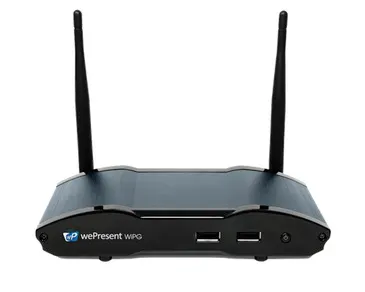
Barco wePresent WiPG-2000 Wireless Presentation Gateway

Connectivity
1 x 15 pin VGA (back)
WhatsApp
Priceon request
QuotationWithin 1 working day
DeliveryConfirmed with your quote, based on stock
PDFDownload datasheet (wePresent-WiPG-2000-en-Spec-sheet.pdf)
Overview

The Barco wePresent WiPG-2000 is a wireless presentation gateway for conference rooms and boardrooms. It lets up to 64 connected users share content over HDMI or VGA displays at up to 1080p, with up to four sources shown at once in a fixed layout. Barco has discontinued this model, and ClickShare C-10 is its listed replacement. SmartRooms Qatar can quote a current equivalent for meeting rooms across Doha.

A wireless presentation gateway for shared meeting rooms

The Barco wePresent WiPG-2000 lets people in a room share what is on their laptop, tablet or phone to a display without running a cable to each device. The unit sits beside the screen, receives the wireless stream and passes it to the display, so a presenter only needs to be on the same network. It was built as a lower-cost option for conference rooms and boardrooms that want wireless sharing alongside on-board USB media and document playback.

Barco has discontinued the WiPG-2000 and lists the ClickShare C-10 as its replacement. If your room already runs this unit, or you are comparing it with a newer model, SmartRooms Qatar can quote a current equivalent or a compatible replacement and advise on the change.

Capacity and connections at a glance

  • Up to 64 connected users and up to four sources shown at once in a fixed screen layout.
  • Output up to 1080p at up to 30 fps through one HDMI and one VGA port.
  • Wireless on 2.4G (b/g/n) or 5G (a/n), switchable, with a reach of up to 30 m.
  • WPA, WPA2 PSK and WPA enterprise authentication for managed networks.
  • Three USB 2.0 ports (two front, one back), an RJ-45 LAN port and a 3.5 mm stereo audio jack.

Clients run on Windows 7, 8, 10 and later, Mac OS X 10.9 and later, Android 4.0 and later, and iOS 9 and later. Because the supported list reaches back to Windows 7 and Android 4.0, check the devices your staff actually use before rollout.

Power, environment and placement

Power comes from an external 5VDC, 2.6A adaptor or from power over Ethernet at 4.4W, so one network cable can carry both data and power where the switch supports it. Full-load consumption is 15.3W. The unit measures 159 x 91 x 29.9 mm and weighs 293 g without packaging, so it is small enough to sit beside or behind a display.

The listed operating temperature range is 0°C to 40°C, and operating humidity is listed at 90%. Summer temperatures in Doha can exceed 45°C, so keep the unit inside air-conditioned rooms, away from direct sunlight, windows and hot equipment cabinets.

Where it fits in Qatar

  • Boardroom in West Bay or Msheireb: executives present from their own devices to one screen, and up to four sources can be shown side by side during a board pack review.
  • Seminar room on a campus in Education City: a lecturer and visiting presenters switch between laptops without handling cables, with the 30 m reach checked against the room layout.
  • Ministry meeting room in Doha: a team working in Arabic and English shares documents from several devices on a managed network that uses WPA enterprise authentication.

Planning the quotation

Send us the room size, the display in use, the number of regular presenters and the network type, managed or open. SmartRooms Qatar offers free site surveys, so we can confirm the cable route, power source and unit position before you commit. Quotations are usually issued within one working day. We accept purchase orders (LPOs), government tenders through Monaqasat, and payment by bank transfer, cheque or purchase order. Request a quote and we will recommend the current equivalent for your room.

Highlights

  • Up to 64 connected users per room
  • Up to four sources shown simultaneously
  • One HDMI and one VGA output, up to 1080p
  • 2.4 GHz and 5 GHz wireless, switchable
  • Power over Ethernet at 4.4W or 5VDC adaptor
  • Discontinued by Barco; ClickShare C-10 is the replacement

Room fit

Tell us the room size and platform (Teams, Zoom or BYOD) and we confirm the right combination with your quotation.

Estimated timeline

Quotation within 1 working day · delivery timing depends on stock availability, and we confirm it with your quotation.

Specifications

18 specifications · Source: manufacturer · checked Oct 2026
General specifications18
Operating system
Windows 7, 8, 10 and above Mac OS X 10.9 and above Android 4.0 and above iOS 9 and above
Video Output
1 x HDMI 1 x VGA
Frame rate
up to 30 fps
Output resolution
up to 1080p
Connected users
up to 64
Sources
up to 4 simultaneously with fixed screen layout
Audio Outputs
HDMI analog via audio jack 3.5mm
Authentication protocol
WPA WPA 2 PSK WPA enterprise
Wireless transmission protocol
2.4G (b/g/n) / 5G (a/n) switchable
Reach
up to 30m
Interfaces
1 x 15 pin VGA (back) 1 x RJ-45 ethernet LAN (back) 1 x HDMI (back) 2 x USB 2.0 (front) + 1 x USB 2.0 (back) 1 x Stereo phone jack (back) 1 x LED power button (front) 1 x Reset button (bottom)
Power
External power adaptor (5VDC, 2.6A) Power over ethernet (4.4W)
Power consumption
15.3W (full load power consumption)
Heat dissipation
18.755BTU/hr
Weight
801g (with packaging) 293g (without packaging)
Dimensions
216 x 220 x 66mm (antennas disconnected, with packaging) 159 x 91 x 29.9mm (antennas disconnected, without packaging)
Operating temperature range
0° C~40°C
Operating humidity range
90%

Downloads

2 files from the manufacturer

Questions about wePresent WiPG-2000

Is the Barco wePresent WiPG-2000 still the current model from Barco?
No. Barco has discontinued the WiPG-2000 and lists the ClickShare C-10 as its replacement. If you need a current unit for a meeting room, request a quote and the SmartRooms Qatar team will recommend the equivalent that suits your display, your network and the number of presenters you run in the room.
What does the WiPG-2000 do in a meeting room?
It receives wireless screen sharing from laptops, tablets and phones and sends it to the display connected through its HDMI or VGA output. Presenters do not need cables on the table, and up to 64 connected users can join the same session, which suits boardroom reviews where several people contribute.
How many users and sources can it handle at the same time?
The unit supports up to 64 connected users and up to four sources displayed simultaneously in a fixed screen layout. That suits a boardroom review where several speakers take turns. Because the layout is fixed, plan how each source will appear on your screen before you buy.
What resolution and frame rate does it output?
Output reaches up to 1080p at up to 30 fps through one HDMI port and one VGA port. Test fast-moving video in the room during the free site survey before relying on it for product demonstrations or training clips.
Which devices and operating systems can connect to it?
The listed support covers Windows 7, 8, 10 and later, Mac OS X 10.9 and later, Android 4.0 and later, and iOS 9 and later. Check the laptops and phones your staff actually carry, especially older devices, because this list is the basis for compatibility rather than a guarantee for every app.
Can it run on a managed corporate or government wireless network?
It supports WPA, WPA2 PSK and WPA enterprise authentication, and the wireless band can be switched between 2.4G (b/g/n) and 5G (a/n). Ask your IT team which authentication method and band the network uses, and send those details to us when you request a quote.
How is it powered, and does it need its own socket?
It runs from an external 5VDC, 2.6A adaptor or from power over Ethernet at 4.4W, and full-load consumption is 15.3W. If your switch supports PoE, a single network cable can carry both data and power, which reduces the number of sockets to plan behind the display.
Where should the unit be placed in the room?
Keep it within the listed wireless reach of up to 30 m, in an air-conditioned spot away from direct sunlight. Its dimensions are 159 x 91 x 29.9 mm without packaging, so it can sit beside or behind the display. A free site survey from SmartRooms Qatar will confirm the cable route and power point.
Can it be used in a hot room in Doha during summer?
The operating temperature range is 0°C to 40°C, with operating humidity listed at 90%. Summer temperatures in Doha can exceed 45°C, so the room should stay air-conditioned and the unit should not sit in a closed hot cabinet or near a sunlit window.
Which Qatar setting suits this unit best?
A boardroom in West Bay or Msheireb where executives present from their own devices is a strong fit, as is a seminar room on a campus in Education City where visiting presenters swap in without cables. A ministry meeting room working in Arabic and English also suits it, provided the network supports the authentication methods listed.
Does it support media playback and document display from USB?
The manufacturer positions the unit with on-board USB media and document playback, and it has two USB 2.0 ports at the front and one at the back. The data does not list supported file formats, so confirm the file types you need with SmartRooms Qatar before ordering.
How do I request a replacement or upgrade for a room that already has this unit?
Request a quote with the room size, display type, network type and number of regular presenters. SmartRooms Qatar offers free site surveys and usually issues quotations within one working day. We supply, deliver to all 8 municipalities of Qatar, install professionally, and accept LPOs, Monaqasat tenders and bank transfer or cheque payments.

Suggested replacements

Barco ClickShare Desktop App Barco ClickShare Desktop App Wireless Presentation Software
Wireless presentation
Barco ClickShare C-5 Barco ClickShare C-5 Wireless Presentation System
FCC/CE
Barco ClickShare Control Panel Barco ClickShare Control Panel 10.1-inch Touch Controller
1280*800 @60Hz USB Type-C 3.2 Gen1
Barco ClickShare CX-20 Barco ClickShare CX-20 Wireless Conferencing System
FCC/CE
Barco ClickShare CX-30 Barco ClickShare CX-30 Wireless Conferencing System
FCC/CE

Similar models

Biamp MAX Connect Biamp MAX Connect 910-02278 Wireless Presentation System
CB
Clevertouch CleverCast Clevertouch CleverCast Wireless Presentation Device
Compatible
Clevertouch CleverHub 2 Clevertouch CleverHub 2 Wireless Presentation and Screen Sharing Device
Yes - CleverCast only NRCS
iiyama WP-D002C iiyama WP-D002C USB-C Wireless Presentation Dongle
Wireless presentation
iiyama WP-MEET03M iiyama WP-MEET03M Wireless Presentation Solution
Wireless presentation
Email Call