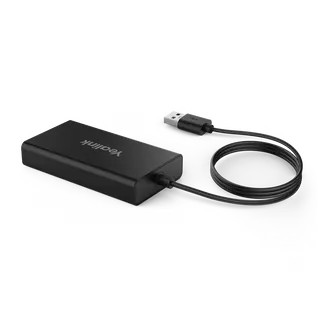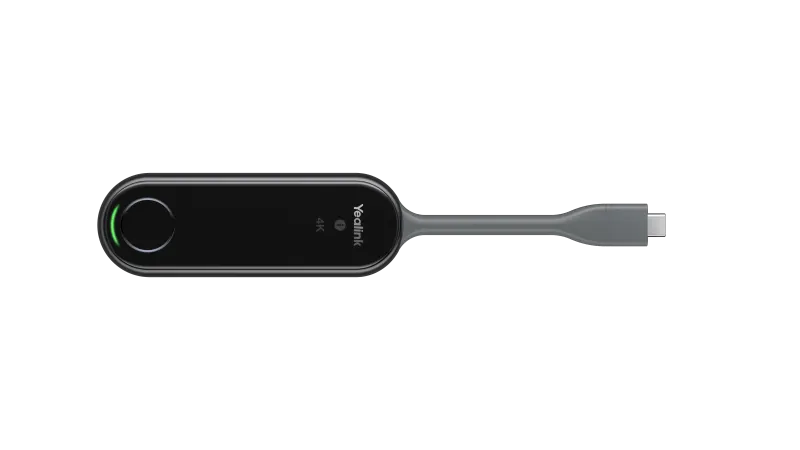
WPP20-WPP30
Yealink WPP20-WPP30 Wireless Presentation Pod
The Yealink WPP20-WPP30 is a wireless presentation pod that lets a laptop or phone share up to 4K/30fps content over its own built-in Wi-Fi network, with no router changes or driver setup. It presents up to four streams on the main screen and supports annotation and whiteboarding. Yealink has discontinued this model, so organisations that already own one, or need a replacement, should request a quote for a current equivalent or compatible product.
A discontinued wireless presentation pod for meeting rooms
The Yealink WPP20-WPP30 is a compact wireless presentation pod measuring 220 mm by 38 mm by 16 mm and weighing 75 g. It lets a laptop or phone show its screen on a room display without a cable running to the screen. Yealink has discontinued this model, so this page serves organisations that already run one, buyers comparing it with other pods, and anyone who needs a current equivalent or compatible replacement.
What the pod does in a meeting
The pod shares content at up to 4K/30fps and can present up to four streams at the same time on the main screen. Participants can annotate shared material, use a virtual whiteboard, and operate the presenting computer through an intuitive remote control. The video is encoded by a built-in hardware chip, so the manufacturer states that the presenting computer's processor is not loaded by the sharing task.
Network, ports and security
- Self-built Wi-Fi network: no router or extra network configuration is needed
- Dual-band operation: 2.4 GHz and 5 GHz, with 802.11 b/g/a/n/ac/ax support
- Ports: one full-featured USB Type-C port, plus a USB-C to USB-A adapter listed with the unit
- Encryption: AES and WPA data encryption, with WPA-PSK and WPA2-PSK security
Because the pod runs its own network, presentation traffic does not depend on the business network. The manufacturer states that the encryption protects shared content from accidental leakage and tampering, which matters for ministry, bank and energy company meetings where documents are confidential.
Where it fits in Qatar
In a West Bay boardroom, a visiting client can plug a laptop into the pod and start presenting within moments, without IT staff reconfiguring the office network. At Education City, a lecturer in a seminar room can share a 4K slide deck from a Mac or Windows machine, and students can annotate the material on the display. An Al Wakrah private school fitting out new classrooms could equip teachers who move between rooms, provided each room has a suitable display. Training centres in Mesaieed or the Industrial Area benefit from the four-stream capability, because several trainees can show work from different devices in one session.
What to plan for before ordering
- Operating temperature: -10 to 40°C, with 0 to 90% humidity, non-condensing
- Power input: 5V/600 mA, with 2.2 W typical consumption
- Indicators: 4K, system error and system status LEDs, plus one START/STOP button
The rated temperature tops out at 40°C, while Qatar summer temperatures can exceed 45°C. Keep the pod in air-conditioned rooms and away from outdoor areas and direct sun. Confirm the power arrangement with your installer, and check the operating system list against your fleet, since versions 270.357.0.5 and later are not supported on Windows 7 or Windows 8. The LEDs also help help-desk staff: a solid red system error light means the pod failed to connect to the endpoint.
Yealink's notice confirms it stopped selling the WPP20 and WPP30 in the United States from 25 April 2024. If you need a replacement or want to add a unit to an existing setup, request a quote from SmartRooms Qatar. Tell us the room size, the devices your presenters use and the number of units. We will recommend a current equivalent or compatible replacement and send a quotation, usually within one working day, with delivery to all eight municipalities of Qatar.
Highlights
- Discontinued by Yealink; request a quote for a current replacement
- Shares content at up to 4K/30fps with up to four streams
- Built-in Wi-Fi network with dual-band 2.4 GHz and 5 GHz
- No driver needed; full-featured USB Type-C port included
- AES and WPA encryption for shared presentation content
- Rated for -10 to 40°C operation, non-condensing humidity
Room fit
Tell us the room size and platform (Teams, Zoom or BYOD) and we confirm the right combination with your quotation.
Estimated timeline
Quotation within 1 working day · delivery timing depends on stock availability, and we confirm it with your quotation.
Specifications
Basic5
- Decoder
- Up to 4k/30fps
- Input Power
- 5V/600 mA
- Power Consumption
- 2.2 W (Typical)
- Button
- START/STOP Button x 1
- Details
- Interface: - Full-featured USB Type-C ×1 - USB-C to USB-A Adapter x1 LED - 4K/UHD Indicator × 1 - System Error Indicator × 1 - System Status Indicator × 1
Wi-Fi3
- Standard
- 802.11 b/g/a/n/ac/ax
- Security
- WPA-PSK/WPA2-PSK
- Details
- Frequency: 2400-2483.5MHz 5150-5250MHz 5250-5350MHz 5470-5725MHz 5725-5850MHz
Device Compatibility1
- Details
- Operating System: - Windows 7/8/10/11 - macOS 10.10 or later Versions 270.357.0.5 and later are not supported on Windows 7 and Windows 8.
Advanced Features1
- Details
- Desktop Sharing: - Duplicated Desktop - Extended Desktop Collaboration: - Annotation - Whiteboard - Intuitive Remote Control - Multiple Screens Share
Operating Environmental2
- Temperature range
- -10 - 40℃
- Humidity range
- 0 - 90%, non-condensing
Dimensions2
- Weight (g/lb)
- 75 g (0.165 lb)
- Size (mm/in)
- 220 mm × 38 mm × 16 mm (8.66″ x 1.50″ ×0.63″ )