Thursday, 22 October 2026 · 11 Jumada I 1448 AH Sun – Thu · 9:00 – 18:00
+971 56 914 9477 العربية
WhatsApp
This model is discontinuedThe manufacturer no longer makes it. Request a quote and we will propose the closest current replacement.
Suggested replacements ↓

Newline Reactiv Suite

Newline Reactiv Suite Presentation and Collaboration Software

WhatsApp
Priceon request
QuotationWithin 1 working day
DeliveryConfirmed with your quote, based on stock
PDFDownload datasheet (Newline_Reactiv_Configuration_Guide_For_IT_1.9.0.pdf)
Overview

Newline Reactiv Suite is presentation and collaboration software that Newline has discontinued. It lets presenters arrange PDFs, Office files, web links, pictures and video on one open canvas, write over them and export annotated pages. Basic and advanced hardware profiles are defined, the advanced one suited to 4K design work. Organisations in Qatar running it, or needing a compatible replacement, should request a quote.

What Reactiv Suite was built to do

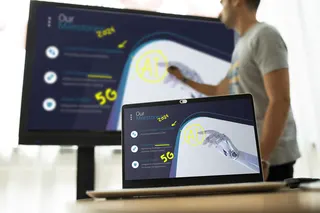
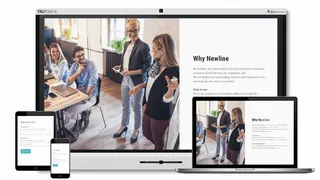
Reactiv Suite is presentation and collaboration software from Newline. It runs on a computer connected to a display and turns the screen into an open workspace where presenters can place documents, pictures, web pages and video on one canvas, write over them and rearrange them while the meeting is still under way. Newline has discontinued this model. This page is written for organisations that already run it, for teams weighing it against newer software, and for buyers who need a replacement that does a similar job.

Hardware profiles and related products

The manufacturer describes two hardware profiles. The basic profile suits PowerPoint shows, pinning content, camera use, markup and audience engagement. It calls for an i5 or i7 processor, 8 GB of RAM and a 2 GB hard drive. The advanced profile is aimed at design and engineering work with high-resolution content, large file collections and video. It calls for an i7 processor, 15 GB of RAM, an SSD, a dedicated GPU such as an Nvidia card, a 4K display and touch screens with stylus support. Related products listed alongside it were Reactiv Suite Pro, Reactiv Suite IFP and a personal edition for laptop use, and a free 30-day trial was offered.

Tools that matter in a meeting

  • Mixed file types: PDFs, Word, PowerPoint and Excel files, web links, videos and images can share one canvas.
  • Native ink: handwriting is added directly to many common Office files, and revisions are tracked by date and time.
  • Pagination: any section can be paginated and exported to PDF, which suits minutes and action lists.
  • Smart insert and smart rip: space can be opened vertically or horizontally, and pages or video scenes lifted into a storyboard.
  • Comparison: any number of documents and videos can be arranged side by side.
  • Video control: playback, zoom and annotation, with scenes saved against timestamps.
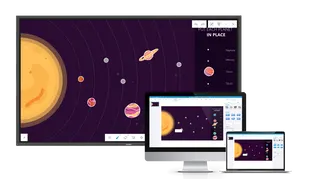
  • Wireless casting: phones and tablets can cast through Chromecast, AirPlay or Miracast.

Where it fits in Qatar

In a secondary school in Al Wakrah, a science teacher can mark up worked examples on a worksheet in front of the class, then export the annotated pages as a handout. In Lusail, a real estate sales team can put floor plans, brochures and a site video on one canvas and compare unit options with a client in the room. A design office in Msheireb working with large drawings and renders is the case for the advanced profile, where the 4K display, graphics card and SSD matter most.

What to plan before replacing it

List the PCs that currently run the software and check them against both profiles. Confirm the display type, because the advanced profile calls for a 4K screen with touch and stylus support. Note which casting method staff use and whether documents in Arabic and English must share one canvas. The source material does not list language support, so ask the SmartRooms Qatar team to confirm it before ordering. Quotations are usually issued within one working day, delivery covers all eight municipalities of Qatar, and government buyers can raise a purchase order.

To request a quote for a current equivalent or a compatible replacement, send SmartRooms Qatar your display model, your PC specifications and the number of users. That is enough for the team to recommend a suitable option and return a quotation.

Highlights

  • Discontinued by Newline; quote for a current or compatible replacement
  • Infinite canvas for PDFs, Office files, web links, video and images
  • Native ink and revision tracking on common Office files
  • Wireless casting via Chromecast, AirPlay or Miracast
  • Basic profile: i5 or i7 processor, 8 GB RAM, 2 GB hard drive
  • Advanced profile: i7, 15 GB RAM, SSD, dedicated GPU, 4K display

Estimated timeline

Quotation within 1 working day · delivery timing depends on stock availability, and we confirm it with your quotation.

Specifications

Source: manufacturer · checked Oct 2026
The full specification and datasheet for this model are available on request; we send them with your quotation.

Downloads

9 files from the manufacturer

Questions about Newline Reactiv Suite

Is Newline Reactiv Suite still sold by the manufacturer?
Newline has discontinued this model, so it is no longer a current product. If your organisation already runs it, or needs a replacement, SmartRooms Qatar can quote a current or compatible alternative once you share your display model, PC specifications and number of users. Quotations are usually issued within one working day.
What is Reactiv Suite used for?
It is presentation and collaboration software for a computer connected to a display. Presenters combine PDFs, Office files, web links, pictures and video on one open canvas, annotate them with touch, stylus or a keyboard and mouse, and reorganise content during the meeting. It suits classrooms, sales meetings and design reviews.
What hardware does the basic profile need?
The basic profile calls for an i5 or i7 processor, 8 GB of RAM and a 2 GB hard drive. It covers PowerPoint shows, pinning content, camera use, markup and audience engagement, so it suits a standard meeting room or classroom PC rather than heavy design work.
What does the advanced profile require?
The advanced profile is for high-resolution content and large file collections. It needs an i7 processor, 15 GB of RAM, an SSD, a dedicated GPU such as an Nvidia card, a 4K display and touch screens with stylus support. Design studios in Msheireb or engineering offices in the Industrial Area should plan around this specification.
Which file types can it open?
The manufacturer lists PDF, DOCX, PPTX and XLSX files, URLs, videos and images. Ink can be added natively to many common Office files, and revisions are tracked by date and time. This helps planning teams in ministries and developers who review marked-up drafts.
How would a secondary school in Al Wakrah use it?
A teacher can display a worksheet or slide deck, write over worked steps with a stylus, then paginate the annotated pages and export them to PDF as a handout. The basic profile is usually sufficient, so confirm the classroom PC meets its specification and that the display supports touch or stylus input.
Is it useful for a real estate sales team in Lusail?
Yes. Floor plans, brochures and site videos can sit on one canvas, with unit options arranged side by side during a client meeting. Afterwards the team can export meeting notes to PDF and share them. Confirm the sales PC meets the basic profile before planning the rollout.
Can visitors cast their phones into the session?
Yes. The manufacturer lists wireless casting from mobile devices using Chromecast, AirPlay and Miracast. This lets a visiting colleague show content from a phone without extra cables, although the building network must allow those connections, so confirm this with your IT team before the session.
Can it annotate and save parts of a video?
Yes. Video can be played, resized, zoomed and annotated, and scenes can be saved with their timestamp. Training teams in Doha can use this to review recorded sessions and mark the moments that need follow-up, without editing the original file.
Does it support Arabic and English content?
The source material does not state language support, so this cannot be confirmed from the product data. Ask the SmartRooms Qatar team to check it before ordering, and test a mixed Arabic and English file on your own PC during planning.
Is there a trial before choosing a replacement?
The manufacturer material listed a free 30-day trial for this software family. Because the model is discontinued, availability may have changed, so ask the SmartRooms Qatar team to confirm whether a trial applies to the current equivalent before you commit.
How do I request a quote for this software or a replacement?
Send your display model or models, the PC specifications, the number of users and whether you need casting or video annotation. Quotations are usually issued within one working day. Government ministries and authorities can raise a purchase order, and payment can be made by bank transfer, cheque or purchase order.

Suggested replacements

Newline Newline Broadcast Newline Broadcast Wireless Screen Sharing Software
Software
Newline Newline Cast Newline Cast Wireless Screen Sharing Software for Newline Displays
Software
Newline Newline Cast+ Newline Cast+ Wireless Screen Sharing Software for Meeting Rooms
Software
Newline Newline Engage Newline Engage Interactive Whiteboard Software
Software

Similar models

Clevertouch CleverLive Suite Clevertouch CleverLive Suite Digital Signage Software
Software
Clevertouch CleverMDM Clevertouch CleverMDM Mobile Device Management Software
Yes
Clevertouch Clevershare Clevertouch Clevershare Screen Sharing Software for Interactive Displays
Software
Clevertouch CleverStore Clevertouch CleverStore Educational App Store Software
Software
Email Call